


Some of us bloggers have a few hundred drafts sitting in our WordPress accounts waiting for the right words or the right time. Hundreds you say? Yup. We’re not naming any names, but you know who you are.
We used to just list all your drafts in your blog’s Manage -> Posts screen. For some of us, that got really hairy really fast.
Now, your drafts can be displayed in a nice table by going to Manage -> Posts and selecting “Draft” from the “Post Type…” dropdown. If you have lots, they’ll be spread over several pages.
This seems way more sane to us.
But wait, it gets better. You can also filter that list of posts by search term, month, and category (just like before) and now by post type and author too. What’s even better is that, unlike before, you can filter on any combination of those things all at once. It should be way easier now for you to find that esoteric piece on Afghan cheeses you wrote back in March of 2006.
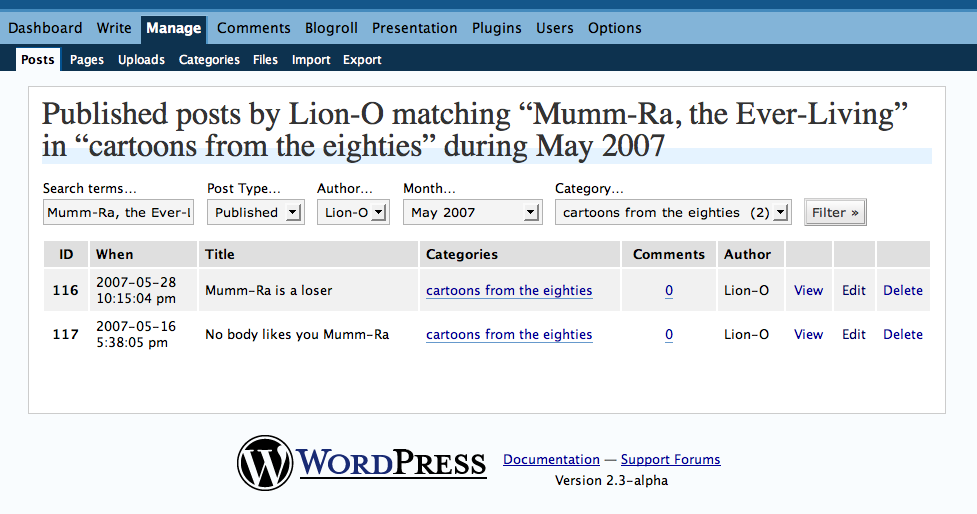
(For more nitty gritty, click the image above.)
 WordPress.com News
Sliced bread, your time is done.
Great feature! Can’t wait to try it out. XD
haha, i went to Manage –> Posts earlier and was just wondering where did all my drafts go when i noticed the change you made. i was so used to all those blue links sitting at the top of my published posts.
wow! this is nice!
Another great improvement for wordpress… thanks.
geez..great! though my drafts are not so many to be cumbersome yet.
neat and great
Great!
wheeeeee! ayos! great!
Nice work!
Sometimes you guys rock and sometimes you rock SO MUCH!!! Today you have out-rocked yourselves.
You sir, have a great sense of humor, nostalgia for cartoons, and are skilled at making useful features.
Way cool. Thanks
this is really nice feature , I have been waiting for it for quite some time.! Thanks
that is a cool feature.
Any chance of having something similar on comments & all comment types (akismet, awaiting moderation, ect)?
It would be a handy way of cutting out the chaff..
Awesome. Those little titles at the top of the screen have always bugged me no end, thanks so much.
Thank you so much ^_^
nice work ppl…
this is great
I just used it. Easy!
Great. I got frightened ’cause I didn’t find them…, but now I already know where they are. Thanx my friend, good feature.
It was freaky last night looking for all my pending posts from other authors and finding them missing.
I finally figured it out.
Why do some drafts have hard, old, dates while others are dated “1970-01-01
12:00:00 am” and others say “Unpublished?”
I would like to be able to filter Drafts by User Role instead of just getting a giant lump of pending drafts written by six different people. It makes more interactive sense to see the same view in the pending drafts screen as I do when I look at my Users screen.
I know I can filter by individual Author, but sometimes I need to see their drafts separated from mine.
Yay. Makes life so much more easier now!
nice!
Wow, wonderful! I just today tried to go back to my oldest drafts. It was hard time for me. Byt thanks to you it ich so easy now! Great – and thank you!
this is awesome!
Good work, guys.
Hello my name is Bananas and i wish to to Join Drafts anonymous. Where is the nearest meeting ?
Thats a nice feature
good … this is the advantage of hosting your blog with other hardcore blogger’s platform
Great feature!
awesome!!! you guys are simply gr8
And I just wondered, what is that, and was it quiet ever there?!?
all right, now i´m calming down again 😉
MIC
yeah.. that’s the reason i’m stuck with wordpress ! Life is so complicated but my blogging-life is getting easier everyday with wordpress.
Awesome !
Very cool! Thanks for making things even better. 🙂
You mean people actually think about what they post. They just don’t “spit, spray, and pray”? What an odd behavior. Here I thought blogging was just scratching one’s own itch. Or other more disgusting metaphors. Well, if it’s a new feature, I’ll have to try it. Imagine delaying one’s own gratification. What would Walter Winchell say? Not Paul Winchell the fellow behind Jerry Mahoney. Always thought that Mahoney could replace most politicians. But that’s another topic. Off to draft something. I thought you drafted race cars. Or cannon fodder. Oh well.
WordPress is like the gift that just keeps on giving…
*averts eyes*
thx wordpress folks!
chz
I don’t keep a lot of things in draft but it’s hard to manage but this looks so handy I just may start.
Thanks for the option.
amm
What a wonderful feature. Thank you!
Great feature. Tremendously useful.
great addition to the WP arsenal
You mean, people write things and don’t post them? Amazing. And here, I’ve just been keeping them all up in my head all this time.
Goody! Atleast now some of those drafts may see the light of the day.
wow you have inspired me to create more drafts 😉
Ha. Was wondering where my drafts went! Knew something was tweaked! Thanks guys. It’s neat!
Thanks! Just keeps getting better and better around here 😉
The new feature is nifty, but my favorite thing about this is Matt’s comment about sliced bread! Classic! =)
genius. pure genius.
Just like Blogger?
Nice!
I kept my number of drafts now precisely because I didn’t want to see them on top of my compose page. Thanks!
Hundreds of drafts waiting for being published? lol
You couldn’t possibly be talking about me. 100’s, meh! My 99 or so is hardly 100’s. Thank you for the nice feature and the reminder to spring clean!
You guys work on this stuff 24/7. Don’t you. DON’T YOU!?!
This is why WordPress.com outshines all the other blog sites.
Nice work! Thank you!
“Sliced bread” & “Afghan cheeses” plus some Montreal Smoked Meat would make a wonderful sandwich…
Thank you 🙂
Great feature! Thanks!
Awesome! Love the new feature, Thank You! 🙂
Terima Kasih!
(Thanks in Bahasa, because just saying “Thank You” at this point would be redundant… 🙂 )
wordpress rocks! getting better by the day!
yeeehaaaa! THANK YOU!
Sounds awesome. Now it’s time to put it into use.
Thanks!!
ٌٌٌwow, WordPress rocks
Very, very cool! Now, where did I put that post on Linux and string theory? 😉
Good stuff. Now, let me be ‘that guy’ who looks the gift horse in the mouth.
Is there any way to BULK DELETE them? That would be be quite helpful.
Great feature! Should be nice for comments too.
Nice!
I was just wondering how I could view my drafts the same way I view my posts.
I noticed this. A very neat table. Thanks for the improvement.
Oooh….
Very nice…
You guys rock!
I’m glad someone is helping us on the backend. This is very useful. Now, any chance we can get rid of the separate preview/view in new tab/windo “feature” (PLEEEASE) and return to the preview at the bottom of the editing pane?
You might as well have just mentioned me by name, you know! Yes, I have over a hundred drafts. Glad to know it isn’t just me.
The people from Uruguay have a word to express their enthusiasm: Mira!!!
It’s equivalent to say wonderful. Thanks!!!
Hey that’s great !!!… thanks for it !!!… now is more organized.
Kewl…
excellent feature thanks
No wonder i havent been seeing any rafts that my partners write under manage->posts!
VERY useful. Thank you very much. Even when I don’t have hundreds… yet, well it definitely helps! Thanks again!
allelouiah!
This is absolutely awesome! Thanks!
Just a quick question: why are the categories in the drop-down menu not presented in alphabetical order?
wordpress just got cooler. thank you so much!!!
Frightened the hell out of me earlier but soon figured out what had happened. Thanks for the refinement.
phew! this is a relief
i think you read mi mind!
thnx!
How smart is it ?
The Nobel prize of blogging is here, at WordPress!
ImPress with WordPress!
Thanks 😀
what will you guys think of next ….world peace ?
Good! But… what about admins could see all drafts?
Really neat. Thanks.
Wow, as great as this is for other people, can you let us have an option to display them at the top? For our blog, we run multiple editors who scan for those marked as ready for review and publication. This has made it about 100x harder for us, as we can no longer just scan two or so lines of text, now we have to scroll through a page or more of tables.
It would be nice to be able to switch on the draft listing.
Hey, someone else is writing about Afghan cheeses, too? What about Venezuelan beaver cheese?
Even though I only have a backlog of 20 or so drafts, I still found this new feature pretty handy. Cool beans.
Did someone say Draft? I’ll take two one for me and one for the wife. Not that type. Draft pending not me I get to feeling guilty and I just gotta do something with it. Come on people whoever you are lets move-em.
helllllloooooo?
cool!
Personally, I like having drafts available in the post screen. You are already using iFrames and collapsible divs. Would be cool to use them for the drafts. Then again, I only have 15 or so and tend to use them to remind me to post things…
WordPress is still great though.