


Some of us bloggers have a few hundred drafts sitting in our WordPress accounts waiting for the right words or the right time. Hundreds you say? Yup. We’re not naming any names, but you know who you are.
We used to just list all your drafts in your blog’s Manage -> Posts screen. For some of us, that got really hairy really fast.
Now, your drafts can be displayed in a nice table by going to Manage -> Posts and selecting “Draft” from the “Post Type…” dropdown. If you have lots, they’ll be spread over several pages.
This seems way more sane to us.
But wait, it gets better. You can also filter that list of posts by search term, month, and category (just like before) and now by post type and author too. What’s even better is that, unlike before, you can filter on any combination of those things all at once. It should be way easier now for you to find that esoteric piece on Afghan cheeses you wrote back in March of 2006.
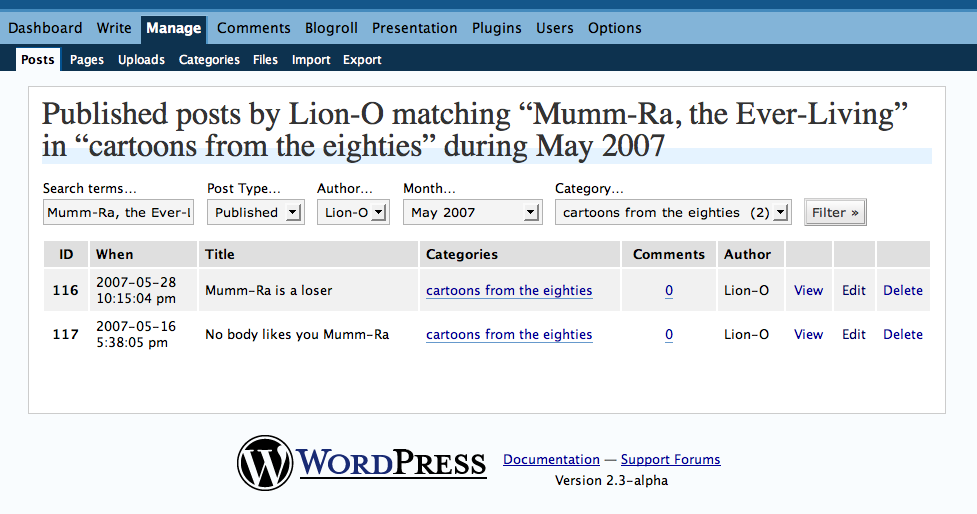
(For more nitty gritty, click the image above.)
 WordPress.com News
I don’t have many !
I thank you for the Improvment
this is really nice..thanks!
Oh, finally! Thank you….you’ve given us something great again!
I don’t have a few hundred. Just 87 *eek!*
Oh! good. powerful
LOL its great! Hey..Matt please check my blog out!
Hundreds of drafts? Wow! I have about 30 and I was thinking that was a lot.
This is a great feature. Much easier to manage. Thanks.
It’s a nice feature but I’d prefer the extra link for drafts in Dashboard or in Manage>Posts (and Pages) as we can see in local installs of WordPress 😉
Woo-hoo! I missed this feature from my Blogger days, and I’m *thrilled* to see it here. Because, well, I’m not in the hundreds, but I’ve enough drafts that it’s been cluttering up the top of my screen in an inefficient and distracting way. This is WAY better. Thanks!
tats a neat one…very much useful for me..who just due to dearth of time or loss of interest leave my posts as drafts….n then have a tough time finding them….so this feature surely makes my life simple.
yo espero que algun dia exista una opcion de enviar TODOS las drafts en un solo click, con una opcion de seleccionar los draft que uno quiere que se envien simultaneamente, sin necesidad de enviarlos uno por uno.
Matt, how do I filter out my password protected posts? It’ll be cool if I can do that! just my 2 cents!
It has inspired me to put down half-formed ideas that will one day spring into fully shaped posts.
WordPress out does all the other blogs I’ve tested out.
Keep it up (the hard work that is)
🙂
Nice feature! Good job, WordPress Team. 🙂
thanks!
That was worth it just for the image at the end.
Thanks
Nice Feature. Thanx for it
This is NOT a nice feature for those folks w/ a lot of drafts. In fact, it misses the point of trying to help people w/ hundreds of drafts. (I currently have 813).
It doesn’t seem like it would be difficult for WordPress to add a “bulk delete” function.
PLUS, this does nothing for users who want to sort their drafts by month.
That is a great feature 🙂
I like the new approach with the filtering, but would like it even more if the default were “all posts” as I more often work on drafts than on published items so it’s an extra step for me.
I suppose the best solution would be to add an extra button “Filter and set as my default” then people could suit themselves.
love this feature…thanks so much!!!
I just got here, and already I was asking myself that very same question. Thanks guys! And I didn’t have to go to the Forums either. Will try it out soon.