

WordPress bloggers love to share their photos and images with each other, so perhaps it shouldn’t have come as a surprise that when we removed the boring, old image icon that you wrote to us lamenting its disappearance.
But if you haven’t noticed already, there’s nothing to fear, for in its place is the Add an Image button in the Media Toolbar, which has been around for a bit but is now more robust than ever — making it the only thing you’ll need to add and organize photos.
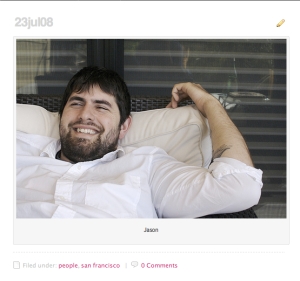
Among its newest features is an easy-to-add caption tool. Just write your caption in the caption field before inserting an image and, voila, the caption displays below the photo inside a tasteful frame.

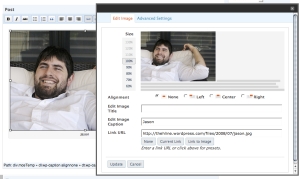
To add captions to an image you’ve already uploaded, select the image in the Visual Editor and click the landscape icon for Edit Image. You’ll be presented with the Image Editor, which lets you resize, realign, edit the title, add a caption, and change the image link URL.
Prefer the HTML editor? There’s a shortcode* for it, too.
*(Check out this page of the FAQ for a definition of “shortcode” and a list of more handy embeds.)
 WordPress.com News
Nice feature.
Can we adjust the background color, width/ thick of the caption?
Please put extra little dot or character x after [/caption] so we do not to switch between Visual or HTML mode to continue writing the article.
Two thumbs up. 😀
Warmest Regards,
Sur
Please bring back the tree as well – this new method is too slow, complicated and frustration for the simple linking of pictures from flickr/photobucket etc..
The Photo caption facility indeed is a great need. Thanks to the innovative team and minds at the WordPress.
loading multiple images in a post with captions seems to mess up things in the post… just check it out…
try all possibilities of messing up… 🙂
AWESOME!! been waiting for this!!!!! 😀
For me, a beginner at any of this, I am encouraged by all that wordpress does to make our blogs look great! Thanks for this explanation of the “caption” line. I had seen it, but just didn’t know what to do with it! You can bet that TODAY’s pictures will have a caption!!
very usefull.
i like it!
nice..
Wooo Hooooo! Resizing right in the upload process? Wooo HOOOOO! Love it!
Interesting feature. I’ve got a system for adding captions to images that I’ve been using for a couple years now, so we’ll see if this feature is worthwhile or not.
I really like this addition. Thanks
hello i wants to upload the image how i do?
Very nice and usefull, thank’s.
this is great, thanx
GUYS! Finally! I’ve been waiting for this. Wondering when you we’re going to put it up.
You’re champions, WordPress folks. Thank you.
It’s awesome updates and I like it. Thanks 😉
Thanks for the update….
way cool. thanks… this will be more useful for directly uploading photos to WP
great!
Thanks heaps for this. I always like to add atleast one image for all my posts. And adding captions can be a tedious task at times, trying to get the font size right to be uniform with previous posts, and so forth. This enhancement really is a huge help.
Once again thanks!
hey I cant see that edit button in my blog
think with Caption works fine!!! thanks! :)))
Thank you!!
Very nice. Saves a lot of messing with align when adding descriptive text.
Although robust, the media manager is still pretty slow to load, and it would be great if we could select what items to put in the one-click-Gallery-insert instead of only the items uploaded in one particular batch.
Thank you soo much! I have already used this feature and love it!!
Yeah, actually I saw it, and seems like a Polaroid pic!! It’s really cool, thanks!
Is there any way to resize photos you put in your blog?
ok
cool..!
This is such a wonderful improvement. Photo essays now are possible without chasing down captions.
okay, now give us the old button.
Personally, I find the captions annoying.
why is the caption text used for alt text? it would be nice to have those separate.
Heather is cute.
I love this new feature! I discovered it a couple of days ago. I use a lot of images on my site, and this really makes things look classy. thank you.
Ya, it should b wonderful but I have been inserting the caption for ma images. However, when there is a caption carrying more than 8 words, caption appears as null. I wish your newer addition can handle a caption for more than 8 words, because for portraits a short one word caption does suffice, but landscapes, mountains and other photographs do demand a detailed caption by the viewers so that they can then find the background of the picture standing in relation to the text of the story presented.
First off, I feel this post should have come out when the actual changes did. It took me 10 minutes to figure out how to post a photo after you took away that button! lol
Secondly, I do have one complaint about the captions function itself. Personally when I try to put in another photo after the one I put in with the caption it will lump them both together with that caption. It’s pretty annoying. I have experimented with the caption function but decided not to use it. For some reason my format always gets messed up and it’s more trouble than it’s worth.
If you have any suggestions for something I may be doing wrong please throw it my way! Thanks!
I’ve tried it
Great advance!
Hooray! Thanks so much!!!
Brilliant.
When composing my post the day the image button disappeared I had about two seconds of freak! Then I thought, there is no way they removed it. They’ve just moved it! So I looked — and found — and fell in love. I have added captions, borders and links to my photos. The new improved button is truly new and improved. Thank you!
Uploader for me has broken since 2.6 booooo
Ugh I think this might have messed up all of my blog’s pictures. They were fine until I checked today. Now my blog’s image header has dissapeared and the pictures in my post are, for the most part, not showing up in the post. Is there a quick fix or do I have to go back in and redo all the pictures? I was able to reupload my site header and now it’s fine but I’d really rather not have to redo all the post’s pictures.
I can’t wait for a photo album feature (so you can post multiple pics/slide show in a post).
I really like this feature, although when I insert an image and left align it, I have to make sure that it’s after I’ve written my text, otherwise my text is entered into the caption.
You guys are the bomb! I cannot wait to try out this feature.
Nice! but I’m still waiting for the HTML Edit?
Awsome!
cool 😀
I noticed the new “captions” feature a couple days ago — LOOOOVE it!
HOW VERY COOL!
Great! Thanks, WP.
A bit late explanation. I struggled with this at first (error and stuff) but it’s alright now.
I haven’t thought if it’s better or worse than the older feature, because it’s working fine as it is. I’ll check out the caption thing though…
Thanks 🙂
oh, I used to think it’s an old feature. apparently it’s new.
great job!! 😀
Great!
Thanks for the feature..
Great job! Really appreciate it!
it is much time this feature is on
i’m gonna prove it… thanks…
i mean… i’m gonna try it… 🙂
The feature is really cool! My only question is…. can you make it so that when you go in to edit pictures menu, the caption doesn’t default to “null”….. because sometimes I don’t WANT a caption, and I have to manually delete the word “null” every time I go into the menu to resize a picture or add a border or change the alignment………….
Hi Dear, thans for teaching.
I have noticed it earlier when I wanted to upload my images. However I find it very difficult to navigate especially when i want to insert text after uploading images. I think I prefer the previous image insert button – simpler and more convenient. Anyway thanks for adding another cool feature.
Once you get used to it it’s absolutely a nice addition to the Web 2.0 era. I love its ease of use and functionality once I got use to it!
Don’t get mad at me I’m just Tellin’ it Like it T-I-Tiiiz! http://www.tellinitlikeitiz.wordpress.com
Maybe the old icon was simpler, but at least it permitted me to align images in whatever manner i wanted, without the need to modify html code. 😦
great
Thank you! Now I just need to use it!!
great too !! NOW I UNDERSTOOD.
I’ve started to use it, and agree it’s a great feature.
It saves me an FTP to load images to my server and then link.
WordPress continues to get better and better.
Thanks to the team.
Joe
Qué buena idea. It´s good, very good.
Eduardo Sastre
That’s great! Thanks!
Thanks wp
I have always felt that wordpress is more classy than the rest of the blog softwares in interweave. But I’d really request if you could do something about the Java thing. There are so many widgets that we are not able to put on our website becasue of this constraint.
This was excellent.
Regards,
Scratch Bags
Very cool!
Thanks!
‘)
Yeah, I used the last time.
Thanks for improving WP!
I noticed it last month and found it difficult to use. I was not sure wether that was because of my browser (FF & IE7) or my computer, because some features would not appear on one browser but on the other one and vice-versa.
I hope I have a better luck next time!
I like this. I have been using it for awhile. I am still waiting to have many galleries on one page-like photo albums with themes. I like Matt’s photo blog. Maybe one day! 😉
this looks really classy. Awesome job! I wonder if there is a way to use this nifty feature even when posting pictures hosted on third-party sites, such as Flickr. Regardless, I like.
Good idea but you have to sort the need to fix the image size once its been crunched to death!
Cheers
Bip Mistry
I know I am glad to see it! Thanks so much!
excelente
nice….
woooowww….cooool..
Works for me ! Great feature !
Great new feature.
Just used it! Makes it easier.
Thanks!
That is great. You are making lots of improvements for us. Thank you! 🙂
That great! Very nice touch.
cool!! This rocks!
I started using this feature by accident about a week ago and love it. My blog is primarily HDR photos and I had been having problems importing them into my posts and keeping them the size I wanted. Since this upgrade photo imports are working perfectly for me. Thanks!
nice…
Thanks a lot. I have been dreaming about this feature since long ago. The wonderful wordpress is fully compatible with right-to-left languages, like Persian (Farsi). This new feature also perfectly works with Farsi 🙂
Really cool… Thanks!
I have been using this tool a lot more recently… thanks! … the only improvement I would make to the imageupload-majig overall would be to auto remove hyphens from the text pulled from image name and put in the image title text box.
One Love,
Colin
Nice,…
And Thanks…
I do like this feature, but doesn’t work so great with little tiny pictures.
This is exactly what I have looking for-a webpage where I will be free to express myself
good job fren! very nice…