


Our team loves photography and we hope you do too. While taking countless photos in Quebec, we thought it would be an appropriate time to update the image templates for all of the WordPress.com themes.
If you are using galleries or inserting one image at a time into your posts, you can take advantage of the updated image templates. Make sure to click the Post URL button in the Link URL area when inserting your images or configuring a gallery. When you do this, the images will then link to the image attachment page.
When viewing an image attachment page:
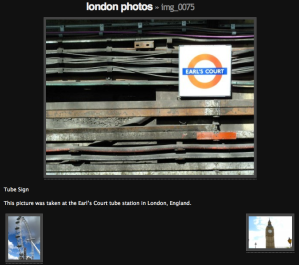
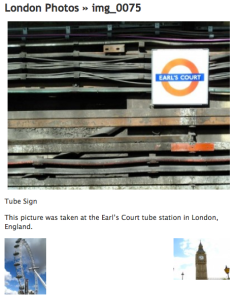
- The image will automatically be displayed to fit the content width of the theme.
- If set, a caption and description will display beneath the image.
- Small thumbnails with links to the previous and next image are shown.
- If the image is part of a gallery, the title will provide a link back to the gallery permalink URL.
 WordPress.com News
Hm, something for those of us who link photos from other sites, like Picasa and Flickr? Hopefully? 🙂
Galleries and image attachment pages are only for images uploaded directly to your WordPress.com blog.
This only works for photos you uploaded from your computer right? What about photos you link to from other sites (like image shack, etc)
Correct.
Can’t wait to try it out…Thanks Word Press! Love E
Another good improvement.
greetings from Mexico
Carlos Gastelum
Fantastic,
thanks WP
huh, that’s pretty cool! Keep up the good work.
love this
Nice idea, primarily for fotoblogs or persons with little familiarity with traditional setting adjustments!
Thank you ; )
can’t wait to try it out , thank you WP photographer groups.
Nice. this will make it easier to change themes every so often.
i’m all about styling… NOT! But this is still great! 😛
Great idea, hope to be seeing more great things released!
That’s nice! Congratulations!
haven’t tried this and my blog is heavy images. so do I need to go back and link url to every image? hmmmm? all my photos are uploaded from computer this could be huge for me
If individually inserted images weren’t linking to the attachment post URL you may want to go back and update them.
This really helps me
Cool, thank you.
Nice feature. Thanks!
More reasons to Love wordpress. Cheers.
Cool… keep it up!!
waw great
always the best
I’m gonna start taking some photos so that I can try this out. Nice feature.
I’m going to check this out!
Oh, so that’s what happened. I just noticed that my galleries started looking different. 🙂 Thanks, great update!
haha , great!
Thanks fo the idea…
This applies only to new posts? Old will work the same way as before?
(Thank you for good job! Greetings from Russia:)
Any images being displayed on an attachment page get the new look.
Thank’s I will check this out , always interested in photographic news..
This is great! I’ll try it out now.. thanks 🙂
Perfect for our huge array of game images we post on the site for reviews and articles, will save heaps of space, and offer readers more options and easy viewing . .thanks again WP, you always seem to out do yourself each time.
yes, you are right, i think many people love pictures and photos even more than posts themselves! that is why i think it is necessary to improve and make it easier to download different pics. thanks!
Haven’t had a chance to try this yet but so glad you’ve done it. Used to be really painstaking inserting multiple images and I never liked what ‘insert gallery’ did. So am looking forward to trying this later today.
love this
Awesome!! And as usual, thanks for the great updates!
anything that automatically fits anywhere is a plus for me. LOL. thanks wp!!! love ya!!! can’t wait til you do a Detroit WordCamp!!
Thank you, thank you for the very welcome additional navigation features for photos. You guys rock (yes, you do)!
I look forward to being able to upload more that one pic at at time but have it be part of the post interwoven into the writing, not a separate gallery.
When choosing your image to upload you can select multiple files at a time.
keep up the good work please. luv u WP team. let me try it out for this one
IS it a template?
It is an image attachment template that is automatically used when viewing an image attachment page.
😦 Thank U… … !!!
Yet another useful innovation. Do you guys ever sleep?!
I think that’s little bit great. I said little bit because I don’t think that it’s a good idea to send my readers to another page (attachment) to view the image. I prefer to insert a width-wide image. But the problem is that I have to manually set the width size of my inserted image each time I publish a post. It was ok. But the problem occurs when I change my theme. Since all themes do not have a width of same size, my pictures get broken if the new theme is of narrower width.
Is there anything that I can do to auto-resize my image fit to the width of current theme while adding an image to post? It’s obviously impossible to resize all the pictures to fit with a new theme. So, I’m worried about future.
Sorry, you would need to update those manually.
This is working for the theme INove for quite some time now (since it was published?) and I find it a great feature! It is good to hear that it is available for all themes now.
As usual, there always is room for improvement :-). I miss a feature, which allows to view the photo in unscaled/maximum size. The most natural way to achieve this would be if the the large photo (when in the three photo view with the two tumbnail photos for previous and next) would have a link underneath (i.e. would be clickable) which opened just the photo in a separate window.
nice idea……….
WordPress just keeps getting better and better. I hope my site lives up to the quality you guys strive to achieve. Thanks.
Great stuff! Maybe we could get this kind of make over for the widgets page too……it’s totally cumbersome.
What’s next on the to do list guys???
I am loving it…….
Can visitors leave comments for each photo?
If comments were allowed on the post where the images were originally uploaded, comments will also be enabled on the images.
Great job. thanks you
I wish that I could post photos on my iPhone app and dictate where the photo will be in the post rather than all appearing at the bottom of the post. Would look more professional in my opinion.
This is being worked on for future versions of the iPhone app. Head over to http://iphone.wordpress.org/ for news and discussions.
Thanks! You guys are working hard 😉
I’ll play with it this afternoon, hehe.
Wait, are you saying you finally created a second Photoblog template?? PLEASE PLEASE PLEASE PLEASE let this be so!!!!!
This isn’t a new theme. It’s a template that controls how the image attachment posts are displayed.
This was very helpful
I didn’t know how to put pictures on my page before
but now thanks to this tutorial I think I’ve figured it out.
Wimper… *please* could we get a second photoblog theme? The color-chaning thing ´for Monotone is not conducive for serious photography. Just let us set it to a nice neutral gray, that’s all we ask….
We just might have something in the works. 😉
sounds good
*excellent*…
very useful! I’m looking forward to seeing how it changes things on my blogs! thanks, WordPress!
Nice, love WordPress.
hmm…, this is a usefull thing to various my blog…
Nice feature…
Support > Images > Gallery > Adding a Gallery > 1. Open a post or page for editing. 2. Click the “Add an Image” icon. 3. Select files to upload…
I followed these instructions, but didn’t find a list of image files from which to select. Such a list is clearly shown on the video. Did I miss a step?
fantastic! I will find this handy! Thanks!
Coolcool! 🙂 Love WordPress.
¿Has somebody an example for this feature? I want to try it but before this I want the results.
Ah,, you guys should make a theme that just is a gallery and allows comments, I need this, I am having trouble creating my blog atm, It is being laggy.
I’ve tried your new image template upgrade and it works like a Swiss Clock. I used to manually adjust the images to my current theme. I did it by “trial and error”. Now it’s a breeze. Never worked with galleries. Will play with them after reading your post.
Most grateful for your consistent improvements. I love WP.
Regards,
Omar.- (From Panama in Central America)
Something does not work for me. Has made a new post – http://1dom.wordpress.com/2009/10/19/gorodskoi-dom-s-sadom/ – and anything new, the picture both opened simply in a new window, and opens…
What do I do incorrectly?
You need to link to the attachment post URL instead of the File URL when inserting the images.
Thanks!
@sajib: Use relative instead of absolute sizes, e.g. width=”100%” (drop the height attribute). With width=”100%” the image will always fill the available width irrespective of the absolute width the theme uses.
Although I appreciate the continual improvement work that you guys do, I’m a little confused about the value of linking to a post compared to the linking to the file. Sometimes I post several images at a smaller size, each linked to the file which displays an enlarged image on a blank page. When people comment on the post (or the images) the comments are all in one place, connected to the post, so people can follow the thread of comments. If they can comment on individual photos the comments will be sprinkled all over the place, on any of the image pages, which makes it harder to find and follow the threads.
Also, without the words “NEXT” “BACK” or an arrow, I’m not sure people will get it that you click on the little thumbnail to go in one direction or the other.
Could you please explain the ways the link to post option will be helpful? Also, I too vote for another photo theme!
This is most welcome. So can you do anything to improve the way in which Galleries are displayed within the post itself, without needing to go to the Gallery?
i think you should consider more integration with flickr.
and definetely offer some more photoblogging templates.
Very helpful, thank you! I’ll be checking back to see if you discuss audio players. I’m searching Support now.
This is cool! But bad i didn’t let my images with direct link….
This is cool Nick. Thanks 🙂
It’s a bit a hard to make the image’s URL as attachment page.
We need to manually edit the link URL, right? Or is there any other easier way to this? Thank you.
Click the Post URL button in the Link URL area when inserting your images or configuring a gallery.
I don’t like that each image has an individual page with comments. I prefer Lightbox style popup, so that the visitor doesn’t have to leave the article he is reading.
wow…cool
let me try it bro’
very nice 🙂
thanks! thats work correctly… i’m using my cellphone and use a “post by email” feature, on my post (http://wp.me/p9aVi-hW) contain six photos. if you click one of these photos, thats automatically arrange to best position…
thanks a lot Nick! 🙂
I’ve tried this and can’t figure out how to get my image into my blog post…i have DePo Masthead theme could there not be enough room?
Did you try the instructions from https://wordpress.com/support/images/ ? If you are still having a problem, please use the contact form at https://wordpress.com/support/contact/
Great
I figured it out-sorry!! great stuff!
interesting indeed
I’m still lost but will keep trying.
interesting and fun!!! thanks
@ nick – any way to connect it to : https://wordpress.com/support/images/picapp/ ?
No, they are different features.
Thanks – I am trying to work on some photos for my blog – this will truly help.
Don’t you just love when life is even just a bit easier? wait…should i tweet this?
Great ,,for a new feature
Can I get rid of the Small thumbnails with links to the previous and next image are shown?
You could hide them with Custom CSS.
I wish I understood the change, but I’m totally lost. I hope that it will become clear to me eventually b/c (almost) everyone else thinks it’s a great improvement.
Is there anyway to insert a slideshow into a post- i have a photography blog and this is ideally how id operate my site, many thanks
I already try it. It’s great. I wish this guide before I uploaded all of my daughter photos !
If we upload photos in the new post that taken from galery, is the upload space will reduced (twice)???
this is rad! and hold on: gallery? since when? I was totally not aware we could do galleries!! It’s not theme related is it?
Once again: this is rad!
Galleries
are available on all themes 🙂
nice
Thanks for the info.Really helpful.
Excellent, I want to try this on my photoblog.
really nice! I’m just wondering why all people does not use WP.com ;-p
My site is picture-heavy so I’m really interested in any improvements, however, this may seem stupid, but I don’t understand what this new feature does. How is it different to before? Can you give me the URL of a site that uses it so I can view it and compare?
Thanks