


During the Automattic company meetup, Team 21* holed up in a cottage outside Québec to create a new set of features for a blog near you (literally!). Have you ever wondered where in the world a blog post was written? Where a commenter was located? If there were other WordPress.com bloggers near you? If so, hold on to your hat, because you’re going to love the geotagging and geolocation features we’re introducing.
Starting today, when you log in to write a post, you have the option of identifying your location. For browsers that support it, we can get this information automatically through the magic of 21st century technology and you just have to double-check to make sure the location is correct. You can also enter your location manually. This feature is opt-in, meaning that if you don’t want anyone to know where you were when you wrote a post, that’s okay.
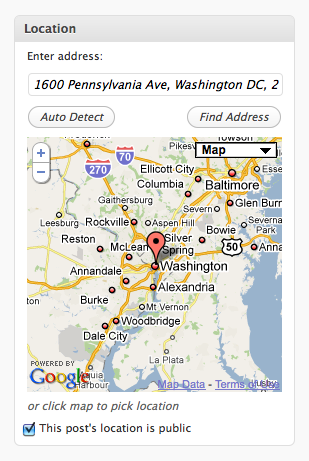
In addition to geotagging posts, you can also geotag your profile. Interested in reading blogs by other people in your area? A quick search will find them, and in the future could even be used to organize local WordPress.com user meetups.
Right now, we’re only collecting and exposing geodata for posts and profiles. Geotagged posts get marked up with the geo microformat, geo.position and ICBM meta tags, and GeoRSS and W3C geodata in feeds.
This is all machine readable data: hidden from display. What good is it if it’s hidden? It tells search engines where your posts are located, and with browser plugins like Operator and Geo, you can view geo information on any web page (not just WordPress.com geotagged posts).
The machine readable data is cool and geeky, but what about something for us humans? Right now, we don’t display geo data anywhere in a human readable way. Don’t worry, though. We’ll be launching theme integration, various maps, widgets, and shortcodes soon.
This is just the beginning. Building on this platform, we’ll gradually roll out more geotagging features, such as showing the location of your commenters, the location of poll votes, a live map view of blog updates on WordPress.com, or an annual report showing you where your posts were written and where your comments came from — kind of a blogger’s version of the Dopplr annual travel report.
For now, we’re pretty psyched about the geotagging and (the upcoming) search of posts and profiles and hope you’ll all give this new feature a try! If there are other geotagging features you’d like to see built on this foundation, suggest them in the comments!
For more information, check out the Geotagging support page.
Note: We’re holding off on launching the geo search feature until we start getting some data (from you!). So start geotagging 🙂
 WordPress.com News
Sweeeet. Very sweet.
Brilliant! One of my favourite features in years.
I’m looking forward to this. Now I have to write a post soon so that my readers will know that I’m from Philly!
Can’t wait to find out where my commenters are coming from.
Thanks.
جيد
This is a great feature!
And here I thought part of the point was that it didn’t matter where you were… Ah well, maybe next up will be a better way of crosslinking sequential posts or something.
Sounds great.
I guess a set of great and interesting features are coming. Thanks.
Possibly stupid question . . . but how would one, when this feature is enabled, search for a member’s profile via this geotagging? I mean, the only profile I was aware of that others could see was on the forums . . . or did I miss when a whole other public profile suddenly surfaced. (I mean, I know there are several fields in the ‘Edit Profile’ page options that don’t show up on the forum members’ profile pages.)
The profile comes into play as important because of blogs with multiple authors, often in different locations. So at first, the profile geotag search result would just link to the blog itself. That said, I could see a member directory or something being a cool idea for WordPress.com at some point in the future. Would people be interested in that?
I don’t think this is a good idea and I won’t be using it. Why would I want the internet to know my location? Especially if I’m posting potentially controversial material.
This feature is completely opt-in, so no worries. Many people use the internet to forge connections, so it will be useful to them. I will say that personally, I find “controversial material” to be more interesting if I can see who’s behind it; otherwise I tend dismiss it as trolling/linkbait. For example, someone writing with passion about a local political issue (and maybe slamming an elected official or policy) often will have more credibility if they are actually from that area, rather than commenting from afar.
Wait, are we talking town/state, or does it actually give my street address? I definately don’t want that out on the internet. I’m not sure I even want my town given. (I’ve mentioned on my own blog that I’m from CT, so state doesn’t bother me.
The precision of the information is up to you. It can be exact coordinates, an address, or just a state or country if you wish. And it’s all opt-in at the profile level, as well as at each post and page level. 🙂
Wow this is great and terrible at the same time. You guys are always doing something spectacular.
Cool – when you find me be sure to send supplies. And, by “supplies” I mean vodka and mixers. Ok, screw the mixers…just send vodka. Lots of vodka. And, maybe a babysitter.
I don’t find this very appealing, since I like my anonymity when blogging about controversial topics. I don’t really see the advantage of knowing which bloggers are close to me and where comments originate from. (shrugs)
WOW! Cool! ❤ WP
Very cool. Very cool indeed. Commence the stalking. jk
I am going to use it like anything! 🙂
Brilliant Thoughts for such Great Features…
wow this is amazing! I probably will just tag my profile since i generally blog from home. It will be cool to see where other people are too. Any people writing travel blogs have gotta love this!
Love continuous improvement.
Love. Continuous improvement.
Love. Continuous. Improvement.
I was shifting to wordpress.org but dropped the idea! Wp.com is full of features and keeps improving almost daily. Plz let users put ads on wp.com and it will be great!
We plan on releasing these features as a WordPress.org plugin as well.
This is a great idea. I’m part of a growing community of WordPress genealogy/family history bloggers and I’m already imagining some possible uses for this new feature.
Thank you,
Nice…. in some years, I hope teleportation in the sidebar.
I’m just kidding: an excellent idea that incorporates a great feature.
Thanks ; )
totally rad!!!! =D
kool, love it
Not a great idea. If I want people to know exactly who I am and where I am I tell them myself. There’s already enough info on the web about my location. I have no wish for it to become any more specific. The joy of the internet is that we can connect with any people any where, no matter of ethnicity or location or country. I don’t want another method of separating us into areas or countries …..
Annie
For some people, augmenting the geographically distributed communications with actual face-to-face connections can be powerful (just look at the energy behind WordCamps!). The geodata should increase appreciation of how distributed we are, not separate us into enclaves. Team 21, for example, has members from 3 U.S. states and one Canadian province!
excellent feature. I will try it out.
How do you do geotaging?
Is our Geotagging support document helpful?
Very intriguing!
Nice ^_^
Awesome! Already set it up on my blog and one of my posts! Interesting!
As I was entering “My location,” I suddenly realized the privacy issues associated with providing a very specific location. Yikes!
On a related note: Am working on geotagging my photos. Can some of your software read the Exim data and extract the geotag? Just wondering!
Keep up the good work.
Geotagging photos and other attachments in on our list. We’ll definitely support EXIF data when we do it.
Nice to see. I’ve had my location identified on my ‘about’ page for some time. I found that Google’s estimate of my address was wrong and needed adjustment.
excelente idea adelante
this is good especially if you are planning meet-ups… cheers to this new feature!
how about a new theme?
Great ideas – wordpress is full of them! This is a fab feature that many will love using.
About later plans to allow location of commenters:
Will the commenters have to decide every time they comment whether they want their comment geotagged?
Or will the blogger have to set and announce some sort of blanket policy – yes or no to geotagging – and therefore alienate forever those commenters who find the whole idea quite creepy and a boon to stalkers?
It will certainly be opt in on the part of the person providing the data (in this case a commenter).
I don’t want google mapping me and I don’t want WordPress to do it either. Data mining is happening 24/7………..why do we insist on handing over so much personal information in public venues and having no idea who is picking that info up?
You can disable geotagging under My Account > Edit Profile in your admin bar.
…whoah..i’m not into this so hope i’d be a good beginner….thanks a lot!!!!!
sweeeeeeeet……:D
The magic of tecnology
can it work in my country?
Yep! It’ll work anywhere on planet Earth 🙂
If you don’t travel a lot I find this new ‘thing’ useless. What I would really, really, REALLY like you to work on is to let all kind of HTML be shown in my blog. For example wp.com does not allow my photo slide show from Picasa, does not allow my photo slide show from Picnik and it’s very annoying.
That’s not HTML that is being stripped out, it’s Flash and JavaScript. There’s a workaround for this using VodPod, though, that will let you embed Picasa slideshows. If you search WordPress.com support, you will see many threads on the Picasa issue with this suggestion.
I just use it, thanks!
sweet..
Lol. It is as if Matt looked at my Google map that has the location of all my blog posts :).
Great work as usual from the WP team.
WOW!
very nice indeed
I love the idea that general location is available. It’s part of the fun to know where your readers are! And I am happy for folks to know that I am here in Ireland.
I already have ClustrMaps on my blog (have you come across this widget?) and I get a kick out of checking the red dots. Although I think what you (wonderful) guys are proposing is something more specific?
juno
xx
COOL STUFF
I was wondering: when I create a new post, do I have to press ‘find adress’ again (and then save the post when I’m ready to publish it) or will the geotag info automatically be inserted once I activate it in the ‘users’ section (and I set it to public)?
Whatever is shown on the map when you click Publish is the information that will be saved for that post. Your default location (which you supplied on your profile page) is pre-entered for you whenever you start a new post.
To change that location, you can enter a different address, but if you just want the default location, you don’t have to do anything.
Hmmm, not really a feature I’m interested in. Unless your blog is about your local area, I don’t see the appeal of this.
Just another super wordpress-feature… Ihr seid genial!
Geotag. I like it.
I really do not like this whole geotagging hype. Everything from cameras to blogging platforms seem to have some sort of geotagging feature built in these days. With credit card info, security cameras, electronic plane and train tickets, the possibility for IP-tracking, cell phone triangulation and whatnot, I involuntarily and inevitably give away far to much information about my whereabouts as it is.
However, props to the WordPress people for making it op in.
You can disable geotagging under My Account > Edit Profile in your admin bar 🙂
great! will try it!
This is fantastic stuff! I think we’re gonna see a lot of sites copying this feature in future!
Lovely.
“so nice” and its great ideas.
Sounds cool 🙂
Certainly looks useful to me. Though I may have to start listing an email address for questions and queries. Part of living in a “destination”.
One of the weaknesses I’ve seen in this feature is to assign locations by five-digit zip code. In my case that’s Silver Bay, MN. I live 12 miles northeast at Little Marais, which is a place name in atlases. Can you do 9-digit zip codes?
You don’t have to type in a zip code. You can enter any kind of address. Typing in “Little Marais, MN” worked for me just fine, for example.
Great Feature, I’ll try it.
Is there any way to see where our visits/hits are coming from, too (no just comments)? Sorry if you already have this in place somehow…
Also, is there a way I can opt out of Geotagging my own location, but allow commenters if they want to still use this feature?
Geolcation data is not available in WordPress.com stats reports right now, but we’ll consider that for the future. Geotagging isn’t available for comments just yet. It should be completely optional for the content author if it does become available though.
Jane, we run three hyper-local news operations on WordPress, and love it. Thanks, first, to all there for a great product.
We’re less interested in geo-tagging post locations (they’re all written out of the same office, and so geotag info relating to it is of little help to our readership) than we are in geo-tagging where the news happened or will happen (accident scenes, municipal meetings, the church craft sale, the sewer pumping station.) Right now we accomplish the task by embedding Google Map links.
If Team 21 can address this (or has already and, if so, please advise), we would be supremely grateful. Thanks again.
This is indeed already possible Joe.
Each of the geotaggable objects (posts, pages, profiles) can be tagged with whatever earthly location you want, and is not bound to the current location of the writer (your office). You can geotag the content by entering an arbitrary address, coordinates, city, or any input accepted by Google Maps.
Do note, this feature is for WordPress.com at the moment, not the self-hosted version (aka: WordPress.org).
What Stephane said. 🙂
If you use auto-detect, it will just go for your personal location, but you can manually enter any address or GPS coordinates to ID where the news happened.
Very brilliant idea I must say although I doubt whether I would want people to know my exact location. They already know my name and certainly I don’t want anyone to hunt me down from the telephone directory!! 🙂
This can be nice for some situations, but my little non-techie brain is puzzled — big time. For quite some time, on WordPress blog sites and on other web sites, I see this map thingy with all sorts of red dots on it, showing where the readership is from….. Then, under the map it reveals my location and the time I went on that web site or blog….. As far as I can figure out, I have not opted in or out of anything — and have no clue what I can do to opt in or out of anyone’s ability to know where I live.
So, if these “other” location indicators already reveal my location, without my permission, what good does it do for the WordPress geotagger to have an opt out / opt in option?
This might keep me awake at night. 🙂
Anytime you visit a web site they have access to your IP address. The map thing you mention doesn’t link the location back to a specific visitor on a blog so another visitor has no way to know that one red dot might be you or another visitor.
Sounds great for me, I sometimes get threatening comments about some of the stories I post about in my blog. It would be nice to be able to send a copy of the comment with the location the comment was made from to LEO instead of just deleting it as spam.
Opting in to geotagging will be up to the comment author though.
What feature I want to see most in WP is the ability to use the blog to make money. I want to use ad in my blog. Can you tell me, when you plan to give the bloggers opportunity to monetize their blog?
Nice Feature
Seems like a very cool idea,I’m on my way to have a look see….
Great idea. Most welcome. Road to further improvement & establishing relationship.
really fantastic!!!
Wow..
oooh shiny….
One of the coolest things about blogging was that nobody knows where are you bloggin from. 😦
wow awesome…i need to try it…
Cool. But I don’t really think I will be using this, I just don’t feel comfortable telling other people where I post…
But I’ll check it out and see what works! 🙂
Great! Progress!
I introduced myself in my blog that I am Sydney-based to help others appreciate why at times, I write something Australia-specific. Do I want to know where my commenters are from? No, that’s not important. What’s important is what they think, and *** not *** where they live.
How insanely cool : D
wild! will need to learn more–like can we geotag some posts and not others?
Yep. It’s optional for each post.
Interesting idea. I’m glad you’ve made it opt-in. I’d advise those using it to make it as generic as possible – i.e. town or city rather than street address. I can see how it might not matter anyway unless you blog about local issues, but it’s sometimes interesting to see the general area where one of your particular favorite bloggers hangs their hat.
Those worried about blogging about controversial topics – in the West I don’t think I’d be too concerned with that, there are more than likely a host of people that share your same views. But since WordPress has a global community, there are definitely some users in certain countries that wouldn’t want their location broadcasted, particularly if they’re talking about local political issues. So keep it opt-in.
It does seem like a cool feature to me. I don’t know how it helps my blog traffic in the big picture, but nifty as an option.
How specific the data gets is up to the person doing the geotagging. They can be specific or just a general location.
Do you know how dangerous this is for many young kids on here who don’t think about their privacy and safety? They already have to fear about their safety when purchasing a domain and I’ve told many women to go elsewhere and buy a domain that offers the privacy feature and their personal information will kept off of public record. You see many young kids on all social networks saying their real names, address, and which school they go to. Now WordPress??
That’s why it is an opt-in feature.
yah its good unless I complain about my landlord or neighbors, then they’ll know whose doing it LOL
Awesome !
WOW! This is so awesome! Thanks WordPress!
It is deliriously hard to find bloggers from my locality. I guess this new feature is going to end this hardship! Thank you for your hard work.
Sounds good, but is it a good thing for bloggers who blog on topics and subjects which are politically charged and attracts positive and negative views?
I guess like also new tools, its up for reviews once its been tested.
Excellent!