


During the Automattic company meetup, Team 21* holed up in a cottage outside Québec to create a new set of features for a blog near you (literally!). Have you ever wondered where in the world a blog post was written? Where a commenter was located? If there were other WordPress.com bloggers near you? If so, hold on to your hat, because you’re going to love the geotagging and geolocation features we’re introducing.
Starting today, when you log in to write a post, you have the option of identifying your location. For browsers that support it, we can get this information automatically through the magic of 21st century technology and you just have to double-check to make sure the location is correct. You can also enter your location manually. This feature is opt-in, meaning that if you don’t want anyone to know where you were when you wrote a post, that’s okay.
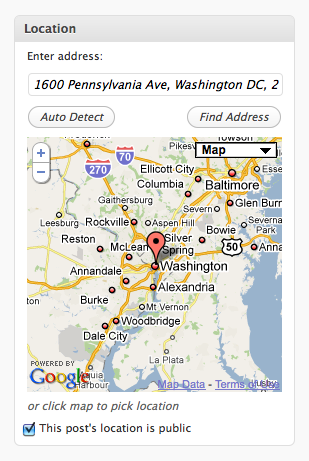
In addition to geotagging posts, you can also geotag your profile. Interested in reading blogs by other people in your area? A quick search will find them, and in the future could even be used to organize local WordPress.com user meetups.
Right now, we’re only collecting and exposing geodata for posts and profiles. Geotagged posts get marked up with the geo microformat, geo.position and ICBM meta tags, and GeoRSS and W3C geodata in feeds.
This is all machine readable data: hidden from display. What good is it if it’s hidden? It tells search engines where your posts are located, and with browser plugins like Operator and Geo, you can view geo information on any web page (not just WordPress.com geotagged posts).
The machine readable data is cool and geeky, but what about something for us humans? Right now, we don’t display geo data anywhere in a human readable way. Don’t worry, though. We’ll be launching theme integration, various maps, widgets, and shortcodes soon.
This is just the beginning. Building on this platform, we’ll gradually roll out more geotagging features, such as showing the location of your commenters, the location of poll votes, a live map view of blog updates on WordPress.com, or an annual report showing you where your posts were written and where your comments came from — kind of a blogger’s version of the Dopplr annual travel report.
For now, we’re pretty psyched about the geotagging and (the upcoming) search of posts and profiles and hope you’ll all give this new feature a try! If there are other geotagging features you’d like to see built on this foundation, suggest them in the comments!
For more information, check out the Geotagging support page.
Note: We’re holding off on launching the geo search feature until we start getting some data (from you!). So start geotagging 🙂
 WordPress.com News
starting with it…………thanx
Like the other “commenters”, I don’t think it’s a good idea. What if somebody suddenly decides to stalk you or whatever. It’s fun to have your location automatically shared but if you think hard about it and if you’re a negative thinker like me, it’s also scary.
You are not geotagged unless you activate that feature, so no need to worry.
Google is a powerfull tool, no doubt about that. I’m a writer and not always can visit the places described in my books, so it happens sometime that I travel on google maps street view.
Don’t know haow much usefull would be being geotagged and what kind of plus would give to my blog.
I have to think about it.
yes i agree too stop!!! i dont think it too!!!!
Okey doke.
For me, I think “The Heart of the Alaska Range” is just about as detailed a location as AlaskaRanger cares to reveal, at least for now!
Now, what would be cool would be learning where RESPONSES are coming from 🙂
Very good. Particularly,
good .. thnx
Ermeh
google is perfect searcher..
please work in my country…..he he…
It is a great feature, but not for people in countries where you are not supposed to have access to websites like wordpress. So it is good that it is optional.
What? Might as well give them my name, number and address! This is as good as spying disguised in “good news!”
Give me a break! Who the hell are you people working for?
ATW
great idea
would come really useful for people like us
its awesome
souds good… hmmm.. ^.^
I’ve started and am curious to see how it catches on. Thanks!
Voila, thanks, its shining.
Well could the blogger manually put in a fake address? I think they could. Why would anyone put in a street address? I can see a blogger identifying a location or an area they are blogging from but not a street address.
Absolutely. It’s all user supplied content. Just like a blogger could put in a fake profile name or make stuff up in their blog posts.
And you can put in whatever level of detail you want about your address. Your country, your city, your full address. It’s up to you.
Ideal for my kind of blog: bicycle-infrastructure.
Sounds great! But what happens if I log with an UMTS connection via Mobile Phone?
It works based on IP address. Try it out and see what happens.
Shall eagerly wait for theme integration launch of this attractive feature.Great Geeks !
great i’m goin 2 try it all out lil by lil I learn more from ya Word Press
Awesome.
I fight in this club penguin army.
It has a WordPress blog and its near my location!
mmmm, very good
wow, that is epic…cant wait to use it
nice feature….make me interest and happy to know that anyone could see me….
This seems really cool!
Thank you for all the hard work!
It is back to blogger what the blog will be used for. Now I’m just begining my blog.
very good..
This is cool since i will be able to get noticed by the people i was trying to reach on another app
so now i become tracable in to my local comunity within such a great site and my ranks of searching will multiply security is not a problem its managable
SwEEEEEEEEEEEEEEEEEEEEEEEEEEEEEEEEEEET
I love this one
Great feature…
Sheri; mdawaffe Thank you for your (lengthy in mdawaffe’s case) replies. I’m familiar with what you’re doing, and understand it well (I’m the author of the proposals to extend the use of the Geo microformat for other bodies such as the Moon or Mars; and for non-WGS84 coordinate schema here on Earth). You do indeed have good coverage for machine readable data; I’m suggesting that you could have *better* coverage, for minuscule extra overhead. That’s not meant as as criticism, but a hopefully-constructive suggestion – I’m sorry I didn’t make that clear.
It’s good that you’re working on making geospatial data human readable; microformats are, by design, meant to mark-up human readable data. Some microformat parsers will not, by default, recognise hidden microformat data. Some people, me included, want to see coordinates on the page, not just maps. Your post mentions “theme integration, various maps, widgets, and shortcodes”, but not that; at least not explicitly.
If I can help in any way, you can contact me via my website.
The man from ARRO says nice
Look forward to using it on trip round Australia. Can it be left turned off, then just turned on for the occasional post?
Once you turn it on in your profile, you have the option to turn it on or off for any post.
I don’t know if this is the safest thing in the world . . .
Isn’t it dangerous?
good widget. I may use it
Great Idea
I’ll try this out.. thx to the developer..
Very good. Thanks
Just getting into WordPress… this was my first read; and it was a great intro. Good Stuff!
sounds very interesting
good!!
Fantastic, sounds like discovering our digital-selves in physical space!
Great feature!
Keep up the good work 🙂
Cool feature and has it’s place, but I’m in the TMI camp.
Just an FYI for others, the new Firefox 3.5 has Geolocation info ENABLED by default.
To turn off geolocation in your Firefox browser type “about:config” into the address bar and in the filter type “geo.enabled” then double-click it to turn it to “false” to turn off geolocation.
wow…..what a gread article…..
Perhaps advocates and cooperators
of lots of much needed change
will find this GIS feature very valuable.
Such as when people need to meet face to face
and there is this GIS evidence
that those who will come are from nearby… it’s optimal to savings in travel costs in all its forms 😉
More power to innovations like these
This might have already been suggested, but how about allowing users to select from previously used locations when tagging a location on a post. I just enabled the geotagging feature and although it’s easy to click on the map to select or correct the location, it would be nice to just select a previously used location too once you’ve started using the feature. My 2 cents…
Wow! A very helpful and exciting feature of WordPress. Now, I would know if there are bloggers near my area too. Excellent!
wow nice
it doesn’t work in the Netherlands. and besides that, what’s the use of it?
It should work anywhere the Google Maps API works. If you are having problems please contact support.