


Over the weekend, we turned on a new theme called Twenty Ten. Twenty Ten is a big deal for us — it’s our first update to the “default” theme (the one you see when you start a new blog) on WordPress.com. Our goal with Twenty Ten was to create something stylish, customizable, simple, and most of all, readable. Since every new WordPress.com user will be seeing Twenty Ten, we wanted to design an example of what a WordPress theme can do — that meant inventing some new features as well as utilizing a few that you may not know about yet.
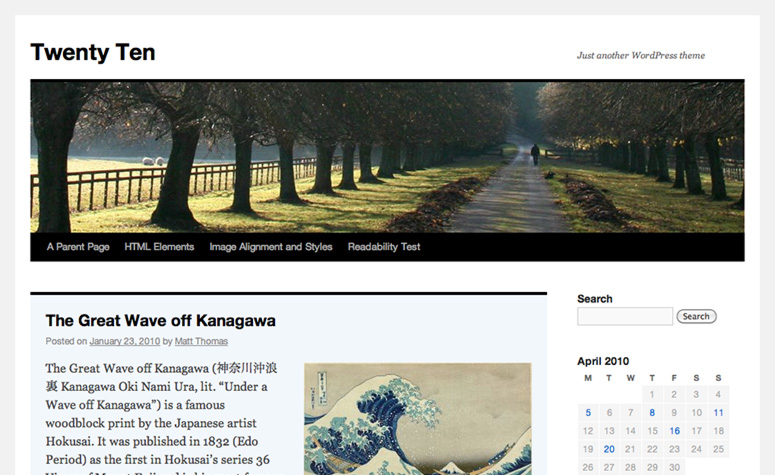
Custom Headers
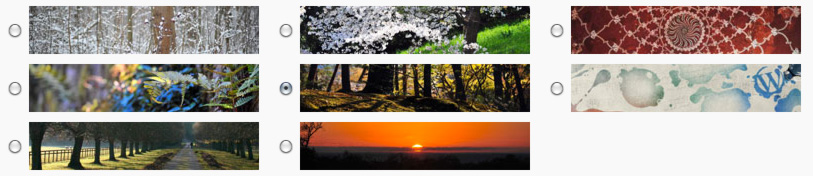
Twenty Ten comes with a selection of great header images. It’s easy to switch between any of the included header images or upload your own. You can even use a different custom header image for each post by including a Featured Image when you publish a new post.
Custom Backgrounds

One of the easiest ways to customize a theme to your personal style is with a custom background image or color. Twenty Ten is the first theme to use WordPress’ new custom background feature, so it’s easy to pick a new background color, upload an image, and tweak its tiling and positioning. If you’ve ever had to write CSS or muck about with code just to change your background color, we think you’ll really dig this new feature.

Drop-down Menus
Twenty Ten neatly organizes your pages into a menu right in your blog’s header, and includes drop-down menus for multiple levels of nested sub-pages. There’s more coming with the menu, but give us a few days.
Special styles for Asides and Galleries

Twenty Ten includes special styles for posts that you file in the “Asides” or “Gallery” categories. When viewed on an index page (like your home page or a list of posts from a particular month), asides get a simplified look that seamlessly fit between full-length posts, while galleries give a peek at the photos that lie within. If you don’t already have those categories on your blog, just add them and start assigning posts to them. Twenty Ten will recognize the category name and start applying the correct styles automatically. For an example of what inspired us here, check out Matt’s blog and how he intersperses shorter posts and galleries.
Editor Styles
If you’re like me, you constantly find yourself hitting the Preview button while composing so you can see what your post will look like with your theme’s styles. Twenty Ten aims to break that addiction by using the editor styles feature of WordPress. Now, the Visual Editor in WordPress can mimic the look of your theme, so you get a perfect visual representation of your post while you’re writing. I think this will be a really popular feature with new themes once people try it out.


One and two-column templates
By default, Twenty Ten uses a two-column layout with lots of room for widgets. If you’d like to hide the widgets and focus on the writing for a particular page, just choose the “One column, no sidebar” template.
Widgets Galore

Because we know you can’t get enough widgets, we’ve included two sidebar widget areas (extra-useful for those of you who customize your CSS) as well as four footer widget areas. It’s easy to load Twenty Ten up with lots of widgets without sacrificing your blog’s design.
Beautiful in Print
We’ve all experienced unpleasant surprises when trying to print an article from a web site. Twenty Ten includes special styles for printing, so you’ll get printed copies that are just as easy to read as the original.
To see more of Twenty Ten in action, visit the theme demo blog. If you already have a WordPress.com blog, you can find Twenty Ten under Appearance → Themes. If you don’t yet have a WordPress.com blog, just sign up and Twenty Ten will be waiting for you when you log in. Twenty Ten will be default for WordPress.org users when WordPress 3.0 launches in May. (What’s the difference between WordPress.org and WordPress.com?)
 WordPress.com News
Neat! Thanks.
This is the best theme you guys have created! You’ve put everything I’ve ever wanted into one theme! I may think about switching to this theme over the next few days. The only problem I see is that it’s the default and many people will be using it. Hopefully, I can make it look totally original.
Thanks,
~Sara
Wow.. I am using it.. Thank you very much. After almost three years, I have changed my theme from digg 3 column to TwentyTen.. That was awesome!
Thank you guys again!! 🙂
Can you please explain what the ‘set featured image’ means in the left column on the ‘edit post’ page? How does it work, what does it do? Thanks.
Featured images are one of the new features in WordPress 3.0, which recently rolled out on WordPress.com. We’ll be talking more about the new stuff and updating our documentation soon.
YES! Custom backgrounds! 😀
With this theme as a “default one” you, the Team, became my personal heroes !
The dropdown menus here are a bit too dark, and their look gets worse with more parent pages. Otherwise – great.
Now I am looking forward for some themes in the style of INOVE.
Greetings from Poland!
Keep the themes coming!
Thanks for the hard work and dedication guys.
Cheers,
Remain.Simple
Love the look of this but PLEASE can we have more themes where its possible to choose whether to display the author’s name on posts or switch it off?
really a good theme… great job theme team… :-p
Damn it!! Just spend hours fixing up my blog and then saw this awesome new theme… Love it!!
I like how simplre this is. WIll switch ASAP!
Considering switching to this now…I’ve been wanting a way to change the background color without CSS for a long time! Thanks for all your hard work, guys!! 🙂
This looks very nice…so simple and clean. You can’t go far wrong with that.
I want to change over to this new theme, but I’ve never changed an up and running blog before…can you tell me if I’ll lose any settings as I have them now using Vigilance theme? (www.theromanticvineyard.wordpress.com) Any chance you could add the banner feature to this theme? I LOVE the banner – very helpful when you need to say something quick or highlight something new without taking an entire post for it.
If you’ve added custom CSS or certain widgets they may not carry over to Twenty Ten, but you can preview the new theme before making the leap under Appearance→Themes in the admin.
Me Likey!!
love this theme ive had it since it came out
suits me perfectly thank god ive been waiting for this
Wow! Another exciting evolution at WordPress!! I love that you guys are constantly innovating!
More and more goodness. Thanks guys.
Awesome! does this mean that wordpress.com has upgraded to 3.0 for the custom background?
Indeed it does!
This is beautiful. I’ve been waiting for one with custom header.
Hi, this is cool, very clean-cut and easy to use. I have never switched themes before, will i lose my current widgets? thanks for your help!
Hi Jenna — most widgets should transfer, but some may look different in Twenty Ten. If you’re not a fan, switching back to your previous theme should bring you joy. 🙂
Peace to you!
Thank you for this new theme. On the Lord’s Day (Sunday), as I was working on our mission’s blog (http://jdisciple.wordpress.com/), I wanted to change the theme, and I found this new theme of WordPress, so I applied it to our blog. It is very practical and has many features that we needed in the past. I only have two little requests for now, if your team would like to help:
1. The most important one: When I put my red sentences in bold, they are appearing as bold black. Is there a way to make them look bold red?
2. Is there a way to make the drop down page-menu optional?
This much for now. May the Lord bless you all!
Grace to you!
YAQUBOS†
Woop Woop!!
Very good theme. Good font, good handling of block-quotes. One tiny problem. I don’t know if it’s me or you. At the bottom of each of my posts I have a few social bookmark buttons. They’re all in one line, separated by dots (Alt-7). With the new theme, all the dots drop down to a line of their own. Weird. But that’s stopping me from considering a switch.
It’s a huge improvement to the default theme. I do wish that it’d be available with a sans-serif font (or at least a better-looking serif font), though. Also, it would be nice if the visited links weren’t purple.
I’m a big fan of Typekit for customizing fonts; you should check it out. They’ve posted a guide to using Typekit with WordPress.com that will help you if you’d like to check it out.
Drop Down menu’s for the win! I’ve tried implementing on my own servers, but it seems rather difficult. Can we expect them to be integrated into existing wp themes?
There’s some cool menu stuff coming with WordPress 3.0. More news should be coming about that soon.
I love it! It’s easy to navigate, keeps the page uncluttered, and it still has most of the features I need! Keep expanding and coming out with new material. Thank you!
Yes, I like it
Wow, WordPress themes are beginning to show up regularly. And clean looking too. I like that. And I like this one a lot. 🙂
looks really nice, simple and elegant, will try it!
Great theme, the perfect one to start a first blog and fall in love with blogging!
A great widget i think would be a special print button, so you can print out the post without all the extra stuff like many sites have. great theme though, anyway to get the homepage button?
Try printing a page from Twenty Ten — we’ve removed the widgets, the header image, and all the other cruft so the printed page just focuses on the article.
great job, Matt..
Hmmmm, This looks very Cool,must give it a try
Holy Christ! This is totally awesome! I am way surprised with this new theme….COOL! I so LOVE it!
keep it up!
Greetings from Philippines!
I’ve spent the day playing with this theme, working on a possible change from Vigilance (yes, you actually tempted me to change). However, unlike other themes I’ve used, the header/banner on this one is NOT a link to the home page. Hope that’s an oversight that you’ll remedy, because the only alternative I can think of is creating a link in the sidebar — a far less attractive option. I’m guessing by now that most WP users are used to clicking on the header to return to the home page, rather than searching for a link in random locations in the sidebar.
You should find that clicking the site title takes you back to your home page — if not, contact Support and they’ll help you out.
how can i get this theme?
You can find it in your blog’s admin, under Appearance→Themes. Just search for Twenty Ten.
wow.. i love it for sure 🙂 . Thanks
Just implemented it. LOVE it! Thank you!
This is a wonderful addition to WordPress. Thanks so much Matt!
I have a question about this theme. I don’t understand which tab takes you back to the ‘Blog” page….besides clicking on the header.
I love the drop down menu and I look forward to hearing about more of them. Terrific work! 😀
If your main page is your blog page, clicking on the site title will take you there. If you use a separate page as your blog index, you should be able to click its title in the navigation bar. If you have trouble, just contact Support. 🙂
This is wonderful! It is one of the best themes I’ve seen.
If this will become the default for the next WP-theme, i can’t imagine how the non-default theme will gonna be. I really hope it will be greater than the default. 🙂
Anyway, i tried to run this theme on Mozilla 2.0. It breaks the design. 😦
Thanks, Putri. We’ll take a look at it in that older version of Firefox, but you should consider upgrading to Firefox 3.6 — you’re missing out on so much cool stuff. 🙂
Dear Matt Thomas, But I won’t be changing my theme because I already have lots of readers and they are already familiar with the theme I’m using now.Thanks.
This theme is quite nice
This is definitely my favorite theme so far. My only issue with it is the font size.
I’m rather new to the website, so I’m not really sure if this is the right place for this, but it’d be a seriously huge life saver if I could change the default font and size for the entire site. It’s not an issue to do it manually… but obviously it takes a bit of time.
If you’re comfortable writing your own custom CSS, try adjusting the font size for the body tag.
body {font-size: 75%}should be a start. Twenty Ten uses the browser-default font size of 100%.New ceases to amaze me how creative you guys are. Well done – a simply sterling job.
Very nice theme from this first glance! I just adopted PressRow for Flaming Catheads and am still tweaking it, but I am definitely going to keep Twenty Ten in mind. Seconding the appreciation for the demo blog, too. I’m not going to have time to explore it tonight but will later.
the theme is great and very simple.
the theme demo blog helped to know how the blog will look like, thanks guy.
welcome 2010 🙂
Love it! I’ve already received positive feed back from readers. Thanks guys for a beautiful theme
I was looking for a new theme for my new blog on photography,”Motion Mask”, a you came up with Twenty Ten , it is awesome.great job Matt, i really like the Asides and Gallery concept.It’s brilliant .looking forward for such new and creative themes from you.
Wow, this was the best theme so far! Switching immediately! Maybe the header is a bit too big to my taste, but choosing a theme is always a trade-off. =)
See that link to Matt’s blog that you include? I LOVE his theme! It’s Grungy! Now if only we could have more Grunge type themes, more colour etc on WordPress.com I would move my other blog on here as well! I love that theme! Keep up the good work guys.
I love it! especially with the customizable header and background.
thank you very much for your hard work. I can’t wait for more themes from you guys!! ^___^
Like the visual editor feature.
Melody x
wow it’s beautiful!
Wow … this is very good
hey ! i liked it and used it for my blog in Hindi.
I like it!!!! Clean and elegant!!
Thank you!!! I love this!!! 🙂
Was this a new theme? I just added the theme two days ago, i was trying to find some theme which is very readable and customizable. I foud a theme named Twenty Ten, and added it, i just came to know from the Dashboard that this is a new theme! At last you have made me change from Journalist v1.9 to Twenty Ten, this is really a customizable theme with an extra wide header, clear fonts, organizable widgets in different widget areas. The best part is the footer columns, i can add the blogrolls and the licensing suffs at the footer without cluttering the right side bar. And huess what, this fulfills my requerement which i complained in almost every theme, the width, this theme has the same (almost) page column width as Journalist v1.9 so its an instant change, without nasty line wraps, and overflowing images. Thanks for making this theme.
I have a question. I can see the author name and the about the author at the end of each post. I do nor want to show this , is there any way to stop this?
I have a problem with this theme, or is this not a problem but a feature?
The latex formulas are showing higher than normal text in the line, looks like the latex expressions are shown as superscripts. Please check my blog ‘s first post to understand what i am telling.
Thanks! That was a bug, and I’ve fixed it now (latex users both on WordPress.com and WordPress.org have your gratitude). 🙂
Very impressive theme. WELL DONE.
Brilliant! Excellent stuff! I am actually one of those people who end up hitting ‘preview’ frequently. I think I may try this one out soon 🙂 Thanks guys!
I have switched! Susan 🙂
SO AWESOME! I love it!
I love the custom background! Thank you!
Wow this great news to find out the Twenty Ten theme has arrived here at WordPress.com. I have been following the progress of this theme on the demo site and really look forward to implementing this theme on my blog.
Can’t wait to give this a try!
Dakujeme! Thank you! Danke schön! 🙂
This just got me sooooo excited!
Love it
Hi Matt, I just switched to this new theme and love it!…. except for the fact that it does not have the link for “home” along the top where all the pages are. Any chance this could be added? it would really complete the look and functionality of this lovely new theme. Thanks!
Hello,
Well, I really think this theme is getting closer to what I am looking for. My blog is all about visuals. The header is huge! Love it!
And so many features…
I will definitely try it but will wait until all goodies are finished.
Thank you!
~ Gabriela ~
After 3 years using Freshy (i’m a top 20 blog) I tried this one and ran a reader poll.
Overall they liked it.
#1 complaint – no “home” button/link in the pages menu
#2 complaint – no delineation between posts, they seem to run together, and I agree, some sort of separator is needed.
#3 complaint – body font color is a bit too light, and I agree with that too
There’s also some oddities, like inability to assign a color to a bolded section of text with the wp.com visual editor, sent to support.
Overall a good job with some rough edges that still need smoothing out.
http://www.wattsupwiththat.com hosted on wp.com
thats a really nice theme! cool man
hey thanks, i loved the theme…!
…perfectly beautiful!
I like the new look of this, and I love the idea of a “feature” header. What I’d love to see are more themes that give you the option to turn off that annoying second “home” menu/tab when you make a static page your homepage. It would be awesome to take that idea of a feature header as well and be able to have a different header for each of your pages. Some great customizable options here though…
I really like the changes!
Honestly, themes are getting better and better! And this one is… woah!
Thank you, this is my new choice.
I like it, and it’s great that there is a demo blog for it.
simple and sweet.
Cool theme, it simple and not bad looking or distracting with lots of colors. A fellow blogger I follow is already using it – see how fast people like these new themes? Keep rolling out even more hopefully in the new future, more themes + more options = more wp.com users
Matt, I’m having fun with the new Twenty Ten theme! I’m really enjoying the custom banners and side bar color options. Thanks! I also like that you can make your own custom headers but for now I’m enjoying playing around with the ones that come with the theme. Great Work!
Great News, but I do not get it to work like shown on http://2010dev.wordpress.com/2010/01/23/the-great-wave-off-kanagawa/
– How can I place that Author Info beneath a Post on my on hakre.wordpress.com?
– How do I highlight that Post on my Blog’s homepage on my wordpress.com blog?
The author info below posts comes from your personal profile bio. Fill out the “description” field in your user profile and it will begin appearing on your blog. The highlighted post you see at the demo blog is a sticky post.
You say that there are print styles on this. I’m looking for the “print this” icon – is there one, or is some coding necessary?
None necessary! Just print any page using your browser’s standard print button or keyboard shortcut, and Twenty Ten will automagically reformat your content to fit the printed page.
I’ve been wanting to change my theme for a while now but havent found one that I like…but this definitely comes closest, and I might finally switch. Although, the header image I think takes up a lot of space, with the title above it like that. Font size is bigger than I’m used to, but for people reading the blog this might be a nice relief. Really good job on this, it’s really nice and customizeble!
I’m impressed – this looks like a perfect default theme. Good work!
Also…
What does “This post is super-awesome” mean when selected?
Hi there, that’s one of the surprises related to our fun new “Surprise Me” feature: https://wordpress.com/blog/2010/04/17/surprise-me/
I like this theme. It’s just a cool one. What a beautiful Job!!!!!
Per my post above, some additional top level most seen comments from the thousands of users that have visited my blog with Twenty Ten newly installed:
– Just a bit too much whitespace, common suggestion is to have slightly less line spacing.
– The extra whitespace leads to another common complaint, which is purely psychological: “it’s too bright” which is funny since my previous theme also had RGB of 255, 255,255 for the text background.
– Several complaints that this theme breaks under older browsers and screen res of 1024×768, which I’ve seen myself.
– The missing home page button still gets a lot of complaints a day later, given your excellent drop down menu system, this seems like an important feature to put in. Please please do, people aren’t getting that they can click on the blog name, it’s a bit counterintuitive.
See my entire thread on the Twenty Ten implementation here. As a top 20 wordpress.com blog, it has been given a heavy duty workout by users, and the thread has even more comments than this one!
Overall the response is positive, but users with older software are having a lot of trouble. I know you can’t please everyone, but it sure would be nice to see some attention to these issues. Thanks for your consideration.
Really interesting the drop-down!!! great job in all…a big bravo!!!
I like the new theme alot, but I’m not sure the Asides feature is going to work for me–maybe if it were in a slightly shaded box or something to delineate it from the other posts, more than just smaller font? Otherwise, switched from Misty Look because Twenty-Ten offers more flexibility me and good navigation tools for the user.
Good one, using this theme now.
OK.. you got me, big time – I’ve been wanting to change the look of my blog for ages so when I saw 2010 I decided to jump in the deep end & give it a go… I’m not computer savvy at all so the terror set in but, there was no need, it all changed beautifully. I soooo love the drop down menu for pages, the clean look & the easy as pie changeover – you guys are amazing – I don’t like the Black outline & bars… but hey! I can live with that when I consider all the other great stuff I now have…. thanks WordPress.com & the guys who developed this theme…. I’m soooo veeery happy!!!!
Thank you once again, Theme Team. You guys are, simply put, amazing.
It would be great if you could add support for excerpts — too few themes on WordPress.com does so!
Beautiful theme. Periodically I go through and try out a bunch of new themes. This is #1.
That’s one of the best new themes I’ve seen in a long time, crisp, clear, creative and stylish….fantastic!