


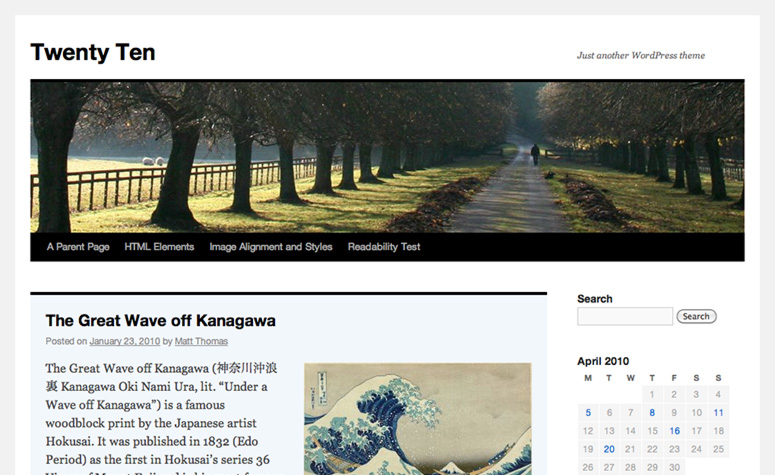
Over the weekend, we turned on a new theme called Twenty Ten. Twenty Ten is a big deal for us — it’s our first update to the “default” theme (the one you see when you start a new blog) on WordPress.com. Our goal with Twenty Ten was to create something stylish, customizable, simple, and most of all, readable. Since every new WordPress.com user will be seeing Twenty Ten, we wanted to design an example of what a WordPress theme can do — that meant inventing some new features as well as utilizing a few that you may not know about yet.
Custom Headers
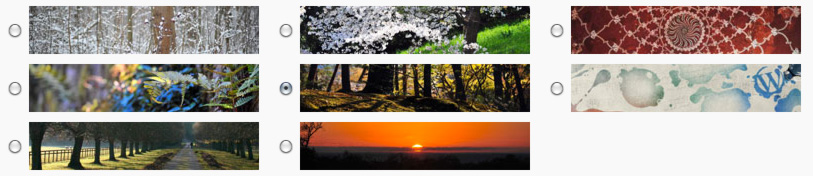
Twenty Ten comes with a selection of great header images. It’s easy to switch between any of the included header images or upload your own. You can even use a different custom header image for each post by including a Featured Image when you publish a new post.
Custom Backgrounds

One of the easiest ways to customize a theme to your personal style is with a custom background image or color. Twenty Ten is the first theme to use WordPress’ new custom background feature, so it’s easy to pick a new background color, upload an image, and tweak its tiling and positioning. If you’ve ever had to write CSS or muck about with code just to change your background color, we think you’ll really dig this new feature.

Drop-down Menus
Twenty Ten neatly organizes your pages into a menu right in your blog’s header, and includes drop-down menus for multiple levels of nested sub-pages. There’s more coming with the menu, but give us a few days.
Special styles for Asides and Galleries

Twenty Ten includes special styles for posts that you file in the “Asides” or “Gallery” categories. When viewed on an index page (like your home page or a list of posts from a particular month), asides get a simplified look that seamlessly fit between full-length posts, while galleries give a peek at the photos that lie within. If you don’t already have those categories on your blog, just add them and start assigning posts to them. Twenty Ten will recognize the category name and start applying the correct styles automatically. For an example of what inspired us here, check out Matt’s blog and how he intersperses shorter posts and galleries.
Editor Styles
If you’re like me, you constantly find yourself hitting the Preview button while composing so you can see what your post will look like with your theme’s styles. Twenty Ten aims to break that addiction by using the editor styles feature of WordPress. Now, the Visual Editor in WordPress can mimic the look of your theme, so you get a perfect visual representation of your post while you’re writing. I think this will be a really popular feature with new themes once people try it out.


One and two-column templates
By default, Twenty Ten uses a two-column layout with lots of room for widgets. If you’d like to hide the widgets and focus on the writing for a particular page, just choose the “One column, no sidebar” template.
Widgets Galore

Because we know you can’t get enough widgets, we’ve included two sidebar widget areas (extra-useful for those of you who customize your CSS) as well as four footer widget areas. It’s easy to load Twenty Ten up with lots of widgets without sacrificing your blog’s design.
Beautiful in Print
We’ve all experienced unpleasant surprises when trying to print an article from a web site. Twenty Ten includes special styles for printing, so you’ll get printed copies that are just as easy to read as the original.
To see more of Twenty Ten in action, visit the theme demo blog. If you already have a WordPress.com blog, you can find Twenty Ten under Appearance → Themes. If you don’t yet have a WordPress.com blog, just sign up and Twenty Ten will be waiting for you when you log in. Twenty Ten will be default for WordPress.org users when WordPress 3.0 launches in May. (What’s the difference between WordPress.org and WordPress.com?)
 WordPress.com News
A wonderful theme – we are dropping a website to adopt this because of these features.
I really like this theme and all of its features – the footer loaded with widgets is excellent option and the background image option is really wonderful! Not to forget about the cool drop down menus..
This is something that I was really waiting for… I have started using this theme in my blog! Great work!
Like the new theme. Will try it out very soon. Good work, Mr. Thomas.
Great looking theme. Need to hone my skills to be able to take advantage of all the features.
Love this theme. Have implemented with the drop down menu pages to construct some sane structure. And used a fav
pix for header img that I took in Venice.
It nicely accomodates my special style for Greek text and other customizations in the CSS.
This is a keeper. Great work!
I’m new here, but I saw this one and tried it on. So far I have liked it but I am sure I am far from it’s potential since I am not very computer literate…
Pretty cool theme…nice images.. and loads of options too! Good work, guys! 🙂
This is outstanding work.
Fantastice theme. I just love how it works, its much more user friendly and easier to help others set up their blog as well. Your objectives have been accomplished!
Thank you soooo much
Carolyn
It’s raining themes now! 🙂
Cool… I think I’ll try it.
Custom background! Really nice!
Awesome, I really like this theme layout. You guys have out done yourselves on this one. Thank you.
Clean and set up for action. The customization is perfect for photos, art, whatever is needed. Perfect!
This is amazing, can’t wait for WordPress 3.0 to be officially released for self-hosted users!
I like the theme but I already have a good theme.
Very nice. This is the best WP theme.
Please delete earlier post. This is the edited version.
Love, really love the theme. What I have always been looking for. Cool drop down menus, clear, beautiful lines!! Thanks so much.
The one beef I do have is the font size and I see it has been mentioned above. I have purchased the custom css option and tried to apply your fix that you gave to paulichu – “If you’re comfortable writing your own custom CSS, try adjusting the font size for the body tag. body {font-size: 75%} should be a start. Twenty Ten uses the browser-default font size of 100%.”
But just sticking that code into the fix does not seem to change the font of the page. It does change the font of the widgets on the side.
Is there somewhere you could point me for a little more instruction in that. I not familiar with CSS but I am an old computer programmer so I have some of technical background. I think this is the one sticking point with this theme and others will have that same question. Just one little override on the text of the page so that we can control the size will really help.
Again, thanks I love it.
My mistake, chapb — try
.entry-content {font-size:75%;}as a starting point to reduce the font size of your posts in Twenty Ten.Hi, I love this theme. I designed my blog using this and have just tranferred my website to be able to use wordpress.org but can’t find the Twenty Ten theme. Is it coming. Can I downl;oad it and upload to wordpress.org. Help!! Terribly disappointed here.
No worries, anlaby — Twenty Ten requires WordPress 3.0, which hasn’t been finalized just yet. You’ll find Twenty Ten bundled with WordPress 3.0 when it ships soon.
That looks awesome; I’ll be trying that soon. Good work.
Hmm… I like this one. And then it comes with all the bells and whistles =)
Very nice, thanks for the hard work
This seems like something that would be a good idea. I like the idea that it is called twenty ten because of the year. To me it comes off as something new and fresh just like how the year is still pretty much new and fresh, they correspond with each other.
Thank you for making the background feature available without mucking around with code. love this one a lot, and switched to using it.
I like everything about it except for the typography.
Very nice, awesome background. It’s all beautiful, 🙂
Wow… I’m gonna get that right away!
Simplicity is beautiful.
I really like this one a lot. I would use it if I could figure out how to make the header larger than what it is.
Does anyone know if it could be possible to also have one-column layout on certain posts?
Currently, that’s something that can only be done with posts, on a case-by-case basis, with the Custom CSS upgrade.
Awesome theme mate. Liking the new features and widgets man. Great job!!!!
I use Vigilance and I think this is his best competitor! Will try it out soon…for sure!
Amazing! Best theme I’ve ever seen! I love the drop down page things. And the backround! Now I don’t have to buy Custom CSS! Nice work WordPress!
It’s nice theme… I like it.
I do like this; Cutline has been fine but not visually interesting enough for me. I’ll check it out this week. The demo blog is nice.
I would be delighted if 2010 allowed for wider pictures. The column is only 640 pix, while The Journalist is 700 pix — it’s still a bit narrow, but the whole 60 pix more.
I love it. I’m using it now. It is the theme I have always been waiting for. Thanks, guys!!!!!!!!
That is far too many exclamation marks…
Yup i love it also. I saw my friend using this theme: looks great. Still thinking whether to change my current theme or not.
This is great, I prefer light, simplistic layouts and I’ve been using Kubrick before this because you can edit the picture. I’ll be using this from now on! Thanks.
It has that whole newspaper vibe.
Best. Theme. Ever.
So beautiful. =) I can customize a lot of things right away. Thanks.
I saw this theme the first time I joined. How can this be new?
Alright, I have activated it and it looks good. I’ve even added a custom pic to the header. Very nice feature, by the way. Kudos to WordPress for doing this. Hope to see more themes.
Thanks,
Goon
Great theme! I am currently using it. I definitely like the options and simplicity because I am still figuring out this whole blogging thing.
Good theme… I will try it.
I really like this one. I think I will try it on. I am excited to use it. Thanks.
I like this theme. Thanks.
Good job, I like it!
I’ve always wanted to change the header picture but never knew how! This is my absolute dream come true!
Go WordPress!
I like the design, especially the option of choosing background image.
I’m afraid I’m not liking this at all. It looked pretty neat, but having changed to it I realised it’s way too cluttered to be honest and has more than a couple of design pitfalls.
Does the text really need to be so big by default? Do we really need to SEE post tags when all they do is look messy? Silver text on white background is a bit of a no-no in my book, as is the dark grey text on black background in the menu. It may seem perfectly readable on a cheap LCD screen, but on better LCD/TFTs and even more-so on CRT screens these low-contrast couplings make text hard to read. How about dividing one post from another on the home page and the same with the widgets? An unintrusive separator is not too much of a bugbear, is it? As it is, everything just seems scattered across the space.
Looking at the other comments here, I might be alone in my opinion. But the custom background image and what-not sounded great and I was so disappointed that I found the theme so scattered and cluttered that I couldn’t NOT comment. Then again, what I think doesn’t matter; I’m too enamoured with iNove to commit infidelity with another theme, anyway. 🙂
Sweet! I may use it but right now I have Iceburg.
It’s nice, though are there any more flexible-width candidates?
Nothing interesting. Just like any other theme.