

I’m really excited about today’s new theme, Coraline. It’s a familiar-looking theme packed with upgrades that will make your blog more customizable and more fun.

As you might have guessed, this will be a replacement for the Cutline theme, which we’re phasing out. Since Coraline replaces Cutline this means we get to add some exciting new features that I think you’ll love.
Multiple Layouts
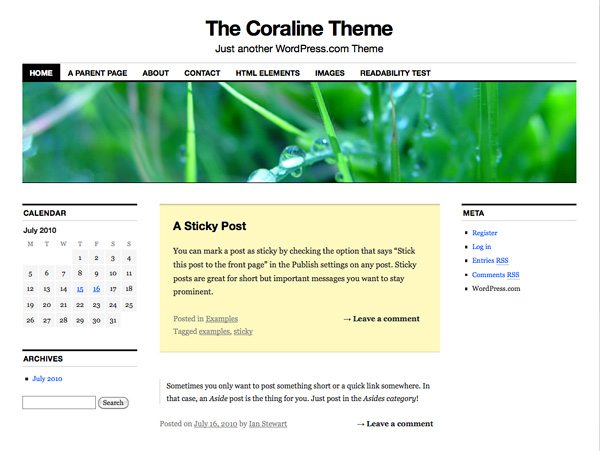
One of my favorite new features in the Coraline theme is the multiple layout options. Visit Appearance → Theme Options and you can select from 1 of 5 layouts. Choose from up to two sidebars—on the right or left—and 3-column layouts—including one with sidebars on both sides.
Up To 7 Widget Areas
If you need a lot of widgets for your site you’ll really like Coraline. We’ve added four widget areas to the footer and—if you’ve selected a layout with two sidebars next to each other on the right or left—a bonus “Feature” widget area that spans two sidebar columns.

Alternate Color Schemes
Does your blog need a darker look? Coraline also has an alternate dark color scheme selectable from Appearance → Theme Options.

Even More Features
Coraline was based on our latest default theme, Twenty Ten. That means you get even more features built-in; A custom background, custom headers that you can change on any post or page with a Featured Image, special styles for Gallery posts and shorter Aside posts, a Visual Editor that mimics the look of the theme, and customizable drop-down menus.
The Coraline theme is available today in Appearance → Themes and will soon be available in the WordPress Themes Directory, for self-hosted WordPress.org users.
 WordPress.com News
I am switching as soon as I hit “Submit Comment” — thank you!
Liking the flexible options it has.
That’s good looking. I like the dark background.
Beautiful. So clean and I love the multiple layouts.
Attractive looking, especially the dark theme.
You make me want to write even more blogs – so I can use all these lovely themes!
I intend to try this new theme out! Hurray, the Theme Team is back!
Fantastic, especially the dark background! I have one blog on Cutline which I’ll change over in the next few days.
My main blog used Cutline but the instant I saw this, I upgraded. Very awesome, similar but cleaner/smoother.
This is awesome!
Looks fabulous!
Nice! I already use Cutline, but this really does make it even better!
I use Cutline … and I have to say: AMAZING. Switching straight away!
It is good though obviously not better than iNove. I am apparently addicted to iNove! 😛
Awesome. Nice theme. Loved the dark alternate color.
Very nice 🙂
Another option – that’s nice!!
I think I might switch (again) to this one! I spotted it earlier today while browsing themes and wondered if it was a newbie – Thanks WordPress!
I’m still sticking with Vostok, though.
This is slick news, Ian, congrats on making this transition to Coraline!
I especially like the — “bonus ‘Feature’ widget area that spans two sidebar columns” — Bravo!
Very nice customization regarding possibility of relocating sidebars. But the font on the tabs is too big – as a consequence my tabs are forming a second line while applying this theme. That is why I will stay with my good old Inove. Maybe the time will come when there will be an optional, VERTICALLY ORDERED dropdown menu available in WordPress.com? Be it or not, you are great. Greetings.
That sounds like a good suggestion for a future theme. Thanks, greglewicki.
VERY sharp lookin’ layout. You’re tempting me to take the plunge from Bueno theme. 🙂
This is awesome! I might switch to this when I get tired of Under the Influnce. I love the dark color scheme.
Wowza! i’ve resisted every new theme for the last 6 months-alas i do believe ya finally got me!
I switched to this theme the moment I saw it a couple of days back. It’s gorgeous and clean. Thanks and please do keep introducing more 3 column layouts.
You can do so much with this, thanks!
I like everything except I am so tired of the blue link color – that stops me from using it. I will stick with Koi, modified with my custom headers and background, for the time being. Otherwise, it is a great replacement for Cutline users – nice.
Finally, I’ve been waiting for a nice new 3-column layout! Thanks, Theme Team.
This one is really neat! I might try this one.
Wow, this is definitely an improvement on Cutline. I like it. 🙂
I may test it out and see if I like it. I think it looks cool as it is.
Excellent. Nice improvement on Cutline. It’s better for handling blockquotes — the vertical line that Cutline placed in the left margin is gone. Very clean! And you kept the font with serifs. This is great.
I actually saw this theme before there was a blog post on it. I’m very impressed with this new update!
I’m glad to see more and more options available as you roll out new themes. I hope that continues!
Wow, looks great! Almost as good as Vigilance 😉
Sooo gonna use this for my new blog
Very well designed. Thanks.
Beautiful! Definitely going to use it!
This looks excellent. I almost switched to Cutline a couple of weeks ago. Great theme!
Looks nice. I’ll check it as soon as I get some free time!
We can make it black? Yeah! I’m definitely gonna consider this theme for my new blog!
Love the multiple layout option 🙂
Can’t wait to play around with Coraline’s features!
Very nice looking and flexible options! Thanks!!!
I don’t see one-column which is advertised but I can’t seem to get to it. Might be the solution for my desire to have maximum width images. Put those widgets somewhere else like the caps lock key. 😉
The one-column layout is available as a custom page template.
Thank you. That is what I want.
Great theme. Very professional and clean. Thinking of an upgrade.
Can you customize the background color?
Yep! Visit Appearance → Background and all the options are there.
Liking it. 😉
I’m definitely naming my next child WORDPRESS HUBBARD!!! I LOVE THIS!!!
Thought it’d have something to do with the movie Coraline … Still a nice theme though. 🙂
I’ve been waiting for weeks for a new theme to be posted and this one sounds very interesting so I’m gonna see how it looks.
The multiple layout option is fantastic. This is an awesome transformation of Cutline. I love Inuit Types theme, but this one will tug at my heart. Great work, Theme Team.
Nice ! but I am addicted to the “under the influence” theme. LOL
Looooooooooooooooooooooove it. And I like the name too.
Absolutely beautiful! And it goes with my name, so of course I’m using it. 🙂
Thanks for the hard work!
Oooh, I’ll try to preview how my site looks with it! I like the font used.
Really loving the flexibility and options of Coraline. A keeper for sure!
I love it!
I changed my theme already. I loved Cutline, but it was time for a change. This isn’t dramatically different, so my subscribers will still recognize “me,” but it’s updated and cleaner looking. WIth the added column for widgets, I had to re-load my header image so it filled all three columns, but beyond that it was an easy change. Thanks, WordPress!
This theme by far is one of my favorite themes thank you. 🙂
I love it!! You can change the background, the color, the header, everything! You can customize all you want! 😀
This theme looks awesome! Unfoirtunately, the computer I’m on doesn’t have JavaScript, so I can’t change my blog’s theme. 😦
It is such a pleasure to try on every new look that you come up with for us. I love it. Thanks again and keep up the great work!
LOVE IT, but I’m going to keep my current theme. I’m just waiting on something purple in the background, LOL. I love purple.
Welcome back Theme Team!
I’m sure this theme will be gracefully accepted by Cutline users. I really appreciate the customization that you put on the new themes. Keep them coming, Theme Team!
Cheers!
Your talent has no borders – very nice 🙂
It can still look like Cutline or you can make a totally different layout with all the new options. I like it.
I love it. I activated this new theme pronto but the custom headers I tried didn’t look right and I am still trying to figure out why…..however, the coraline theme is really a good looker. Thanks for a Monday surprise!
Relatively painless update — love the new menu system! The default line height in the tag cloud seems too big, though.
Well, after switching, I just had to have a Coraline themed header as well. Thanks to WP and Neil Gaiman both
A little notice to Cutline users would have been nice before you went ahead and changed my theme behind my back. An email or something. Sorry if I sound frustrated but to come and find out the look and feel has changed is a bit surprising.
Sorry for the frustration and surprise, Byczek. We hope that you’ll find Coraline a good fit your blog.
This is great!
This is my new theme. Thanks!
Wow, nice theme! Why is it called Coraline, by-the-way? Does it have anything to do with the movie or the book? Although I like this theme a lot, I don’t think I’ll replace Motion. Motion is my favorite theme.
It’s a friendly play on words. Coraline can mean “like Coral” and Coral is something beautiful that grows on top of what came before it—just what we hope Coraline can be for you.
I use Cutline, and seem to have been changed across to Coraline automatically. Not that I mind, as the new features are very welcome.
Wow, I really like this! I would consider changing to this theme, but it doesn’t allow for the divided banner that Fjord has, which I get such great feedback on 😦 . Maybe yet another option, down the line????
I’ll think about it….worried some things might go crazy like last time…
Really Cool and Great Work – THANK YOU !!!
Wow! This looks good but I’m sticking with mine. I love the widget areas though,
Love this theme! I like the flexibility and options. It gives my blog a clean and professional look. Thank you so much!
Once again … great!
I love it. There is one suggestion though. Much better if you you make the tag text smaller. It’s eating up all the space. 🙂
I am excited too. I hope this theme has no any problem with page break unlike I am having with other theme.
Once this cause no problem, I won’t simply make a switch.
Thank you for the good news!
That’s why I’ve chosen WordPress to post my stuff. Great themes. Great features. Great service. All for free. Congratulations and keep on going!
Cool. I liked it. I would like to try this out on my test blog.
This means we get to add some exciting new features that I think i love.
This is a very promising theme, one of my candidates for my next theme change on my blog’s 2nd anniversary this November 😀
It’s great – I’m using it. Just one suggestion: it would be great if you’d use Arial as a default font for posting — for this theme and / or for more themes. Thanks!
It’s a great theme!!!!
I’m working on putting together a blog for a student organization I’m a part of and this one looks perfect! Thank you so much for the new theme.
Nice, crisp theme! I like having room for more widgets.
A nice fresh design.
Covers just about everything I can think of, will give it a go I think! Thanks, WordPress team.
A crisp theme with many, many options. My site is new and my theme works well enough, but when I am a bit deeper into this, I can see there are possibilities in Coraline I had not yet even considered. Maybe when it’s time to announce an upgrade in about five months…. Thanks for all you do!
Traditional blog themes and Photo-blog themes seem to be incredibly popular – and they look great and everything – but I don’t suppose there is a theme in the works tailored completely towards Programmers who want a less, er, “bloggy” way of talking about projects as well as sharing code? The sourcecode tags works only to a certain extent – it is buggy on occasion, especially when going from Visual to HTML and back, and it would be cool to have other “for programmer” blogging tools and theme. I’m thinking less clutter, clean wide area with some sort of built-in “Insert Source Code” buttons?
Thanks for the theme suggestion, Dalin. More themes tailored for programmers and coders sounds like a good idea.
Its a good theme but similar to Twenty Ten.. Probably you may get us some thing really different from what is currently available..