

Ever wish you had a blogging assistant who helped you write posts that are full of great links, photos, and tags? Wish no more: We’ve partnered with the folks at Zemanta to give you a hand at quickly jazzing up your posts.
Once you’ve activated Zemanta, you’ll see several new widgets on your edit screen that let you quickly add recommended links, photos, tags, and articles. With just a few clicks your post goes from simple to snazzy.
Here’s a quick video overview:
How to Activate Zemanta
To add Zemanta, go to Users > Personal Settings in your Dashboard. You’ll see a new option near the end of the page that lets you add Zemanta to your posts. Click “Help me find related content (images, links, related articles, and tags) to use in my posts.” Hit “Save Changes” at the bottom of the page. You can turn it off at any time.
How It Works
Here’s how Zemanta looks in your edit window. (In this example, I’ve opened and dragged the Zemanta “Recommendations” widget up next to my text box.) It’s giving me a set of recommended photos, articles, and one link to add to my post.
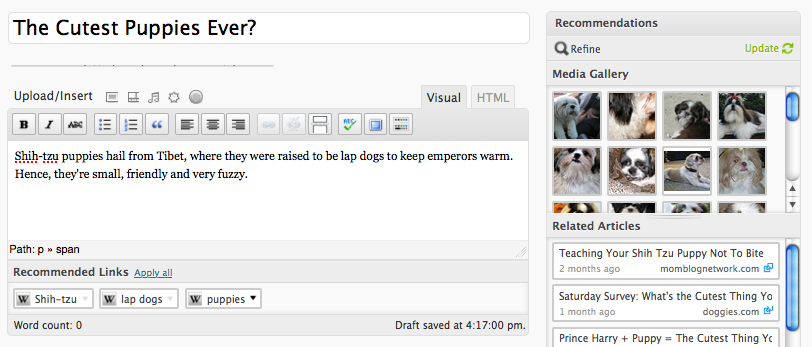
I then clicked a photo I liked, as well as an article and the recommended link. Zemanta automatically adds them into my post as I click on them.
Here’s how my post looks after it has been spiffed up by Zemanta:

A Few More Details
If you don’t like the results Zemanta is giving you, you can hit “refine” to see a new set of recommendations. And if you’ve changed the topic of your blog post, hitting “update” will give you new choices. You can use as many of the Zemanta recommendations as you like, or you can ignore all of them — totally up to you!
Currently, Zemanta works on English-language blogs and can only be used in the visual editor mode. It’s not available on private blogs. Photos recommended by Zemanta are copyright-cleared, but we urge you to check out the photo’s license if you have any doubts (you can do that by hovering over the photo).
Please see this page for more helpful details on how Zemanta works, as well as our Support document on Zemanta.
Enjoy!
 WordPress.com News
sounds cool. any plans for other languages maybe german ?
Fantastic!
I would have preferred to be able to add some related content according to my content on my blog… I’m quite disappointed. But this could be cool for cross-sharing content with other blogs 🙂
I’m still waiting for adding related content on wp.com …
Very Interesting!
This is a fantastic feature to enhance your posts. Already started using it and it’s quick & easy to use.
Thx a lot! I am pretty new in blogging and recently discovered how much more attractive posts with some photos are! xD
Gonna try it right now!
I love the images Zemanta found for my post – but is there any way to use one of them as my featured image in Inuit? Thanks
Not sure, it probably depends on the image, and whether you can download it from the source.
As a new blogger, this looks pretty cool –
Will give it a shot and see how it goes 🙂
good idea
I have been Zemanta via bookmarklet for a while. I love it! Thank you for adding it.
Will using this feature prevent a post from being selected for “Freshly Pressed”? As I recall, you seek original content for those selections, including photos. The “assistant-enhanced” posts would certainly be less original than a post where all content was created by the blogger.
This has no effect on Freshly Pressed selections.
what about for wordpress.org ?
Just WordPress.com
Thats a wicked app. I really like it. I hope i get more clicks on my blog 🙂
Are the recommended photos filtered by Creative Commons license?
Hi please see this link: http://www.zemanta.com/faq/wpcom/#faqid-4
I love it!!!
Am i dreaming? please wake me up, i love this!
Shure i am ready for jazz but please don’t be afraid for some soul
This is excellent, thank you!
Vote for : hope for zemanta in all languages . 🙂 .
Thank you for the information!
Excellent work, WP Crew… I’ve been using the Zemanta Firefox plugin for some time now, so i’m happy to see it integrated fully into the WP.com core.
xoxo.
This is FABULOUS on so many levels! It will not only enhance posts, it has the potential to cut my blogging time by 50% or more! Whoo Hoo WP!
This is a super cool idea but I am interested in how it will play out in my daily posting…. We shall see!
Thanks Joy! I’ll go take a look.
This is freakin’ awesome!
i’m going to use this
Amazing idea! let’s try it.
another ‘tool’ that removes creativity from blogging. seems like it could be easily exploited to drive traffic to certain websites, as well.
Hi, I’ve tried your zemanta adds-on tip. It works well. Thx a lot.
This has been one helluva addition. Very imaginative and very useful. We are connected better to the WWW than ever before. Thanks a lot!!!
This is the best thing in a long list of good good things. Not only does it make my posts better, but it makes them better in less time. Thanks so much. ~Peregrine
Thanks, WordPress!
It’s important to me that the images are copyright-cleared. I’m glad this is part of the terms!
What a great idea! I will definitely check it out. Thanks for the tip! 🙂
That’s interesting, it looks like it could really help with cross-referencing.
another reason to stay here 🙂
thanks a lot….
Those all seem like pretty awesome widgets. I am thrilled to see wordpress staff is constantly developing and improving this site. I love wordpress. 🙂
Looks like a very interesting feature as a blog post assistant. I will try it out. How does one format the layout of the items that are inserted by Zemanta? I normally use the HTML editor much more frequently than the visual editor.
After you’ve added what you wanted, you could tweak the HTML for a layout you prefer.
Hm. Neat idea for many bloggers, clearly . . . since I’m primarily blogging about a single photo in each post, Zemanta doesn’t sound useful for me. But thank you for constantly adding new features and options!
Seems like an excellent tool – owt for nowt as they say in these parts.
Just what I need 🙂
This is a great new feature! I’ve been using since it was released, and I’ve also used it to update previously published posts. Love it! Now it’s SUPER easy to tag (no more need to make your brain hurt), link (no need to search the web and find a suitable website), and find pictures (in case you don’t have your own picture and you don’t want to waste time searching), instead of doing all the work yourself–LOL. Thanks a lot, WordPress!
Great addition to the WordPress community!
Wow! Just tried this feature and I love it! Another successful addition to improving your wordpress posts! 🙂
I’ve activated this feature as instructed but it does not show up as a widget on my dashboard. What am I doing wrong?
It only shows up when you are creating a new post. Create a new post, and then scroll down to look for “recommendations.”
WOW…This one really works.
Thanks for the help.
My “Users” section doesn’t have a “Personal Settings” option.
Yep, it does. Go to your left-hand dashboard, and scroll down to “Users.” Click the arrow button on the right to open the menu. It will appear.
Now it’s there! Thank you, WordPress.
Love it – I’d like to try, once I’ve built my site !!!
Why cant we chose more than one pic?
You can! Please see this document:
http://www.zemanta.com/faq/wpcom/#faqid-5
it would help if you showed an example of how it looked when it was set. instead of having me do it myself and perhaps wasting time.
I’m not sure I understand your question?
So how do you say thanks, great idea, any differently from everyone else? I guess I can’t, so, thanks, great idea.
hahahahaha… You write that shi-tzus are small and friendly and the link that pops up reads “teaching your shi-tzu not to bite”!
awesome features….hoping for even more and better innovations. continue the good work guys 🙂
Good news – it works in Russian too! Very inspiring feature. Thank you!
I wanna try this .. Always a pleasure to try something new and exciting .
Cool feature. Tried it out already.
Tried it and I love it, this tool’s awesome!
This is just awesome! Looks like a great time saver! Thanks WP!!!
I love it! I love it! However, it would be nice if the links were to open in a new window, instead of opening the Wikipedia, etc. websites. That way the reader doesn’t leave the blog, and doesn’t have to go throught the back arrows to get back to my blog. Can this be done?
But, otherwise, well done, WordPress. 🙂
Though I upload my own images, I might as well try this one. Many thankies WordPress!!! ^____^
Looks good! I’ll give it a whirl on my next blog post!
Useful, but I agree with ikiru2009 that if a lot of people are blogging on the same subject then there’s a good likelihood that many of them will select the same pics and links.
Have just had a play around with it and there is one thing I’m not so keen on. What happens when you don’t want the Zemanta picture to be the main feature picture in the post, but just use it as, perhaps, another example ?
The Zemanta div is automatically placed at the top of the post. Moving it further down by using the HTML editor is okay, until you want to change your mind about which picture you selected (after all, we’re still in draft mode here). If you click on a different picture the Zemanta div is repositioned at the top of the post again. Ugh !
Why can’t it just replace it in situ within the post ?
For multiple images positioned around the post, ripping the div off of it and then cutting and pasting it to the desired location replaces the div and adds a dragged class too. Not sure if that is good or bad.
Generally speaking, messing around with multiple Zemanta images is going to be a bit messy and will need the HTML to be manually adjusted afterwards.
Still a useful feature though. Thanks.
This is an amazing assistant. But it is inserting recommended links in
tags. I do think that it should not insert links in tags.
The rest of the functionality of being a blog assistant is really cool.
Ghee, very cool. Will check it out and thanks for pointing it out.
Interesting feature, thanks I’ll try it…
wow. love this SO much.
I hate ( read: sooo love ) you wordpress!!
This is awesome
I fall in love again and again with you
Sounded very interesting initially, but the results (at least for what I write about) were so far off the mark as to be pointless.
I really don’t need photos of knitting machines when writing about woodworking.
At least turning it off again was nothing more than unchecking a box.
Pity – it did sound promising.
Hmmm. Interesting.
Let’s give it a whirl.
This is very cool. I’ll always remember the day I chose WordPress over Blogspot. WP is the best!
Nice. I think this is a nice option. Will it be modified to allow those of use who prefer not to use the visual editor?
Regards,
WonderGoon
I’m not sure. For now, only the visual editor.
Its so Sharp! Love this Feature!!
Wow! That’s Great!
There is something similar for WordPress.org blogs?
Here is some info: http://wordpress.org/extend/plugins/zemanta/
Such a good add on for us at Border Crashers, we do travel stories and insert a lot of pictures so it makes it so much easier. thanks!
groovy. can’t wait to try it!
This has been a very cool feature for me to have. It has allowed me to seamlessly add professional content that would often take much more time to add to my posts before. I have already noticed an uptick in my readership, and I honestly think this contributes to that…keep the innovation coming guys!!
very cool, don’t need to search manually
good job
Excellent tool. Will be using it on our Promotional Products blog.
very nice..thanks to wordpress 🙂
Hello,
That’s great. I am rightaway going to get this thing up on my blog.
Thank you for letting us know.
loving this
wow, you guys are so creative! thanks for all your hard work. I bet this will make things more cheerful. I’m looking forward for your next ‘invention’! XD
I just tried it and I love it! I don’t always have pictures to go along with the shells I write about, but I’m thinking that now I will.
Thank you!
Sounds really helpful. I’ll try it out ASAP! 🙂
Shih tzus are okay. 😉
Oh yes, the byrd thinks she may just *like* …..he he he…..this and finds it very good that it can be used OR not…. very good! THANK YOU! I am so glad I came to wordpress…. really guys thank you!
Looking forward to using this feature to connect up to other like-minded crafting blog articles! This should save me oodles of time in finding and organizing relevant content.
I’m going to have to give this a shot. I have a great post this week I think will work well with it!
Looks good! May give it a go! Thanks WordPress for yet another creative tool hope it’s as easy to load use and unload (if needed) as you say.
NEATO! THANKS
This sounds like it could be really useful and time saving, as long as it brings up helptul items of interest that are related to the article that you are writing. I will definitely be trying this out.
This is unbelievably cool! I am going to save soooo much time!