

Ever wish you had a blogging assistant who helped you write posts that are full of great links, photos, and tags? Wish no more: We’ve partnered with the folks at Zemanta to give you a hand at quickly jazzing up your posts.
Once you’ve activated Zemanta, you’ll see several new widgets on your edit screen that let you quickly add recommended links, photos, tags, and articles. With just a few clicks your post goes from simple to snazzy.
Here’s a quick video overview:
How to Activate Zemanta
To add Zemanta, go to Users > Personal Settings in your Dashboard. You’ll see a new option near the end of the page that lets you add Zemanta to your posts. Click “Help me find related content (images, links, related articles, and tags) to use in my posts.” Hit “Save Changes” at the bottom of the page. You can turn it off at any time.
How It Works
Here’s how Zemanta looks in your edit window. (In this example, I’ve opened and dragged the Zemanta “Recommendations” widget up next to my text box.) It’s giving me a set of recommended photos, articles, and one link to add to my post.
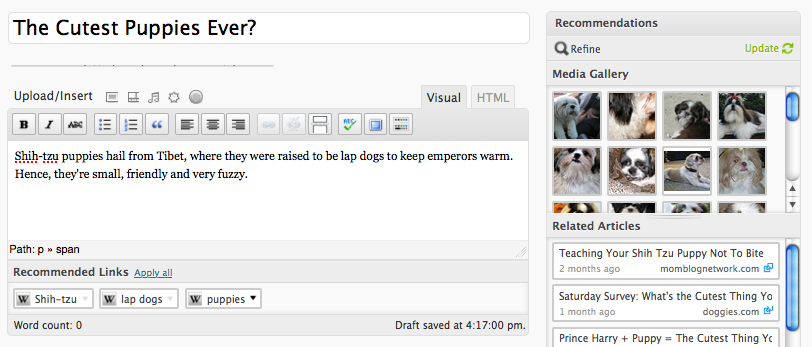
I then clicked a photo I liked, as well as an article and the recommended link. Zemanta automatically adds them into my post as I click on them.
Here’s how my post looks after it has been spiffed up by Zemanta:

A Few More Details
If you don’t like the results Zemanta is giving you, you can hit “refine” to see a new set of recommendations. And if you’ve changed the topic of your blog post, hitting “update” will give you new choices. You can use as many of the Zemanta recommendations as you like, or you can ignore all of them — totally up to you!
Currently, Zemanta works on English-language blogs and can only be used in the visual editor mode. It’s not available on private blogs. Photos recommended by Zemanta are copyright-cleared, but we urge you to check out the photo’s license if you have any doubts (you can do that by hovering over the photo).
Please see this page for more helpful details on how Zemanta works, as well as our Support document on Zemanta.
Enjoy!
 WordPress.com News
Tried it and loved it!! way to go with intelligent blogging
This looks very cool and more importantly useful
Interesting. It sounds pretty nifty, and it’s going to save me some time searching for pictures and links. 😀
Sounds like brilliant 2me.
Looks cool, I’ll try now 😀
Very cool, always innovative and giving us the tools to make our blogs better. thanks!
Thanks! I’ll try it
The information is very useful for WordPress Blog …Thank You…
Very helpful post.
Sounds nifty! I’m looking forward to trying it out.
Nice & interesting feature. Thank You WordPress.
Excellent feature I must share with my friends.
Whow!! This is a powerful tool!! I will definately use this to enhance my blogs!
Really enjoying Zemanta! It’s helped me out quite a bit already! It’s really helping adding some ze-mantauan good looks to some of my posts.
Sounds nice but im sure there are photographers getting screwed somewhere.
You guys are making us bloggers lazy. When will you come up with a tool that writes a new post daily, related to the blog title, gives it a great heading, then activates zemanta to add photos and links… and publishes!
Just kidding. Thanks for another new feature 🙂
this what I m looking for, thank you 🙂
You’ll see a new option near the end of the page that lets you add Zemanta to your posts. Click “Help me find related content (images, links, related articles, and tags) to use in my posts.” Hit “Save Changes” at the bottom of the page. You can turn it off at any time.
I can’t find it in my dashboard! re: “help me find related content”
zemantified
reblogged this from zemantified.