


Sometimes, you can’t always get to your computer, but you may really need to handle something important on your blog. That’s when a new feature we’re launching today — WordPress.com Text Messaging — steps in to help. Through our shiny new 77377 (PRESS) shortcode, you can manage your blog using SMS messages. No computer? No problem.
Note: Currently available in the USA only. Standard text message and data rates apply.
We’ve added great free and paid upgrade features to Text Messaging that make it easy to blog while on the go:
Free Features

For no additional cost, you can receive text notifications when the following changes occur on your blog:
- Users are added or removed
- The theme changes
- The privacy settings change
Upgrade Features
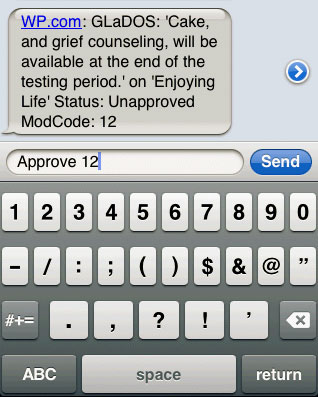
For ultimate control over your blog while on the go, check out the features you get with the Text Messaging upgrade:
- Protect your blog by using a two-step login process. A text message will be sent to your phone upon login with a passcode that must be entered in order to access your Dashboard.

- Get notified of new comments and moderate them on the spot with a simple text reply. You can also send in a reply to comments you receive.
- Get a notification when a post is published on your blog.
- Need to post something short and sweet right away? You can fire off a text and a new post will be added to your blog instantly.
The upgrade is available for just $20 per year. To purchase, select “Upgrades” while on your blog Dashboard and then select “Text Messaging”.
Get Going
Ready to get started? From your dashboard, click the “Text Messaging” link under the “Settings” tab to register your phone number with the service. After activating, you can select the Text Messaging features that you would like to use for your blog.
Full instructions for using the Text Messaging service are available at https://wordpress.com/support/text-messaging
 WordPress.com News
Nice… Hope to see it in more countries 🙂
If the feature proves useful for our users, we’ll definitely look into expanding it to other countries as well.
This sounds useful, so long as you don’t all start text talking! I really h8 that!
Quite interesting!
This is supercool!
It’s a long time coming! Woot woot!
Very Good…. I love being able to handle business on the go 🙂
Yes, hope this will be available in countries like the Philippines. Great job WP team. You keep on impressing us!
Very interesting innovation for WP users. Keeps getting better the longer I blog.
YES! I text and blog. Now I can have the best of two worlds!
Cool feature! Will give it a shot.
Need this in the UK!
Sounds like a good feature!
Not bad, but I like the iPhone app! This would be handy for people without smartphones I think.
ABSOLUTE need for WordPress in Australia – that’s all I’m going to say. Lucky Americans.
I hope it will be at germany too! this would be soo cool! *____*
Too bad the cake is a lie… 😉
But really, nice feature for people without smart phones.
Great idea, especially for those who have remote access to their blog blocked by the corporate BlackBerry people! Good work WordPress.
The WordPress App is much better. I would like to see more usability built into the App platforms, like making it easier to grab shortcode and instant notification of comments.
This will be great. Problem is I just dont like typing on my phone.
Hope that this feature is not going to transform the wordpress blogs into another micro-blogging technology like twitter 😛
Cool thats a wicked idea!!.. And I have a BlackBerry too so typing is really easy!! Live on and live strong QWERTY !!! lol
It’s a great feature, but I do prefer the classic computer-keyboard thingy.
We could try it and see it how it goes, but isn’t available in my country.
Sounds really cool! I always love when websites I love can be accessed and used through my phone.
Haha. That’s why I barely get on facebook on the actual computer. =D Thanks!!
Just don’t use this feature while driving!
This is great for those of us without smartphones yet. 🙂
It’s not useful for me, but I can see how other bloggers might want this feature.
That’s very cool!!
Thanks for the new update. Appreciate it. 😀
What?? You wanna charge me $20 for a service that others have free? Facebook and Twitter and others allow you to post free. Why should I pay $20 for the service?
You don’t have to.
Nice Features!!
Lots of great innovations recently, BUT, when will you provide for a direct cross/up load of word files INCLUDING pictures… The present process to feature pictures is cumbersome and wastes time.
Right now I am using the WordPress App on my iPhone with much success… But still I wonder…
Why is it so hard to pilot something in both the USA and Canada… We are practically the same place in terms of this type of thing. I find apps, codes, streaming and the like (not just WordPress) to be all sorts of bias against us tasty northern neighbors.
😦
Nice to see WP reaching out to non smart phone using USA residents tho… I guess. 😉
Wow. I hope this will be available in other countries soon 🙂
This sounds like a new feature that will be fun and resourceful! Thanks much!
Wow, very fantastic feature, great. 😉
To me, send an email via cell phone is enough. Besides, text message has limitation characters
Great feature! But why the US only for now?
We need to test the waters a bit.
Hey thanks for this cool feature! Need this feature in India. Is it available yet?
Awesome!! I hope this will be available in Indonesia 🙂
Make it available in India. 🙂
Such a pity it is only for USA bloggers 😦 We’re waiting for other countries 😉
When I first saw the title I accidentally read “Taxing: It’s Now For Blogging, Too!” and nearly had a heart attack.
We want this facility in India. Hope you would help us.
Nice feature! ^^ I hope this feature available soon in Indonesia.. Thank you! 😉
Hmm another great innovation!
Will it be ever available for India??
I usually LOVE new WP features, but I can’t see the point of this one. The free features seem utterly useless, and the pay features seem pretty bare bones for $20/yr. The pay features of WordPress.com are reasonably priced. And no one begrudges WP the right to make some money of a totally awesome product, but I would most likely move to a self-hosted WP install than pay for something like text messaging. Especially when WP for smart phones is completely free.
The Text Messaging feature is perhaps not for everyone. It’s useful if you need to stay updated with what’s going on on your high profile blog – if there are more than 1 editor for instance. It’s great if you’re concerned about security, as the new two-step authentication process makes your account even more secure. It’s awesome if you’re in a no-3G coverage area but still want to post something small and nifty. And if you don’t have a smartphone, you can now moderate and manage your blog on the go.
I hope this feature will be available in Indonesia.
Would it be available for Pakistan as well in future?
Too bad it’s only in US.
New cool feature 😀
It’s good but, it should have been all over the world.
Could you use this with TracFone too?
It should definitely work, however if your’re in doubt don’t hesitate to ask your provider.
Good news! Looking forward to it’s arrival to this part of the world (Asia).
This is great! I hope it will be available here in the Philippines soon. So that if we don’t have an Internet connection or shall we say a PC, we can blog through the use of WP text msg. =D
Nice. Great job. You get the job done!
Seems like a good idea. Makes sure you never miss anything, or miss a chance to update, on your blog. However i think the $20 service charge is a bit steep as other social networking sites make this service available for free.
I really wish that this would come to Canada! Great for those times I’m not at my computer!
So is this like calling your blog?
Very cool, great job WordPress!
Texting is killing the English language. I prefer when people take the time to compose a well thought-out email or comment.
Very good move…
It would be nice, if we can get SMS if someone posts a comment on a blog…
Sure hope I can start using this in Canada soon!
REALLY COOL! Now if it was only available in Canada.
Quite interesting!
Great to know! I like how something new and interesting is always coming out. I think blogging can be a great career starter!
Looking forward to have this option globally.
Great. I will now be addicted. Thanks, WordPress! 🙂
Yeah it’s right… Texting and blogging are almost the same 🙂
Not keen in imperialist Amerikkka inventions.
WOW! Exciting. It’s nice to update my blog in my iPhone. Thank you. And regards.
Yes nice… Interesting this idea…
I like this. Should start using WordPress on my iPhone
Nice! Very useful for me!
Why currently available in the USA only?
Wow how we all think that this should be all around the world.
Now I need to get a cool phone 🙂
Very nice…when do you think this might be available in Europe?!
Wow, great! I hope it will come soon to Indonesia.
Now I have to buy my iPhone… rs
Now it will be like in Twitter? =)