

We’ve made some big user experience improvements to how the traffic building feature called Publicize works. This feature allows you to connect your WordPress.com blog to your account on social networking services like Twitter and Facebook, broadcasting your posts to your friends automatically for you.
In the past it took a few steps to figure out how to get going. Now it’s just a click away.
Starting today, when you publish a post, you’ll see a mention of the Publicize feature.

If you click Turn on the publicize feature, it will take you to the Sharing Settings page in your Dashboard. Here you can configure any of the Publicize services you like.

Pick one or more of the services you want to turn on. It’s required that you already have an account with each service you want to use, as you’ll be sent to the service and asked to log in to connect your WordPress.com blog.
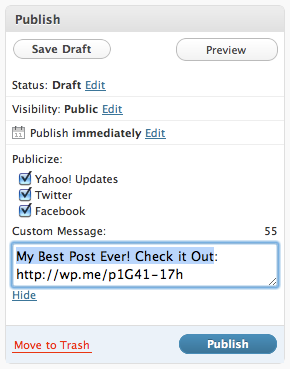
Then, as seen above on the Edit Post page, WordPress.com will let you choose which services you want to send your post to. You can also customize the message you send along with the URL.
It’s now easier than ever to grow traffic to your blog. If you have more questions, you can read more about how Publicize works here. Happy publicizing!
 WordPress.com News
wow cool,……thanks a lot
Cool feature. Do you have anything like this for the .org blogs, too?
This has been out for awhile. Been using it. Very cool. Would be nice to have a stats page that shows what geographical place people are coming from.
My Free Psychic Advice Blog is brand new, helped increase traffic already! TY
Yo, thank you guys so much for this!! I already do this through Facebook and Twitter, but had to do it manually. This makes things much quicker.
wow! 😀
Best feature ever!! 🙂
excellent, thanx 😉
wohooo thanks!
goodstuff…its great to see this as an option!
Great features thanks
one of the best features yet!!
great feature!!! thanks!
are you also going to add the facebook “like” button? and/or re-tweet button?
I think this will also be a strong traffic builder.
We do allow these services already – read this: https://wordpress.com/support/sharing/
Great stuff Scott! =)
When will it be available? I don’t see ‘sharing’ under my ‘settings’ tab as yet. How long would it take for it to be seen?
You can visit my blog here too!
http://blog.baberafzal.com
It’s available on WordPress.com only – if you have a self-hosted blog, or a blog hosted by a hosting provider, this feature isn’t available to you.
Hello. I have not been increased traffic. I signed up long ago. Have a nice day!
It’s really a feature that has been long awaited by bloggers, this will allow us to publish all our posts to friends
Like the custom message feature and I’m also keen for publicize to page on facebook. RSS Graffiti does the trick but would be better to send it directly from wordpress. Thanks again guys.
Brilliant!
I use it and have seen an improvement of traffic to my blog.
Great! 🙂
Great feature.
I think it is already there. What is new in it?
I am using and and love it.
Fantastic, Thanks.
Its useful for new blogger like me.
Cheers 🙂
Fantastic!!!
Good one. Inserting iframe of facebook fanpage’s like box on the blog would be a very good feature to have. Or is there a workaround?
This is cool, i’ve been using publicise for my facebook and twitter for months now, but this makes it more user friendly, so will be more popular. Regarding all the people wanting to publish to facebook pages, there are several apps in facebook that you set up to auto publish to your page (not profile) NetworkedBlogs is one of the most popular, but theres quite a few out there, just need to search…
Great. Thank you!
Thanks 😉
Already use the facebook and twitter connection daon t realu understand what is the new feature
Yes! wow! Love it…Thank you.. Very much appreciated…http://swom.com/?r=128690
This is awesome. I’ve been trying to figure out how to connect my blog to my facebook and yahoo account. Thank you. I can’t wait to try it.
Needs to work on facebook pages…there are thousands of people who will use such a feature as it is ESSENTIAL for multi-channel marketing for any business who vaguely knows what they are doing with social media. Those thousands of people are doing bizarre workarounds and using bits of facebook software that mostly aren’t too great.
We’d love a little bit of lovely wordpress to make auto publishing to facebook pages work. it can’t be that hard? tho i appreciate it is not facile.
now, THAT’s a great one! thanks a million.
Genius! Very good way of utilizing social networking sites!
Thanks
Sarah
http://sarahgwan.com
http://millionairelifestyleclothing.com
Hi, Scott. Thanks so much. Way easier to USE. That said, can you give us an automatic plug-in for LinkedIn? I’d like to reach my professional network in addition to my social network. Gracias!
We already have one: http://www.linkedin.com/opensocialInstallation/preview?_applicationId=2200
Trust me people this really bumps up the traffic. 🙂 Great job guys!!
Great Features dave, really feeling good hear that, please try to add more social bookmarking sites like, stumble upon, reddit, etc
Helpfull message, i’ll try. Thanks 🙂
Ride on! This feature helps a lot Thanks =)
exelent…..tank`s
nice! good work! would it be possible for old post that has been already published? I tried for my already published post but could not get through. please explian how it could be done ? regards
saif dewan
You can also go to a Facebook fanpage, like this one, ‘Being Conservative’, which has 2.15 million fans, and past a link to your latest post. I have received views using this method.
Great! feature keep up the good work…
No question, bloggers like me are obsessed with our traffic stats (must be an ego thing). This publicize feature is extremely helpful!
Yaaaaaay!
This is great!! Thanks!!
Thanks for the post. This has opened up some areas for some of us less savvy in the nuances of WordPress…!!!
Thank you so much! I love it! WordPress Rocks!! 🙂
Very cool, I was working via networkedblogs to integrate the blog posts :P!
Oh, I just published a post. SHould’ve spotted this first. I’ll give it a try next time. Excellent idea.
AWESOME! Just adjusted it – thank you superdooper wordpress team xx
Great.. thanks for the info. Much needed.
You guys, thanks this rocks! I love to advertise my blog it is SOOOOO fun!!!
Thank you \m/
Thanks. My blog gets next to no traffic. I like to think of my blog as Batman, hiding in the shadows, but sometimes that doesn’t even help….. :):)
Great stuff here 🙂
Does Publicize work with Facebook Pages at all? We’re an community / organizational blog and would love to be able to push our posts there.
Avec six blogs en construction sur différent site.
Je viens de découvrir WordPress un nom de domaine sérieux qui ne nous fait pas passer pour des imbéciles.
Il faut que je trouve leurs statistiques sur le taux de visites, le nombre de visites par blogs et quelques détails.
Si tout est a mon gout mes blogs et mon future site web seront tous sur WordPress.
Salut équipe WordPress,
AlainBeaulieu
alain02036@hotmail.com
I used to do this manually as well, but the options make it easier. Although, most of my traffic from publicized links is kind of dwindling.
I’m pretty good with just letting people on wordpress see my posts. I am scared to death to attach them also to facebook, to let people I know see what I write? I’m not ready for that yet…
grateful guys.
Good to know! What about for bloggers like me though — that are anonymous?!
can we add linkedin to it too
This is a great service Thank You.
Awesomeness 😀
thanks for help
yeah, this is an awesome feature
Hi, I tried to turn on the Publicize feature through Sharing field, but somehow nothing’s happened when I clicked one of the options (facebook, twitter, yahoo, messenger). Is there something wrong with my account or did I miss something? Thanks!
You should see a new window pop over with a button to connect your accounts. If you’re on a slow connection you may need to give it a minute.
Thanks, just what was needed. Is there a Slideshare application?
Excellent feature, it drives so much traffic to my blog, GJ WordPress
Great people always speak great. I don’t believe there is something better than this post. I congratulate to the wordpress for this awesome post.
Thanks.
Saif
Me parece bien, intentaré probarlo.
Dankeschön für dieses wunderbare Feature. Sicher wird es vielen
Bloggern nützlich sein bei ihren täglichen Aktivitäten im Social-Media-Bereich.
Wir freuen uns über weitere Neuerungen!
– chorone –
Brilliant – makes sharing via social networking sooooo much simpler! Thanks guys.
Is there a way to connect it to my Facebook Fanpage, rather than my actual personal FB account page?
Anyway to help us continue to help spread Hip Preservation Awareness is very much appreciated!
This is awesome, thanks for doing this because I always have to go to all of my networking sites and post the link and update them on new posts. So glad you guys got this going!!
Lovely feature
nice info..hope usefull for my new blog …
urgh cool urgh but I don’t have any social netwroks accounts :s
I’m gonna like this – I can feel it in my nuggets!
I’d like to add my voice to the requests to let us publicize to Facebook Pages instead of only to personal profiles. I’d use it for my business blog immediately! If you can speed up getting that feature I am sure there would be a lot of people who’d really like it.
Brilliant feature.
Any chance to do this in self-hosted WP blog? With a plugin maybe?
What if I want to contact people from outside my circle directly ?
Oh, beautiful. Time for a new post. 🙂
wow..nice..thx for your posting here. 🙂
thanks a bunch
wel done..
Great feature. Thank you:)
Thanks, I am using it!
it’s great… amazing, thank yo