

We’ve made some big user experience improvements to how the traffic building feature called Publicize works. This feature allows you to connect your WordPress.com blog to your account on social networking services like Twitter and Facebook, broadcasting your posts to your friends automatically for you.
In the past it took a few steps to figure out how to get going. Now it’s just a click away.
Starting today, when you publish a post, you’ll see a mention of the Publicize feature.

If you click Turn on the publicize feature, it will take you to the Sharing Settings page in your Dashboard. Here you can configure any of the Publicize services you like.

Pick one or more of the services you want to turn on. It’s required that you already have an account with each service you want to use, as you’ll be sent to the service and asked to log in to connect your WordPress.com blog.
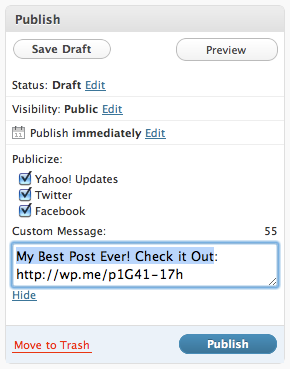
Then, as seen above on the Edit Post page, WordPress.com will let you choose which services you want to send your post to. You can also customize the message you send along with the URL.
It’s now easier than ever to grow traffic to your blog. If you have more questions, you can read more about how Publicize works here. Happy publicizing!
 WordPress.com News
I’ve just recently started blogging and you guys are making it so easy for those who are not technically incline. Thank you so much and keep up the GREAT & FANTASTIC WORK!!!!
its so c o o l ! ! thanks for this app :p
I already use this feature and what is missing is the twitter tag support ie WP tags = Twitter tags in tweet
Is it also possible to post from wp.com to a selected facebook group?
Is there a way of publishing content directly to a Facebook group? I want to share my posts on my group page and not my personal page.
At the moment we don’t support facebook groups or pages. We know many of you want this, so we’ll get to it when we can.
This is a great Feature to have especially with all my Short stories, songs and poems I have to get out there and cuts down on time. LIKE!
This raaaaaaaaaaaaawwwwwkkksssss!!!!!!!!!! xD
Very cool 🙂
I love it! It’s super-convenient! Thank you guys 🙂
Would you please mind telling me how you managed to post the link for this on MY twitter account? WTF?
Having written professionally – alongside other things – I turned to blogging as an outlet for whatever “creative talents” I may still have left. I am no Interweb know-it-all, so this Publicize service will be a help in letting people know I’m here.
This is one sweet feature.
Thanks, WordPress…
First, this is great – thanks! Second, I used to to use the “import an external blog” feature on FB, but this did not work consistently, so I switched to the “publicize” feature on WP instead. While this does work consistently, the small pictures (i.e., 1 at a time, at the top) I inserted with my posts does not now appear on my FB feed as it did when I used the FB import feature – only the text does. Can this be fixed? (If it helps, my blog is transforminghealthcare.wordpress.com). I think having the small picture appear besides the text makes it more attractive for potential readers.
I have recently started using the Twitter plug-in to display my Tweets on my WordPress blog. I assume that if I use the Publicize feature to Tweet a link to a new WP blog post, that Publicize Tweet will in turn end up back in the Twittter widget on my blog. Is that correct?
Publicize is only available on WordPress.com.
Me ha gustado mucho!
You guys are always taking it to the next level at WordPress! Thank you!
Realy nice and practical!
The part that I love the most about blogging is getting feedback from the readers. I’m actually about to celebrate 1,000 comment so I’d like to invite all of you to drop by and leave me a comment. Share with me the power of sharing.
http://wp.me/pXsUB-Gy
Thank you so much!
Thanks, please feel free to visit my blog.
Im not getting the link anywhere, like showed above. I would like to use this, instead of dlvr.it or something like that.
Hang on, is this only available for wordpress.com sites? Not for wordpress sites that are hosted by a 3rd party?
Love it, thank you! What will you come up with next??
This just took WordPress over the top – kudos!
thanks too, tihs powerful and usaful article, I Want to try it
Awesome !!
Thanks for sharing
Oh yay!!!!!!!! I was waiting for this 😀
I thought Worpress was all about the community and stuff. And now this option is only available for .com users. Thats sad.
That should help us out quite a bit. Thank you
Web Design and Development
Hmm yes, im going to give it a try! Thanks
@Scott : Why isn’t it available for WordPress.org blogs ? Isn’t WordPress open source ? 😦
How do I stop receiving email updates about this?
I just love this feature, instead of going to them and manually typing in the same linkback over and over. Now if it was only that easier to submit your site to search engines.
very useful feature thanks
I have used this feature and now know how it works. Cool
Huzzah! -An easier way to pimp my entrepreneurial thoughts and experiences to my friends!
Feature request: for Facebook, please support fan pages instead of just personal accounts.
Great feature..thanks
Great service…. Any chance you could connect with Linked In?
Thanks very much
wow!!! it’s another good feature…thanks Scott Berkun for share it….
Ok, that was easy but, does that improve traffic, don’t think so
Hi again, continuing my last comment, I tried again to turn on the Publicize feature through Sharing field, but now clicking on each options (FB, twitter, etc) always brings me back to dashboard page. Could you please advise for this? Thanks!
Please make sure you have Javascript enabled in your browser.
Good news. Web 2.0 is coming atcha!
This was very helpful! I am getting much more traffic since activated facebook and twitter
I like this feature. Is there any way to have it publicize to my own personal website?
Hey Scott. I am using WordPress.com. Sorry if something in my question led you to believe otherwise.
Still wondering if using Publicize to post to Twitter will result in those same posts showing back up in the Twitter feed on my WordPress.com blog.
They will if you link the same account.
Ok, I seriously love you guys. Like *LOVE*. I thought I’d never be able to be a “real” blogger out there in cyberspace but you all make it so easy! Thank you!!
wow !
whats a great idea i love this ……………………thanks
this is great! Cant wait to use it.
This is the feature I have been expecting to make my life and traffic easier. I have created several fan pages in phase book, but it has been a complete hassle trying to post to them regularly from my blog. With this innovation, life has really been made easier for me and millions of others.
Thanks a million for sharing this!
http://loose-the-belly-fat.org
This is the feature I have been expecting to make my life and traffic easier. I have created several fan pages in facebook, but it has been a complete hassle trying to post to them regularly from my blog. With this innovation, life has really been made easier for me and millions of others.
Thanks a million for sharing this!
http://loose-the-belly-fat.org
wordpress!..it’s not just hosting…! thank you
saves me so much time because I was doing this after each post anyway. Thanks!
He He ! That’s good .
http://www.journalmystery.wordpress.com
Excellant idea, brilliant, thanks – now just need to actually do this lol
Sharing posts -great idea SERIOUSLY! 🙂
Thanks WPress!
using it and sending my updates to twitter
awesome
I don’t exactly understand–if I turn on Facebook it then posts on my profile? How is this better than what I do now–posting myself on my FB page?
yea it worked fine…great
🙂
This is very useful…but I guess I couldn’t figure out why digg and reddit were on there too…
nice feature, i’ll try it out
Great feature. Thanks.
Is this feature not available in the swedish dashboard? I can´t see this feature that says ” want more traffic”. It´s not where you say it´s suppose to be, have looked so many times but no luck.
I have done excatly like you said.
Would like to try this thing though =)
I just found it and the connection is done .. =)
I prefer to do it manually because some times the information you will see in Facebook is not correct, or the image is not that one you would like to be
I was super excited to get the share buttons on my last 2 posts (used FB and twitter). They were working fine, but now the buttons seem to be missing???
All my comments are awaiting moderation. What can I do ?
that’s a very helpful step great thanks for this
keep posting more great ideas
sweeet
This is awesome! Thanks 🙂
very intresting …
Nacho Donut, Word son!
Great idea.
thank you so much i need more traffic
The publicize to Facebook seems to not be working. Reading some of the other comments it seems I’m not the only one having this problem. But the publicize to Twitter feature is really wonderful. The Facebook feature would be too if it actually worked. Till the publicize to Facebook feature is working I’ll just continue to post to Facebook manually which is only a vary miner inconvenience if that at all.
i want traffic and Publicize works? but how??????????????????????????
Looks like a great tool! As a new blog, I hope to get some good traffic this way!
Ok. done it…. let’s see if something happens ‘-D
Also need the business FaceBook area added.
I’d like to share on both Personal and Business sites.
Thanks and keep up the great work.
livingdelight.wordpress.com
I’m confused. Haven’t you already had this feature for a while now? I’ve been using it for the last couple of months to post simultaneously to Twitter and Facebook. What’s different about this new feature?
Its really cool and awesome !!!
great, let me try …
Yay! Good to know! I will definitely be using it.
Great! love it
I have been wanting more traffic! This is great, I feel like a lot of sites they offer to view in the bottom of the dashboard are never true blogs. If that makes since, usually the titles consists of symbols and other things like that. I would love to get more traffic.
This is great. This particular site is a boudoir site and I find a lot of people come just to graze and gaze but I HOPE this way I’ll get more traffic of actual clients!
FANTASTIC!
http://www.oolalaboudoir.wordpress.com
This is great, but I’m seriously lazy… is there an interface that works just the opposite – one that will send my Twitter posts directly to my WordPress blog?
Love this! Thank you…
Thanks for this high technology to people get closer!
hey…!!! guyz plz help me m unabe to understand this feature so just simply help me out plz plz plz….