


We’ve made two big changes that make it easier to encourage friends, family, and colleagues to interact with your WordPress.com blog.
First, now you can invite people to follow your blog. If your blog is public, anyone can use the Follow button to sign up to receive an update each time you publish new content. But if you’d like to share your blog with specific people, we’ve made it easy to send them an invitation to check out your site.
Try it out now and invite some friends to follow your blog:
- Head to your dashboard and click on Users → Invite New. Type the users’ email addresses or WordPress.com usernames.

- Set the Role to Follower.

- If you like, add your own message to personalize the invitation, then click Send Invite.
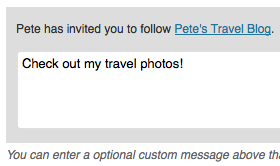
When your friend accepts the invite, they’ll start receiving email updates each time you publish a new post.
Secondly, you can also use the new invitations to add contributors to your blog. Have you ever thought that it might be fun to have a friend write a guest post? Or perhaps you want to ask a colleague to help moderate comments. Adding contributors to your blog has never been easier.
Head to Users → Invite New in the dashboard and enter the person’s WordPress.com username or email address. Then select the contributor, author, editor, or administrator role, and send the invite.

Your new user will now be able to access your blog by visiting the My Blogs section of their dashboard when they log in to WordPress.com. They’ll also receive an email notification that they’ve been added to your blog.
For more details on the new invitations, check out the Support document on Inviting Contributors, Followers, and Viewers.
 WordPress.com News
My mother is about to get an email from me. 😉
WordPress is getting better and better …
Wow, this is a cool feature! It will really make telling people about my blog a lot easier. Thanks!
This is a great update! There are no words for how much this will change things; being able to invite friends and family to follow is just one aspect. I see a lot of potential here. Nice job!
Wonderful 🙂 It is a nice thing to send invitations to friends to follow the blog!!
Love this new feature! You guys are full of awesomeness, thank you!
Easier than ever – WordPress
Thanks for the ‘set role to follower’ tip! Excellent idea!
Excellent!! I have been having to send an email to new colleagues when they start with my organization. This will surely make it much easier and less time consuming. Many thanks for taking the time to install this very worthwhile feature.
Bob Wieters
Thank you Daniel, this article is very useful. I’ve already invited few friends to follow my blog! 🙂 It is far better than sending email with blog URL.
I like this post. Will users be able to unsubscribe?
Yep 🙂
Very good. In fact excellent, as often friends ask “send me the link of your blog at my email.” So this can address this way better and also they can stay connected for longer. Thank you.
I don’t know if this is a dumb question but what is the difference between author and contributor? Thanks 🙂
Thankfully, we have a handy page on WordPress.com Support to answer just that question 🙂
Contributor:
Author:
Very cool! I was just thinking it would be nice to be able to invite some friends to follow my blog and this will make it really easy. Thanks!
Love this!! Great addition!
A suggestion. Many people do not like multiple messages about blog posts, would like a digest possibility added or an opt out of email notifications. I know people can do this on their own, but I also know I would follow more blogs if they gave me those choices. I would like to give it to my followers. Otherwise pleased with this.
There’s already an option for that! Go to http://wordpress.com/ → Read Blogs → Edit List and you can select the frequency for each site you follow.
WordPress comes through again! I have been looking into Paid versions of this very thing. (wish you had a “tip jar” on this post Daniel) Thanks for making life easier. = )
Seriously – you guys are making brilliant strides in all the right directions. Keep thinking. Keep tweaking that creativity. The things you have picked up from social media, the ways you’ve integrated your reader for other content sites sets this company on pace to do amazing things in the future. Keep carving out your place in the market and the market is bound to pay attention.
Great work & thanks for letting me be a teeny tiny part of this.
WOOHOO! If only more of my friends used WordPress.com instead of Facebook….SIGH!
Hopefully this will make it a little easier to convince them 🙂
This is perfect for me. I have a photography class and many students can use these features to interact with each other as well as contribute to our class blog.
All well and good but I’m still holding out for a way for you to let us post GFC on our sites. I could have had 200 followers by now. Most people I know don’t want to get e-mails. And not everyone belongs to Networked Blogs. So see what you can do please? Thanks.
Thanks for your feedback. I will add it to our user suggestions for review.
This is brilliant – been waiting for something like this for a while 🙂
Love it! Thanks for the idea to get more readers!
I’ll admit it. I thought about starting another blog at Tumblr but ended up with two more on WordPress!
I love it here. Am even thinking about paying to have no ads…
🙂
Love this new feature!
I have a blog not opened to public and invited a few friends to be the author. It seems being an “author” doesn’t receive email notifications when I post something, is that true? When I tried to change their role back to a follower… there is no such option. What exactly do I do to let them receive notifications?
An author role is someone who has rights to add content to a blog. A follower is someone who receives notifications. Someone can be both an author and a follower at the same time. Ask them to open your site while logged in to WordPress.com and click on the Follow link in the toolbar at the top of your blog.
Brilliant! I was just telling my sister about WordPress and the beginnings of my blog. This makes things oh so easy!
Thank you so much, I was thinking..How can get more followers…I really enjoy having a blg, so I can express and motivate others….Thanks again wordpress…#Love this site..
It’s gonna be like Twitter, and it is really good!
Is this feature available on WordPress.org too?
I’m really proud for using WordPress.com, every time there is something new and something that makes WordPress.com more flexible, keep up the good work. 😀
The Follow feature (or Subscriptions) is now available as part of the Jetpack plugin which is a suite of plugins for WordPress.org installs, but the latest updates to the invitation process are currently not an option on WordPress.org. Try sending your users an email directly.
This sounds like a good idea. I’ve always been reticent about sending friends or acquaintances info about my blog in an ordinary email but automating it like this makes it much easier. I’m off to try it right now!
Hey, is it possible to somehow send this kind of invite to my Facebook friends? Or Google+ circle? That would be awesome! 🙂
Not yet! But we’d like to add updates like that in the future. Thanks for your suggestion!
How can I add this to my blog since it is self-hosted?
The latest invite updates on WordPress.com aren’t available for self-hosted blogs right now, but it’s something we’ll continue to work on for the Jetpack Subscriptions feature.
Sweet
WordPress was extensively used by bloggers in China. But Chinese government builds a ‘green dam’ to block WP and other overseas sites. It was sometimes blocked in the past. About a month ago, the Chinese government tightened the dam, now WP users in China can’t access their own sites and all information from this site. I hope that the owner of WP can work out something.
I’m sorry to hear that! I’m afraid we don’t have a say in which sites China decides to block. 😦
Sounds good, but I keep hoping for one more thing:
A text-link sending to subscription form. This can be done with Feedburner. So come on, don’t let them beat you!
Its a need, because not everyone sees the widget. And the widget isn’t always visible anyways.
Thanks for your feedback, we’ll keep it in mind!
I’ts a nice way to interact with others, thank you so much
I really like the idea but here’s my problem with this new gadget. I speak French and so do all the people I know. When I send invitations, I can add a personal message (which is great) but the email subject and the introduction are still in English. So, the people I invite will just delete the invitations because they will think it is a junk mail (English subject, English introduction…)
Do you think you will upgrade the service so that we could be able to customized the subject email and the entire message?
The issue in this case is that some of the strings used by the email messages are not translated yet. WordPress.com relies on volunteers for many of the translations. You can help out with French! See this page about Translations on WordPress.com to learn more. See this and this as examples of the types of strings from the email to look for.
Neat feature, thanks. Self promotion is a bit embarrassing 🙂 but this feature takes out the guilt factor !!! Now let me find my contact list…….
Does an author or contributor have acces to other features of my blog? Can he change someting in my blog appearance, widgets etc? Can he see see my e-mail address?
Authors have more rights than contributors. Check out the help page on user roles for details.
Another cool feature. Thanks again, WordPress!
Everyone has been making positive comments, but I am having trouble with the feature. It is going to the Junk Mail section of friends’ email, or they are deleting it because they do not recognize the address as coming from me.
I’m sorry to hear that! Please ask anyone who reports that invitation goes into their junk mail to mark the messages as not spam. We also try from our side to prevent invitation email from falling into junk folders. You may want to try sending some of your invitations as a manual email note if you continue to have trouble with specific users. If you think there’s a wider problem, can you please report as much detail as you can to our support team so they can check it out?
I filled in email addresses for a couple of potential followers I know read my posts anyway, so those people could simply click the link to be advised of latest posts, but I didn’t want to seem like a spammer by doing that for all my email contacts – now you’ve sorted everything with the personalised invite – WordPress continues to amaze me – in the best possible way:) Follower and contributor invites – genius!
Wow! Its pretty Cool. I love this idea.
Thank you for this update. Really appreciate positive changes.
What about for Private Blogs, is our best option still to have password protected posts in order to not force our viewers to create a WordPress account?
Creating a WordPress.com account is so easy! It can be done very quickly. Here is a link to the username only sign up page to help: https://en.wordpress.com/signup/?user=1
I love it. Very easy.
Good job, WordPress. Keep the updates coming…I have yet to see one I don’t like.
Love this!! Great addition!
Interesting idea! I’ll invite people to write on my blog. Great! Thank you.
Awesome, thanks! Keep the good ideas comin’ 😉
I never noticed that option .. Thanks 🙂