

If you feel like it’s a chore to keep up with all your favorite blogs, you can now read posts from all the blogs you follow (even the ones that aren’t on WordPress.com!) in one convenient place on the WordPress.com home page:

Your reader displays all the posts across all the blogs you follow in the order they were published, with the most recent content appearing at the top. You’ll see an excerpt of the introduction to each post, the first image in the post, and thumbnails of any other images that the post contains.
You can even like and reblog WordPress.com content directly from the reader (we’re working on bringing reblogs back to the toolbar!) using the icons in the top right corner of each post:

Whether you’re at the computer or using the WordPress app on an Android or iOS mobile device, having all the posts from the blogs you follow in one place makes it easy to find the updates that are important to you, and skip over the ones that aren’t.
Click  in the toolbar at the top of any WordPress.com site (you must be logged in to see it) to add new blogs to your reader. For directions on adding blogs from Tumblr, Blogger, and other services to your reader, check out the support document on managing the blogs you follow.
Discover New Blogs, Too
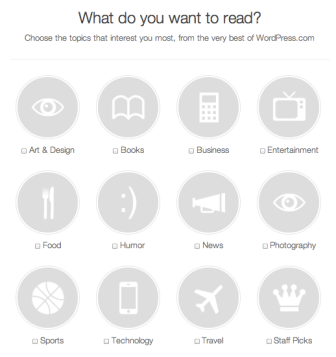
To find some awesome new WordPress.com blogs you might like, check out the Recommended Blogs section of the reader:

Right now you can browse blogs in twelve different categories, and we’ll be adding more very soon.
Use WordPress.com as a Real-Time Information Network
If you want to see what people are saying about your hometown, favorite sports team, or a concert you attended last night, add any topic to your reader to create a stream of all posts published with that tag.

You can add as many topic streams to your reader as you like. You’ll notice frequent updates being published under general topics like “art” and “books,” but you can also add more specific topics like “Picasso” or “J. K. Rowling.”

Want less email?
Each time you follow a blog, new posts from that site will appear instantly in your reader, and you’ll also receive them by email. If you prefer to receive email notifications on a daily or weekly basis, or not at all, you can change your default email settings from the bottom left corner of your reader. You can also change your email notification preferences on a per-blog basis.
Find Friends on WordPress.com
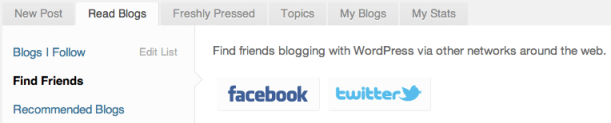
Want to see if any of your Facebook and Twitter friends are on WordPress.com? Give the Friend Finder a try:
 WordPress.com News
thumb up for this
thank you very much
Wow, so easy going to read the freshly post.. 😀
Thanks
Reblogged this on QA 2020.
Reblogged this on Egill.
Reblogged this on i cittadini prima di tutto.
excellent. i love it.
I love the recommended blogs. Thanks. However, I would like the ability to remove blogs from the list…some are not of interest.
You can pick and choose which of the recommended blogs you’d like to follow. To stop following a blog, go to Blogs I Follow -> Edit List in your reader.
Gets better all the time! I’m just amazed at WordPress. I started last Octoberand so enjoy it. So easy to use, such great design – I’m still happy with the twenty ten default – clear, clean and elegant. So many useful features and great, easily understandable support pages and people. And it’s free! Thank you to all who make this possible.
I love it simple and manageable.
Reader on iOS app??? Is there instructions on how to find that? I’ve had the app for a while now and haven’t come across this.
You can download it and find out about all the latest iOS app updates at http://ios.wordpress.org/blog. Learn more about the mobile reader at http://ios.wordpress.org/2011/09/23/version-2-9/
I’ve been through all of this now, I can find the read button on my iPhone but there’s nothing on my iPad.
AT LAST !!!!! This works now. Excellent.
james
“Read Blogs” is great. If only it would load. For the past week or so, when I click that link the page just grinds away forever. Sometimes it will eventually populate, but mostly it just grinds. I’ll walk away and do something else, read email or whatever and come back and there it is, still grinding away. I’m not having problems with other programs or websites loading, so what the heck is going on?
Reblogged this on À Dieu soit la gloire – siryam.
Reblogged this on gabrielraut.
This is cool stuff!
Reblogged this on amlethodirolf.
I think you people should get the award for Most Confusing and Click-Demanding Blog Site ever. You never let someone do something with one click when sixty will do!
I have been loving the reader feature and now enjoy the “recommended blogs” feature as well! Can’t wait to see what topics you add!
Reblogged this on Natuurfreak.
Reblogged this on News by Photos vBlog and commented:
Excellent
Reblogged this on backwards222 and commented:
This is so convenient, and gives you much more time to enjoy blogs!
Reblogged this on newtechniques.
Reblogged this on Jangan Lebay Jangan Asal.
absolutely fantabuloustic
This is absolutely fantastic and good.
Reblogged this on Meir Weiss' Blog.
Reblogged this on mfduran.
This is a great idea, something I’ve wanted from other ‘reader’ services. But I’m not doing it.
Reblogged this on NGEEH.
Reblogged this on Flohnmobil – im Alltag unterwegs.
Good idea. We’ve still got lots of ideas for improvements, but it’s great to finally get to announce it.
Reblogged this on 1earthnow and commented:
Very Helpful Article.
:-))
How do you find the WordPress blogs you’d like to follow?
The way I do that now is to do a wordpress.com domain search using Yahoo Advanced search.
Is there a way to search the tags and other content of WordPress blogs…using a WordPress search feature?