

Want to receive WordPress.com notifications instantly, even when you’re not on WordPress.com?
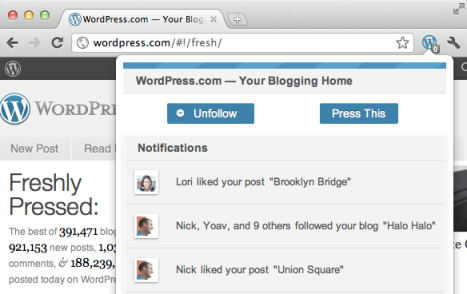
Add the new WordPress.com extension for Chrome and as soon as you get a new follower or a new like on one of your posts, a notification will appear in your browser:

Simply click the icon to view your latest WordPress.com notifications:
Start following new blogs without visiting WordPress.com
The Chrome extension also makes it easy to follow sites from your WordPress.com account by displaying a Follow button whenever you’re browsing a site that has an RSS feed.

Clicking the Follow button will add new posts from the website to your reader, and send you an email each time an update is published. (You can change your default email settings if you like.)
When you visit a WordPress.com site, you’ll notice that the extension icon will turn blue, but keep in mind that you can follow blogs on Blogger, Tumblr, and other services, too.
Quickly post cool stuff you find while browsing the web
Press This is a lightning-fast way to publish content on your blog without ever visiting WordPress.com. Click the WordPress.com extension, then select Press This whenever you find something on the web that you’d like to share on your blog, and a pop-up editor will appear:

Select the blog you’d like to post to, then hit publish to share a link to the site. Your blog will be updated, and you can continue browsing the web from wherever you left off.
If you’d like to publish an excerpt of text along with the link to the site, simply highlight the material with your cursor before clicking Press This:

And it will appear in the editor for you to publish along with the link:

We hope this makes it easier for you to share cool stuff on your blog quickly! If there’s anything you’d like to see in future versions of the extension, be sure to let us know.
 WordPress.com News
Good stuff. Definitely going to use this extension, keep up the good work!
I don’t use Chrome, but this is great for people who do!
Awesome! :>
That is a great idea. I’ll have to try that out.
Nice new features! I typically don’t use Chrome — but I could. So I think I will…
🙂
Reblogged this on tekArtist.
Reblogged this on JJJ.
Fast and furious from you guys these days! Well done the team.
Reblogged this on Break me, please.
I loved it!
Reblogged this on aaron raimist.
The “ripped” text should be in a blockquote tag, IMHO. 🙂
Reblogged this on dimasricardo.
❤ this! Finally!
Reblogged this on Jeremy Herve and commented:
If you’re using Chrome and have a WordPress.com blog, it is a must! Makes things so much easier!
I’m a little nervous about the “this extension can access your data from websites and your tabs and browsing activity” part. Does that include passwords and usernames? How is that exactly safe? Aside from that, I like this and would be willing to use it.
The extension does not access your usernames, passwords, or any other personal data; it only accesses the URL and title of the page you’re on when you click the “Press This” button so that it can use them to start your new post.
Thanks for passing this tidbit along!
I would love if it would grab the photo as well. Posterous has a bookmarklet tool that grabs your choice of excerpt. I started a posterous blog just for re-blogging over articles. It was indispensable.
Reblogged this on Matt's space.
finally got that to work
i just installed it. cool bro! 🙂
Reblogged this on aRVee and commented:
For Chrome Users, you might want to try installing this one.
Thanks very much, this is very cool. I have reblogged this. 🙂
Oh, I like this! Always wondered if they would ever come up with something like this! Great post! 🙂
Reblogged this on Ich sag mal.
Awesome extension! 🙂 The WordPress team is certainly always busy doing something cool like this for us.
Reblogged this on Jangan Lebay Jangan Asal.
It would be nice if you could receive notifications for recent comments and replies to comments that you’ve made on other blogs.
Reblogged this on billmao397.
Reblogged this on Keeping In Touch.
I love the new things you all come up with. Thank you for all your time and efforts that you put into this site making it a kewl place for me to play. 🙂
Thanks a lot man
Love this!!!!
Oh I like this. Not sure I can spare the memory overhead, but I’ll give it a go.
sev
Reblogged this on Egill.
this is great
Awesome!
This is a nice collaboration WordPress with Google.
But I have a dream, if WordPress has and develops its own browser .Could it be?
Now you’re talking crazy. 🙂
I have Chrome, and WANT (so terribly) to love it…. but simply cannot! 😦
This is convenient!
Reblogged this on Scratching the surface..
Reblogged this on Екатерина Мелтдинова.
That’s great! When will we get an Firefox extension?
Reblogged this on Blog?.
It’s long-awaited, thank you. I would like to have it for my Firefox :).
Is it possible to use it with a personal blog not on wordpress.com?
Not currently.
cool!
Does it support multiple logins? I don’t mean one account with multiple blogs, I mean multiple blogs that are accessed through separate accounts.
No, it only supports the account that you’re currently logged in to on WordPress.com.
Reblogged this on AnyDayNow.
Reblogged this on RitaFerrer's Blog.
Ugh, just one more reason why I love Google and I love Chrome.
It asked me before I installed if it’s ok that the app can:
Access my data on all websites
Tabs and browsing activity
why so nosy?
That’s just what we need to be able to start a blog post with whatever is in the window, like the Press This bookmarklet works.
This looks amazing, but sadly Chrome is giving me the biggest middle finger by not even letting me access its own store. :I It’s always been like that. I’ve tried every trick in the book to fix this, but nothing ever works. I’ll never be able to access the store.
Can we have it on Firefox?