

A few months ago we added Notifications to the WordPress.com Toolbar and recently we released a Chrome extension so that you can always keep up with the activity on your blog. Today we’re adding comment notifications, complete with comment moderation and reply functionality. When your post receives a comment, you’ll get a Notification that looks something like this:
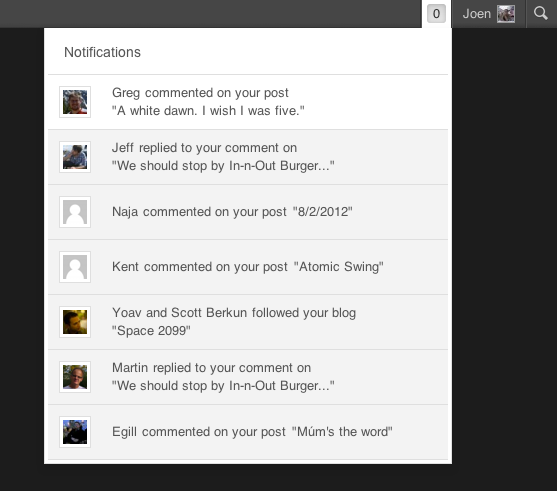
If you’re using threaded comments, you’ll see if someone responded directly to you, right in the notification.
You will see Approve, Spam, and Trash links in your comment notification if you have permission to moderate comments, allowing you to moderate the comment from within the notification:

Clicking Reply automatically approves a comment and displays an area for you to type a reply in. When you’re done, just click Reply and you can get back to whatever you were working on, without having to navigate to the dashboard to manage your comments.

You can still manage comments in your dashboard, but we hope you’ll find the comment notification a convenient shortcut.
For more information about comments and comment moderation: Comments, Manage Comments.
 WordPress.com News
Reblogged this on Falling stars..
I was actually wondering why is it not included the first time. Glad it is now. Easier to keep track of the things going on in my blog. 🙂
I’ve been using it and it works really well. Nice to get a notice in close to real time. More interactivity.
Great! Lovely! Gorgeous! Thank you!
This is a great update! Thanks for all the work you put into the site.
Great!
This is OSM!! I really can’t think about a better blogging platform! I’m serious!
You guys rock at doing things to make our lives easier … this seems like a great feature! 🙂
I love it! 🙂 Thank you!
You guys just keep getting better and better.
FINALLY! I knew wordpress will deliver. Now I won’t miss a single comment and like.
Ow hey! Not that I would want it with my blog notifications but is there any way to lengthen the “Comment’s I’ve Made” section? … for people who do comment a lot.
will the system notify you about this very comment? 😀
Yes it did! And I can reply to you from it, and you can see my reply also.
Its a lot of fun launching something I then get to use as part of the launch. 🙂
you guys rock!!!
This is a bad idea!
We have around 5000 page hits per day, and between 200 and 1300 hundred comments per post.
It is not nice having every comment ramrodded down our throats. It is insanely irritating.
Remove this function emediatly or make it at least possible to deactivate the function.
Carl le Strange, headwriter & owner of;
http://volcanocafe.wordpress.com
Comment notifications aren’t for everyone, but you might like them after you’ve tried them for a while. You can also still moderate comments as you did before.
It is very irritating and stressing to see a counter go like that from 0 to 50 in a short time.
This function should really have an off-switch. The last thing we need is to get reminded that there are 200 comments to go through in the morning.
Notifications will show you the 9 most recent unread ones. For blogs that gets tons of comments per day, you might prefer to continue using your previous method of moderating comments. We’ll think about ways to make this feature productive even for very high traffic blogs.
good update…!!
This is a great idea, thanks for making our blogging life a little easier.
Awesome! But I have been getting loads of spam recently 😦
Thanks! We hope Akismet is doing a good job filtering out the spam you’re getting. If not, marking comments as spam helps our filtering improve.
This seems like a great enhancement. Thank you all at WP for your continuous innovation! 🙂
wow it’s even better than the one on dashboard since it shows full of a comment.
Almost caused me a heart attack (I am thankful that I don’t have a heart)! I don’t see an option to not show a notification in orange when I receive a new comment. Am I unable to do this (returning to having these notifications only for likes and follows)?
There is currently not such an option. Thanks for your feedback.
No probs. I will get used to it : ) It is a good function, but I’d loved it if I had the chance to do it step by step. By allowing notifications for email and being able to allow them for the orange thing too.
@Carl le Strange: Most bloggers would be delighted to have the problem you describe.
I thought the exact same thing!
This is like an automatic instead of a manual transmission. That much easier now to eat lunch and text while driving my blog! Watch Out World!
will i get comments
You can also get these notifications when others respond to your comment. Engaging in discussion on other blogs is a great way to get people to start following your own blog.
Super! ;-).
Great stuff. Thanks for making it easier…always good.
I think it’s great. I get quite a lot of comments a day and think this will help me out. Only time will tell, but so far it has helped me out significantly today.
@Stef:
Yes it is a rather nice cause for the problem. But, I still say it would be nice to have an option in settings to turn the function of the ‘counter’ off. The rest of the function is peachy tree really.
With a burning (pardon the pun) topic, dedicated writers that are experts in their fields, dedicated helpers, and a lot of worried people who want to really learn, it helps to make a blog grow.
My biggest tip to attract a following. Interact a lot with your readers, and keep a friendly atmosphere in the comments. That will give you a very loyal group of readers and participating commentators. Second biggest tip, give a lot of yourself and do not take yourself serious. People appreciate it. Third tip, it helps to be nuts.
@Staff:
And to the staff who do things here, I love the WordPress system. It is easy and very good to use. For instance, Akismet is unparallelled really.
Regards
Carl
Thanks for the kind words Carl. We very much care about the experience for users with large numbers of comments and will continue to work on improving that experience. Overall we felt this feature would help a lot of users and so didn’t want to delay it even though we knew some users would get overwhelmed by them (us included). Hearing your feedback also helps us design our solution. Thanks.
@Carl le Strange: I can see how having the option to turn off the feature (or any feature, for that matter) would be the best case scenario in meeting the needs of as many bloggers as possible. Perhaps future enhancements can always come with a “turn off”/”opt out” option? (Similar to what was done for the iPad appearance launch, the winter snow fall, the SOPA protest, etc….)
@Stef: I agree! Although I can certainly see your point, though. I can see why you would find it annoying if you have a really high traffic blog, but for most of the rest of us, that is the vast majority of the rest of us, this is a great feature! I love this feature! Thank you WordPress 🙂
Great, indeed!
Looks good. Can’t wait to try it out. Cheers. *thumbs up*
This is a very handy addition. What a great improvement!
I really like it. It makes managing my tech blog a lot easier! Thanks!
Love this! Thank you.
Hopefully someday soon I’ll get so many comments that this will be very handy for me! 🙂
I absoulutely love the site of snow fall.I should sign up to go snowboarding with my Cousin this coming Spring Break. Have fun blog memebers with the comments.
love this idea.! Am also loving the stats on the new page aswell, initially was not interested, but now I love the whole two page scenario 🙂
Finally!!! This is what I’ve been waiting for! Next I hope you’ll be able to reply directly from the Chrome extension :D!
This is….well it’s pretty awesome. Thank you!
Oh I’m liking this and the Chrome extension is a great idea too.
Thank you.
sev x
I don’t see Approve when I am on my dashboard, but I see Approve when I look at the same comment from this news website (where I’m writing this comment)
Do you mean you don’t see the Approve link on your comments page in your dashboard on ismailimail.wordpress.com? You have to hover your mouse over the comment for it to appear.
If this doesn’t appear to work for you can you contact support so we can get the details and resolve the problem:
https://wordpress.com/support/contact/
Thanks
Yes, that is the case. While in my dashboard, I hover over my mouse to one pending comment and it doesn’t show Approve link. I do the same outside of my dashboard (say at my blog’s main page itself) and I do see the Approve link.
This is not a big deal for me, was just sharing the info to help if it is happening across the board.
Yes! The additions more user friendly, thanks.
Sounds super, especially for a busy novice blogger like me. Thanks for great support!
Very, very pretty! Thank you!
great work !
oh my Gos hard to type im seeing double wonderful Idea.nice job you Guys are Impressive.
wow, that sounds cool – thanks WordPress. The only other things I could really ask for would be the ability to delete/edit comments after we’ve already posted them on blogs….this would be extremely helpful. Anyway – it’s still great! 😀
-Tia
I second tiallarising’s comment – I would also love to be able to edit a comment left on another person’s blog after the fact. (Darn iPhone spell check!) 🙂
Was looking for this a long time ago. Bravo WordPress! You listened again.
We have got alot of snow in Alaska this year..But it’s all good for snowmachines..
Well, sweet.
I like it! This is a great new feature. Thanks!
How Ironic I was thinking to myself earlier today how nice it would be to have comment notifications and now here it is. Thank you very Much!!! 🙂
Good! A very welcome development! Will make life a lot better. The easier the better!
Yay I’ve been waiting for this! Thanks WordPress ^.^
I’ve been using the Chrome Extension for a bit now, and just got to use the new feature of “reply on the fly”! Love the new toys you’ve been giving us!
Love, love this!
Very nice. Thank you.
thx all .
Super! 🙂
Good :))
I no longer see a check box to give me the option of allowing comment or not. Will WP place that function back on. Sometimes I like to write to express my feelings as like a journal. Not all postings I am interested in feedback. I have a fee account; therefore, I can not use any script. Therefore my question is…will WP atleast bring back the option box in the section of creating new post, the check box to allow comments or not? Thanks in advance.
You can enable or disable comments for all posts or individually for each post. For the latter, please check that you have the Discussion Settings module enable on your edit page. For more information, see “Can’t find the Discussion module?” on this page. If you’re still having trouble, contact support.
Thank you so much Martin. I found it! With the changes it was hiding behind the setting option on the right hand corner on top. I just checked the discussion box and the option appear again. Thank you so much and wishing you a wonderful weekend!
Loving it! Often wondered why it wasn’t a tad easier to manage comments anyhoo. Great addition.
http://researchprojectkorea.wordpress.com/
http://mattlemonphotography.wordpress.com/
This will be so nice! Thanks!
This is now less worable than it was before, because now it contains notifications to replies to comments on other blogs. The number listed is not enough to make it useful. I have long complained that the “My Comments” page is not long enough and should have either “next page” or would be a great place to implement infinite scrolling so the complete history (or at least two days) was available. As it is. we miss comments and this new feature is not going to solve that problem.
Most of us do not live on our vomputer sand have to play catch-up at the end or beginning of the day. 9 notifications is not enough to be useful.
Sorry. 😦 Two things in one day I’m not a fan off – very unusual.
Awesome! Thanks!
wow,,. This is a great idea
this really makes it all so much easier!!! thank you!!!
I am happy, happy, happy about this. Thank you!
Reblogged this on Life is Sharing and commented:
WordPress.Com makin memberikan fasilitas lebih. Notifikasi sekarang ditambah, bukan saja pemberitahuan tombol Like, tapi kini lebih lengkap dengan notifikasi komentar. Komplit pokoknya…. Thanks WordPress.Com.
Can you add comment and like notifications to your app? Also add ability to read blogs through the iPad app. You can only do this on the iPhone app. Thanks!
Those are certainly things we are thinking about.
Wonderful! Looking forward to them. Thanks!
Reblogged this on safwanahmad19.
ok…..lets see how this goes. I am all for comments, but know when to say when.
Hello there, I want to invite you and all your friends to my new Face Book page about me going on a long distance hike. I would be great if you could join the group and follow me on this 2650-mile adventure of a lifetime. Thanks T.J.
https://www.facebook.com/groups/258139000924722/
Thanks for the enhancement to make our life easier. Way to go WordPress.
Awesome!!!
Very nice! I have several blogs setup and this feature is a usefull one. Thanks guys
Cool!
Thank you Good Guy Greg!
yeh, its really superb as I have made my own blog and getting notifications through mail is really very helpful…http://youthalert.wordpress.com/
this is great! you guys really know how to make us feel at home. : D
thank you for you and anymore here
Reblogged this on natalyqaf.
Great improvement!
Hay đấy nhưng tôi nghĩ là như vậy vẫn chưa đủ và chưa thân thiện cho nắm. Tôi mong rằng sẽ có giao diện mở hơn ! Thank You !
Great to be well informed about our own blog. This will be an asset to all us bloggers.
That’s really great stuff, thank you for that! Your team is the best 🙂
Bye for now, Vasilij “Tarner”
Great addition!!
I’m a newbie, appreciate this tool a lot !
Thank you! This looks great! I’m sure I shall use this to reply my dear friends who write so sweet comments to me!
Sunny wishes from Greece!
That’s very nice !!!!
Please add share button to notification , too.
Best Regards , …
Very nice.
i like it 😀
Such a great feature! Love it
Aaaala! 🙂
This is a whole lot of awesome! Thanks WordPress!
Reblogged this on Ich sag mal.
I have been waiting for something like this since a long time !!!
I was even thinking of requesting you to make notifications for comment replies …
And i am so happy that my wish has been fulfilled without even asking for it !!
Once again thanks !!!
I love this new feature!
very useful
I’m surfing on web a little more confident
thanks
on 11, february, 2012
This is really awesome! All ready reaping the benefits, it’s so handy!
Reblogged this on panahjooo.
Good!
I love it.
Great thinking, Greg! My blog is new, but I already know that this is a new tool that will save me time! Good job!