

The process of publishing new posts just got simplified big time. Starting today, any time you’re logged in to WordPress.com, you can create and publish new posts without leaving the page you’re on. So instead of having to visit your blog’s dashboard each time you want to publish a post, now you can start a new post the very second you’re inspired to create one.
Simply click the New Post button on the right side of the toolbar, and you can instantly start a new post with the editor that slides down from the top of the screen:
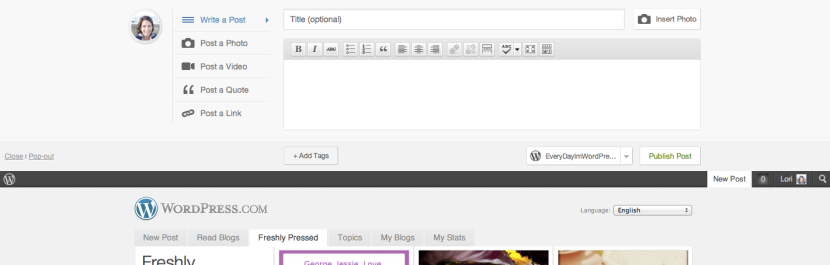
First, select the type of content you want to share (text, photo, video, quote, or link).
Use the Write a Post tab if you want to include multiple images in your post (or if you want to write a text-only post). If you just want to quickly share a single photo, select the Post a Photo tab.
When the post is ready, add some tags if you like, then choose the blog you want to post to (if you have more than one) using the drop-down menu below the post editor:

When you’re done, hit Publish Post, and you can go right back to whatever you were doing before you started the post.
Note that if you have a theme that supports post formats, posts published with the Post a Photo, Video, Quote, and Link tabs will be displayed on your site with a nifty, visually distinct post format:

Lastly, there’s also a New Post tab on the WordPress.com homepage for quick access to the new post editor:

Keep in mind that if you want to add categories to a post, preview it, or schedule it to publish at a later time, you can still create and edit posts with the dashboard editor by going to Posts → All Posts.
So what do you think of this new way to publish posts? Leave your feedback in the comments below.
 WordPress.com News
WordPress seems to be going really slow right now. It won’t post my pictures to my blog and several times when I tried to edit the edit window came up empty and wouldn’t load my post at all. I was using the old slow way to post. But this is ridiculous. I hope this will not continue and has nothing to do with the new fast way being added in…
I tried it yesterday and found it publishing every minute, and I am glad that this problem has been fixed. Unfortunately, I tried again today, and now those saves because a whole bunch of draft posts. I agree that preview would be helpful and the ability to choose category. (Tags are not the same thing.) I can see this being helpful though in the long run to jot down quick, fleeting thoughts.
All these are nice improvements to wordpress blogs and make life easier for the users. One wish list that I have is the ability to use custom fields in wordpress.com. It would be a great and major enhancement to wordpress.com blogs the day this feature is introduced in them.
I love how WordPress is constantly adding new features to make navigating around a whole easier! 🙂
Reblogged this on myreviews.
Reblogged this on litesads.
This is so cool! Unfortunately, I found out that once I popped out the ‘New Post’ window, the post I was writing was not popped out as well, instead the New Post tab closed right away (although it still has my post in it). It would be nice if, say, I wanted a larger window and decided to pop out the New Post tab and my post was there instead of staying in the tab above the bar. (I hope this doesn’t sound confusing!)
Personally, with the way that we write our posts, we find this function a bit annoying. We always have pictures in our posts, we need to create links, and such…it’s just not easy to use it this way. If you could have the option to SAVE the text then continue it later in the editor, that would be awesome and I would definitely use it then.
This sounds much more efficient! Cool concept!
Great idea, but could be made better with a save draft button perhaps??
I am two minds about the function…but after much thought I would prefer that if I clicked on the option to ‘New Post’ then it would give me the option to write a normal blog (with all the functions) instead of the dumbed down options.
I can see this move as a business to decision to try and compete with Tumblr users…so that’s good because it’s opening the platform to new form of customers…but don’t forget about the old fashioned ones in the process…just saying.
Additionally it doesn’t publicize…anywhere!!! So again I find it pointless from that aspect as well.
Thanks, but short [on features] for me: No undo/redo; No HTML edit; No picture formatting; & No facebook/twitter feed. I’m left to use the main editor. I’d be content with a link from the toolbar to the main editor. I do not want to be a naysayer, but I need more for my blog. Sorry…
this is very useful for new blogger like me.thanks
The last time I tried this, the post was published three times. I couldn’t add html tags as well. I think I will check it again if I can use it better. Thank you.
Your awesomeness just keep on going! Great stuff…………
It is effective to post in fast manner. But the thing is some of the functions still in edit mode is good. I prefer both. thanks!
I haven’t used it and have no need for it. I would rather use the full-featured form. I, like a couple of other posters, fear that at some point, posting off of WordPress’s home page may be required, and posting off my own dashboard will no longer be an option, sometime down the line, and I’m wondering if this “new feature” is leading to an actual limitation, rather than expanding our options. I’ve noticed that in the very near future we will no longer be able to view site stats on our dashboards. The appearance is similar. But I find it disconcerting, and I’m wondering what this means.
this is a great step in creativity, I see a bight future for us.thanks a million.
It’s a nice feature, especially if you have all your thoughts in place ahead of time and just want to bang out a blog post. It would be great, however, if we could save our work as a draft and come back to it later. Like many others, I get the bulk of my post down quickly, but have to go back to tweak certain things after I’ve take a look at the preview. So, while applauding the innovation, for my particular way of writing, the Dashboard is still the best bet.
This new improvement is Excellent.
I hope that WordPress continues making such efforts at eliminating the complexity of navigating their site.
Others areas that could you simplification are:
1. Use of Widgets
2. Use of RSS feeds to and from other sites.
Thank you
Undo/redo is accessible using the “kitchen sink” function of this New Post Editor. BTW, a real-time preview in the “old” editor id welcomed. You have piratically brought me back from Windows Live Writer.
Wow. Great add to the feature list. Even after adding all this, the interface remains clutter-free. Congos on that!
Please stop changing things and adding features. I am getting fed up with WordPress as I haven’t got the time to learn all the new changes.
Why have you changed it again without ensuring that the preview is available? Can I go back to the earlier version of WordPress that worked just fine?
You can continue to use the Dashboard to publish posts.
Its very confusing that wordpress changes all the time. Every time I go to my dashboard there are new functions. Please freeze things for a while.
When are going to allow templates when a new post is starting? Stuff/ text I want to be there by default?
Have you tried Copy a Post?
Thanks guys, you do a great job. This is the best. You all put so much into this site for all of the users.
I tried it yesterday, and it worked beautifully for me…easy, smooth, and flawless. Thank you.
This sounds great – thanks a lot !
Grr. Just lost a draft because of the new format. Can’t we opt out and go to the full dashboard? I can’t find drafts and so lost it. Grrr.
We fixed a lot of bugs that came up after release. If you are still having a problem, please contact Support. To opt out, just don’t use this new interface. 🙂
We fixed a lot of bugs that came up after release. If you are still having a problem, please contact Support. To opt out, don’t use this new interface and continue to use your Dashboard for posting. 🙂
Ugh. I appreciate wanting to make things cleaner but I schedule and categorize all of my posts so now I have to do more work to actually get the posts written. I just want the normal screen to write a post not some shortcut that cuts my functionality in half.
You can continue to post from your Dashboard. That is not going away.
How do I see my list of tags etc. Can I still have the full page view, is there an option I can select?
If you need the advanced options you’ll want to continue using the Dashboard to publish your posts.
This feature is excellent.
Wow I really like it.
It’s a great idea! Thanks! I like this!
Thank you so much! This really helps.
I’m glad I chose WordPress, as my daughter did before me, but I can’t see me using the new quick post. Like others on here, I like to write and rest, preview and add. I can see it will be good for those with less time who want to post on the hoof!
It seems a bit limited to me. Where’s the sticky post and can you add a gallery to it?
Yes it is limited. If you want advanced options, using the Dashboard to post will continue to be your best option.
Love the new feature. Super cool!!
I’ve posted this way before but hesitate to use it because it publishes immediately. I like the ability to post the message at a later time. That feature is not present, is it? If it is. let me know and I’ll tend to use it more. Thanks!
It does not have the ability to schedule posts. You’ll want to use the Dashboard for that.
All I can say is “Thank you!”. You do keep making blogging, posting, etc., easier and easier. As a new blogger – this means the world to me!
Cool, that sure is convenient!
I will stick with the “old” way of putting up new posts. Like others who have commented, I want the full suite of functions. I also find it easier to edit and verify in the traditional format. Having said that, I can see how this function would be useful for some bloggers. And because the choice remains with us, I can only say “Well done” and thanks for another enhancement to WP.
I enjoy this a lot! Great work!
I am always impressed, and love WordPress.
I believe that improvement is not a new route to the next Facebook.
Well done for the great work. Your software rocks! Keep making things easier and simpler is just a great way to enjoy the daily interaction with the internet. Thx to you all.
What do I think? I think it sucks. When I want to do a New Post, I’ll go to the page for that. The new editor sucks, because it is less functional than the one it replaced.
Your “speedup” just slows everything down, because now I have to do extra steps to get the functionality I had before you screwed things up.
Since you asked.
I’m sorry you don’t like it, but the idea is to create a quick way to publish posts with the most common options. Posting from your Dashboard will continue to be the best option if you want all of the advanced settings.
Cool! Great add! Much more efficient!
Because of the Leap Year the date is coming up wrong on my posts. It is 1 day ahead!
Do you have the correct time zone set in your blog settings?
How can I select categories for the blog post though? Great for quick posts but does have limitations.
Currently it does not have a way to set categories.
Thanks – will definitely make use of that one!
I think you should definitely have a “save as draft” button. My classmates collaborate on our school’s online newspaper, and we want to be able to review posts before they go online. However, I like the concept – it’s very elegant. Great work!