

Fall is the season for changes and we’re in the spirit on WordPress.com! We’ve been working hard on some changes to the Publicize feature that we are happy to share with you today.
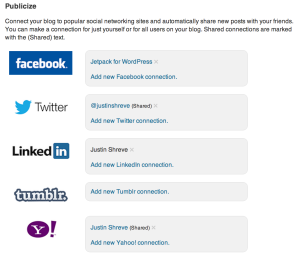
Publicize has only allowed you to connect to one account from another social network at a time. That makes it difficult if you want to post to two Twitter accounts or multiple Tumblogs. Today, we’re changing that. You are now able to connect to as many accounts at each service as you like.

Publicize can now also share connections between users of a blog, rather than needing each user to make their own connection to each social media service. When you initially make the connection, you will be asked whether you want to share it or not. If you do, all users who publish on your blog will be able to use that Publicize connection.
We’ve also updated our image upload process when you Publicize to Facebook. Your images are now uploaded at a higher quality and are uploaded into an organized album in your Facebook account when you use Publicize.
We hope you enjoy these changes as much as we do!
 WordPress.com News
This is a great update. Thank you for continuing to improve WordPress!
WOW! This is really awesome!
I have long waited for this feature to divulge my articles on the twitter account of my blog, and in my personal account on facebook as well.
A great and very helpful update without doubt!
Congratulations, Tim! Nice work as always! 🙂
Sweet. Thanks so much. Will be used.
It would also be nice if we could “auto” update on Google +.
Google does not allow us to connect Publicize to its Google+ platform. We’d love to do this, if it were available.
That’s interesting. At any rate I think the Publicize options on WP are great. Thanks!
Does this work for more than one blog under a single username? I had problems in the past where, say, Twitter would get updated for one blog, but never for the other 13 because the WP.com token was already being used by that one blog.
Yes, you should be able to connect many blogs to the same social media account. If you are having a problem with this, get in touch with our Happiness Engineers and we’ll help get it fixed.
At last.
Very cool. Great update and extremely useful.
this is a fantastic addition! I think it is great to be able to connect with other social media sites.
Great job! Thank you for this wonderful update! 😀
I don’t understand the point of making an album of WordPress photos in Facebook. I would rather people come to my blog to see the photos. Is this something that can be turned off? Or is it totally built into the Facebook connection?
This is not something that can be turned off, it’s built into the Facebook connection and how we communicate with Facebook now. The uploaded photos will all have links back to your blog though. One of the reasons we are trying to display your content and photos better is to entice more users to view your content and to get you more readers.
This is a great update, I’m very happy to hear this!
Wow. That’s a lot of change! Looking forward to giving it a whirl.
I can finally Publicize to my business page on Facebook, rather than my personal wall! Thank you!
Thank you for this information.
Great job!
🙂
Yay! This is why I blog with WordPress – improvements are always being made to enhance our blogging life.
Great update. That will be very useful. Is there any chance of being able to connect and publicize to Google+ in the future?
Google does not allow us to connect Publicize to its Google+ platform. We’d love to do this, if it were available.
Good to know. I guess I will just keep copying and pasting links. Thanks for the response.
I was also wondering if you guys planned to support publicizing to App.net?
We’re always looking at bringing new services on board. App.net may be one of those; keep your eye here on the news blog for updates.
Right on! Thanks for bringing us into the know
Great stuff, really helps to provide more options to increase traffic for my business. Thanks!
There’s any plans to bring it to Jetpack?
We are always looking at bringing WordPress.com features to Jetpack to give you the fullest WordPress experience, no matter where you host. Keep an eye on http://jetpack.me/news for updates!
Sounds great! Is there a complementary wordpress.org plugin?
We are always looking at bringing WordPress.com features to Jetpack to give you the fullest WordPress experience, no matter where you host. Keep an eye on http://jetpack.me/news for updates!
Thanks, I will!
Reblogged this on e-biz newbie adventures and commented:
Change is constant. Just as Mother Nature sheds the withered leaves and renews herself so should we reinvent ourselves to adapt to the changes in our lives.
Great! Already using it! I have a question though: Is there any possibility you will add Google+ to the list?
Great job again!
Google does not allow us to connect Publicize to its Google+ platform. We’d love to do this, if it were available.
Awesome! I was desperately waiting for this feature! Thanks guys!
If we are already connected to publicize to Facebook and Linkedin, for example, do we have to disconnect then reconnect for this new option?
Bruce
You only need to reconnect if you want to share the connection with other users on your blog. Otherwise, everything should continue to work as normal.
Ok. Thanks. Bruce
Thanks for this new features, that will allow me to reach out to more audience and get more people to my website
Yes, it’s about time!
Thank you … I’ve been having a great many small glitches and weird little technical issues. Maybe some of them will be solved. That would be very nice indeed. Sometime a bunch of small things, rather like a cloud of gnats, come together and become a bigger thing.
Very cool stuff.
ah great stuff, really appreciate the work you put in to making the service better. all the best
brett fish
Nice Update!
Well done. this is so so sweet.
Great Stuff.
I’m afraid I’m a little basic. WordPress is ALL I do. No tumblr, interest, FB etc. Just WordPress. I stopped at you, because I’m happy with you! So no uber publicising for me …. 🙂 Noeleen
thank you for this great stuff, it’s nice and wonderful update
Next should be updating to your Google+ account like you do Facebook and Twitter.
Google does not allow us to connect Publicize to its Google+ platform. We’d love to do this, if it were available.
Wonderful!! Thank you for all ya’lls hard work…many, many blessings to you…Robin
Add Quora too…
Thanks for the feedback; we’ll definitely consider this for a future update.
I have been waiting for this!!! YAY!!! 🙂
Great! I wish it was for Google plus pages too!
Google does not allow us to connect Publicize to its Google+ platform. We’d love to do this, if it were available.
It sounds really good – now I just have to read it ten more times before I understand it (I’m not very technical and it takes me AGES to work these things out ) 😀
I think it’s great you added that, and the ability for multiple Twitter accounts. I’ve not been able to add multiple Facebook accounts. Which would be an AWESOME next Feature add. ( I know, no matter what you do, someone’s always gotta be the party pooper eh? ) I’m sorry.. But all the rest you Folks added are truly Super! 🙂
You should be able to add multiple Facebook accounts. Just make sure you are logged out of Focebook (or into the other account you want to add) before clicking the “Add” button in your Sharing panel in your WordPress.com Dashboard.
What about Google+ on Publicize? I’d love to be able to use it.
Google does not allow us to connect Publicize to its Google+ platform. We’d love to do this, if it were available.
Okay. Thanks anyway, I hope it happens one day though. It’d awesome.
Nice job, thanks!!! BTW, when will Publicize be available for the WordPress.org platform?
We are always looking at bringing WordPress.com features to Jetpack to give you the fullest WordPress experience, no matter where you host. Keep an eye on http://jetpack.me/news for updates!
any news on when you’ll be able to connect Google+ to Publicize – that would be great
Google does not allow us to connect Publicize to its Google+ platform. We’d love to do this, if it were available.
ah, I thought it might be something like that. Fingers crossed they’ll allow people to connect soon! Thanks for replying 🙂
This is fantastic news! Thanks, for making this much needed change.
Thanks so much for the great news!
awesome, this is exactly the thing I want for soooooo long, thank you so much ^^
For the next iteration, specifically for the Twitter link, is it possible to build-in an input box on the WordPress end for optional hashtags? I have “fans” that look for the hashtags and then retweet or file as desired. Or, how do I put in hashtags on the blog that are seen by Twitter? Thanks in advance – new Blogger!
#trainspotting#Chicago
When you are writing your post, you can include a custom message with Publicize. Above the Publish button, you should see a list of your connected Publicize services. Next to that is an Edit button. Click that and a text box will appear. Type in there the message you want to appear in your social networks (which could include hashtags, I believe), and that will get sent when you Publicize your post.
Yay – thank you WordPress!!
Excellent. Thank you!
Thanks for information. it’s great
Awesome, thanks for the update. God bless.
Yes, yes, and yes!
I love this feature, it really saves time. The you WordPress!
Nice! Makes blogging-life easier! ^^
I have had some issues previously with the publicize function, I hope that these improvements will solve all of that… : )
loving that last feature! go team WordPress
Is it possible to integrate Facebook or Twitter in the opposite direction, so our posts on FB/Twitter will automatically appear as blog posts on WordPress?
For WordPress.com, there is not a feature to do this currently built-in to WordPress.com. There are external services you can set up, like IFTTT, that can help you.
For self-hosted WordPress.org blogs, there are plugins in the Extend repository that will likely do what you want.
Now, this is fantastic news. I have double twitter accounts for an organization I’m associated with and for my personal use. Sometimes my blog posts fit both. Thank you for this incredibly helpful upgrade! As for Google+, I think their narrow ways will catch up with them. Which is sad, because the hangouts and such were a great idea. Thanks for all you do!
Great job.
It would be nice if we could publicize on Pinterest.
Thank you, WordPress.
Pinterest does not currently have a public API to support a feature like Publicize. Once they do, we’ll take a look at offering that 🙂
Hi can you tell me how I can reset my Blog cyprusscene.com so my other writers can be posted into my Facebook page i.e. “If you do, all users who publish on your blog will be able to use that Publicize connection.”
At the moment we all have our own Facebook pages and publish into our own FB accounrts and then have to start sharing before it appears on each others Timeline. I hope my question and explanation makes sense.
Just follow these instructions for reconnecting Facebook: https://wordpress.com/support/publicize/#reconnecting-facebook
When you get the pop-up dialog that says you have successfully connected and shows you your profile and available pages, there will also be a checkbox that asks if you would like to share the connection with all users on your blog. Check that box, select which profile or page you want to Publicize to, then click Save Changes.
This is great! This is def what I’ve been looking for! Cheers Tim!
Greate update, thanks!
Hi Tim – I do not see a “sharing” option in my settings. How do I setup my Publicize account? Does this mean my site is self-hosted or by a third party and I need to have a plug-in to turn this functionality on?
Publicize is available on WordPress.com, currently, so if you have a self-hosted blog, you won’t see these options.
Love it. Nice work!
This is a great update.. But would like if there was a pinterest feature
Hi. Question: Why doesn’t Publicize post a photo with my posts (even when I choose a featured photo) when it posts on Facebook? It kind of defeats the purpose of the feature because I end up deleting it and reposting the link. Is there a way to change that? Thanks!
Publicize should be posting a photo with your post. There may be times when the connection with Facebook disconnects before the process is complete. If you are having constant issue with this, please get in touch with our support team and we’ll investigate this for you.
This is a great new feature. The only item I would add to a future wish-list is to opt out of the publishing to the connections on an edit of an existing post without having to go back into the connections and turn everything off then remember to turn them back on before you publish your next post. I discovered this when I had to make a minor edit to an older post and then found it had published the old post to Twitter and FB again. Great job on this though!
I’ve been waiting for this “shared” option! Thank you!