

Do you use Google Chrome as your web browser? We’ve got a pretty nifty Chrome Extension for WordPress.com that allows you to post to your site with a click of a button, and follow other blogs without having to visit WordPress.com. We’re pleased to announce WP.com Chrome Extension version 1.3, featuring push messaging and rich notifications.
Notifications will now be pushed to your browser and displayed like other native notifications in Chrome. The preferences page within the extension allows you to choose the types of notifications that you wish to see.
Here’s what push messaging looks like in the WordPress.com Chrome extension. Clean and unobtrusive:
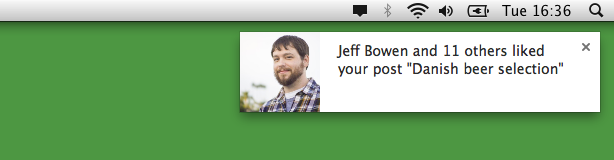
Here’s what rich notifications look like for WordPress.com as seen in the Chrome extension. Also clean. Also unobtrusive:

If you’ve already got the Chrome extension installed, your version will get updated automatically. If you haven’t already installed it, download it from the Chrome Store and give it a spin!
 WordPress.com News
Reblogged this on jsadowski.com.
Installed it, well done
Thanks to Chromium port, working well on Opera 16 too. 🙂 My browser Firefox should also get such instant notification feature. I don’t use Chrome that much.
Just what I’ve been looking for.
I didn’t even know this extension existed, thanks for the info! 😀
Added! I heart browser extensions. I almost have no room left for my URLs 🙂
Very useful, thanks 🙂
Installed. Looks very cool. Thank you.
Being a technical person myself, I like the wordpress reader because we get to learn about so many technical features & their implementation.
Done :).
I’ve been using this extension as long as I’ve had Google Chrome. Thanks for the update!
Done it! Thanks!
This is surely nice breakthrough, considering I mostly use chrome on my mobile device
Nice extension for us WordPress folk. I use it for torch browser and it works well!
Brilliant. Sits well with other extensions – the end of housework as we know it.
This is brilliant! I love the way the notices just slowly slide in and out…with a real calming effect. Keep it up wordpress!