


One of the great things about having a blog is making it your own — adding individual touches to reflect your style and personality. Today we’ll look at three blogging features: two geared to customizing your site and one to help you post when you’re away from your desk.
Scheduling posts to appear at any time you choose
If you’ve got an editorial calendar, you already know which days of the week you’ll be publishing new content on your site. Why not get ahead of the game and schedule your posts? That way, you don’t need to be near your computer to hit the publish button — your posts can magically appear on your site at the time you specify. Here’s how to do it.
When you’re finished drafting your latest post, click on the Edit link next to Publish Immediately located in the Publish box:
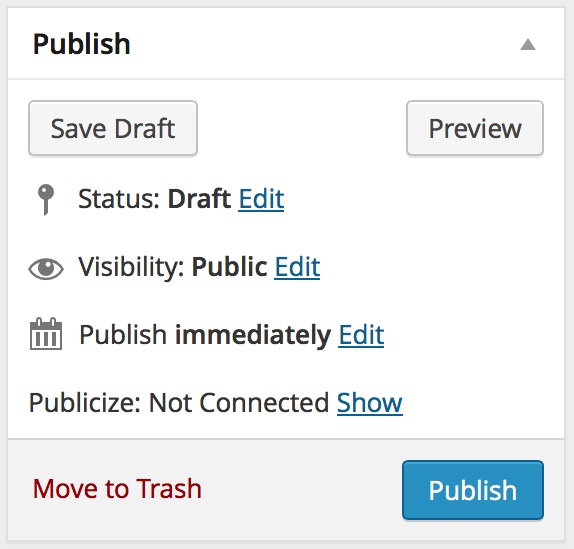
You can now select the precise date and time your post will publish to your site. When the time is set exactly right, click on the Ok button. The Publish button will then turn into a Schedule button. Click Schedule and you’re good to go:

Note that your blog is set to a specific timezone. The time your posts will appear will be based on the timezone set within Settings -> General.
Personalizing your site’s tagline
Your tagline does a great job of telling visitors what your site is about — provided you take a few moments to customize it.
Go to Settings → General in your dashboard. At the very top of the page, you’ll see that you can edit your site title and your tagline:
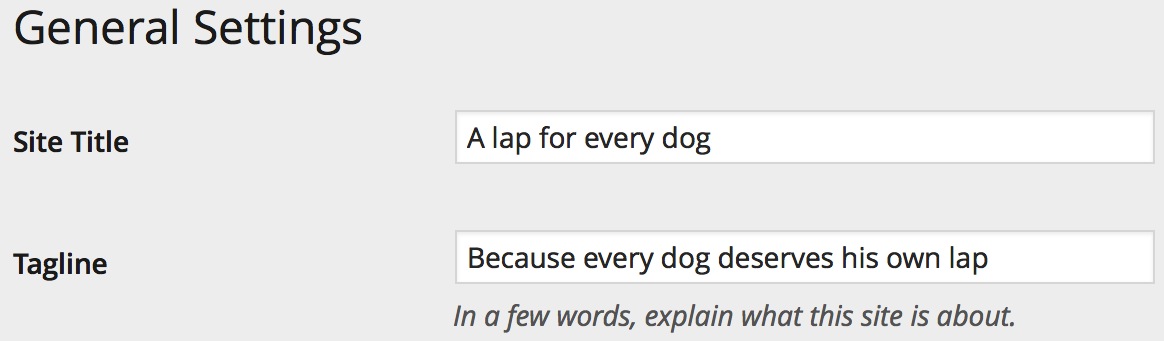
Simply enter the text you’d like to see, scroll down to the bottom of the page and click on the Save Changes button, and you’re in business:

Comment prompts that get the conversation going
Stimulating a lively discussion on your site is part of what makes blogging fun. Did you know that you can customize the comment call to action on the top of your comment form? Go to Settings → Discussion, and scroll down to the very bottom of the page to customize the prompt that appears with your comment form:

Be sure to click on the Save Changes button and then check out your new prompt on one of your posts:

Interested in learning more about better blogging? Check out The Daily Post. We’ve got great tips and suggestions on how to write more and better and a warm and welcoming community of people who love to help one another out.
 WordPress.com News
These are great tips, which surprisingly, I’m actually using all. Well, all except stylizing the comments prompts. The best part about scheduling posts is the ability to set it and forget it. Sometimes, I’ll even schedule a post and I don’t remember what the post is until the day it shows up on my site. Love that little extra surprise!
Great tips! Some of them I was doing already other’s I’ve implemented now!
Always interested in blogging tips, thanks!
Good tips. I almost always schedule posts to launch at 7:30 am the next day. That way readers can check it out first thing. This also gives the impression that I’m an “early bird catches the worm” kind of person, even though I’m actually still in bed, firmly burrowed under the covers.
This feature is really very efficient. Helps in keeping one’s Blog active.
Extremely helpful for those of us (myself included) who are new to blogging with WordPress. I didn’t even think about the comment prompts–I will be updating mine!
Thank you for these tips, I will be sure to use them. Especially the scheduling feature.
Hey this is going to help me a lot. I can’t wait to get started.
Individual touches are definitely key. That and content that just jumps out at you and drags you, kicking and screaming, in. Or smiling. It’s OK if it drags you while smiling 😉
Once a week, I Transfer my old paper diaries to my blog, always use the publish Feature to set it every time as the same. Like it and it is also good for my Readers in this Special section.
That’s a great example of using the Scheduling feature — thanks for sharing!
Krista – is Mortimer someone of importance to you, mayhap ? 🙂
Indeed, Morty is very important to me. 🙂 He’s one of our three dogs. He had a bit of a “ruff” start in life and he came to us last summer in search of a forever home. 🙂 We love him to bits. Morty often sits right by my side while I write articles for WordPress.com News and Daily Post.
Knew it ! 🙂
Pets are without peer when it comes to helping the creative juices. A hug to Morty from a difficult old broad half a world away.
Although I am unsure what this all means at this stage because I am new to blogging, I find that everything on here will be useful and necessary at some point in this adventure for me. Thank you for sharing. I truly appreciate it.
These tips are exactly what I need. I wanted to post regularly on a certain date and I am never where I need to be to publish the article. I have a few articles written , however, they have yet to be posted.
I figured out the tagline initially because wordpress automatically gives the tagline about something and cats pajamas. The exact wording escapes me at this moment.
I am getting followers regularly, however, I do not have any blog interaction. I want my visitors to share and create a sort of conversation coffee house feel on my blog.
Thank you for sharing.
Who knew? Love the info you share. I’m thinking tag lines and conversation starters. Thank you!
I really liked the idea of scheduling the posts. There have been plenty of times I’ve wanted to write a post but just didn’t have the time right then…and am always afraid I’ll forget what I wanted to write about! 😉 Scheduling it definitely gives me a chance to get all my thoughts together – write it at any given time – and set it to go live at a later date. I love that. Thanks for sharing! 🙂
Thanks for some great tips! I am pretty new to WordPress and this is really going to help me to become a better blogger at WordPress 🙂
I wouldn’t have thought of personalizing my comment prompt if I had not read this article. Thanks to you, it now sounds less stiff.
Thank you for sharing! I’ve been a long time journal keeper and have kept online blogs here and there. And now I’ve started a fresh one with WordPress!
I have to admit they are pretty cool!
Thank you for the tips! I’ve just created a blog and this is going to make publishing a lot easier to me.
Thank you for these tips! The comment prompt I hadn’t even noticed before but did so now. Thanks to you!
Thanks! I’m putting in order my ideas for a new blog, erasing all of my other blogs and concentrating my efforts in just one. I’ll use all of your tips. Thanks again!
I loved that tagline idea. Going to try create something like this in my own blog 🙂
Awesome tips! I didn’t realize I could change my comment title. Thanx!
Thanks for the blogging tips. I’m glad to know about the ability to quickly change the Comments prompt. I always save my blog to Draft for starters (though a few early times accidently sent them out to followers because of the default setting to Publish). I wish the default setting was Draft to protect sleepyheads (like me) who forget to immediately change to Schedule or Draft.
I just started my blog so thanks for the tips. They are very helpful. Thumbs up! 🙂
Thanks for the tips! You have been very helpful.
Super helpful thanks!!
Thank you for the tips. I love the bit where you’re still as snug as a bug in a rug while your trusty WordPress scheduler publishes your post!
This is awesome! I have been searching for ‘meaningful’ tips and tricks on how to make my blog better and this here provides such tools.
Thanks for sharing!
I had no idea we could schedule our posts. that’s a major help.
As a newbie on this platform, I found this post really helpful, especially the comment prompt. Thank you!
Thanks! As a new blogger I’m appreciative of any help I can get to get me started 😀
Thanks did two. Have comment prompt, tagline done both in header picture and top, I have to write more posts to schedule them. Still working on building the community first.
Thanks for your advice.
Will try out scheduling posts! Interesting read!
Thank you for these simple but important touches.
Great, this is so helpful!! Thanks so much 🙂
Great tips. I have one query – I post from Australia – do the schedule post times take into account local time or are they based off of the US?
The time your posts will appear will be based on the timezone your blog is set to within Settings -> General.
Thanks for the tips, Krista. I played with the tagline when I was designing the site and goodness knows I jumped on board the publish date option when I was testing out the Post features. But the feature I didn’t do anything with originally was the customized comment prompt. Reading your article inspired me to change them with a little bit of spunk they needed. 🙂
Great tips!!! Thank you so much!
Thank you, I will definitely use the scheduled posts now, and I love the idea of the comments prompts. Cheers 🙂
Hi, thank you for these great tips. I’ve just started and your input is a great help for me since it uses clear and simple language. salam from Indonesia 🙂
These tips are very good, Thanks for sharing such valuable information 🙂
Thanks, very helpful for a newbie!
I figured out how to personalize my tagline after tinkering around but I am glad there is help for us new bloggers who are fumbling around trying to learn how to use the features. Thanks a lot.
These are awesome tips and very helpful, especially for when you’re new to something like this. Thank you.
Great tips… I have always wondered if one can add a tagline. Thank you.
Great ideas, thank you! I also love the automated posts and use it all the time.