


Now available in a widget dashboard near you, we present the Social Media Icons Widget! No longer do you have to fiddle around with complicated HTML code to add beautiful social media icons to your blog or website.
With this new widget, you can add icons for the most popular social networks in no time. The icons are linked to your social media profiles, making it easy for your readers to follow your latest status updates.
The Old Way
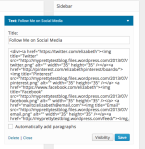
The New Way
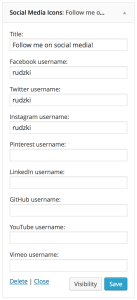
Currently, we support adding social media icons for the most popular social networks, including:
- GitHub
- YouTube
- Vimeo
If you want to add an icon for a different service, you can do so with a bit of HTML.
After you save your widget, check out your blog to see how the snazzy new icons look. Then grab yourself a cup of tea, and watch your follower count skyrocket! 🙂

 WordPress.com News
Is there a widget for adding Paypal?
We have tips for adding PayPal to your site over here.
Is this for wordpress.com sites only?
At the moment, it’s only available for WordPress.com sites. If you’d like to add social media icons to your self-hosted site now, I encourage you have a look at the Plugin Directory. There are a lot of great options.
Thanks Chris and all the hardworking automaticians at wordpress but I can barely make out the information you sent out because the font size is so so small. FYI
You’re very welcome. You might find our support guide here useful.
The long and short of it is, if you’d like to add social media icons to your site, you can do so by heading over to your widgets page, and by entering the usernames for your social networks.
Well I’ll keep using the old way since I not only can choose the color and style of my widgets but also add a Bloglovin widget (since you don’t provide me with that option).
We’ll always be looking for other networks to add, so thanks for sharing your thoughts.
This looks good, will have to try it out.
@Justin,
We have a similar plugin for WordPress.org:
https://wordpress.org/plugins/social-icons-widget-by-wpzoom/
Great improvement! Especially for less “technical” folks. Thanks!
Going to check this out! If if works as advertised, it’s a godsend!
Needs Google+.
We’re looking to add support for other networks. Thanks for the suggestion!
Also, https://www.youtube.com/channel/username doesn’t work. https://www.youtube.com/user/username would…
We’ll have a look! Thanks.
Can you please add one for Google+. Thanks for the easier way to add social media icons!
We’re looking to add support for other networks. Thanks for the suggestion!
How about SoundCloud?
Not at the moment, but we’re looking to add support for other networks in the future!
This is great but I can’t get the YouTube link to work. You have “channel” as part of the automatic url but my YouTube channel does not have that word as part of the url. My username is UNHCOLA (what I put into your field in WordPress) and the full url is https://www.youtube.com/user/UNHCOLA. No “channel”.
Thanks!
We’ll have a look. Thanks!
Thanks. This is great. I’ve been wanting this Widget for a long time. I’ll add my name to the list of those who want to add Google+ in the future. Flikr would be great, too. But thanks for getting this started. D
Is there a Follow Me on Bloglovin widget?
Not at the moment, but we’re looking at supporting other networks in the future!
A very nice addition, thanks! Makes the place look stylish.
(I’d be down with Google+ an Flickr too if that’s planned for additional icons.)
Awesome, but I’ll need a couple more supported before I switch over. 🙂
Thanks! Let us know what networks you’d like to see supported. 🙂
Well, I’m a writer, so definitely Goodreads, BookLife. Deviantart and Flickr would also be useful, since I do photography and illustrator interviews.
FINALLY! And thanks! 🙂
Awesome! I’m currently learning HTML and CSS….Getting familiar with the different Social Media Networks is next…..Thank you!
Only for WordPress.com or does it work for .org as well?
Only WordPress.com at the moment, but you can check out the plugin directory for similar widgets!
Chris, This is a much-appreciated widget! But, I think there’s a bug you need to fix. The YouTube link is not working correctly. It’s displaying the error message “this channel does not exist” when I click my widget YouTube icon. But, it does exist. So… I’m noticing it is trying to route to “youtube.com/channel/mormonsoprano1” but it SHOULD be routing to “youtube.com/c/mormonsoprano1” (YouTube uses just “c”, not “channel” in its URL).
Let me know if/when this can be fixed. Thanks!
Thanks! We’re looking into this.
You just made our work easy & quick.Thanks Chris 🙂
Yesss! Thank you! This is good update.
I was looking for something like this for ages! Thank you, thank you!
This is just so cool! It took me so long just to do this on my blog! This is a really useful update. Thank you very much! 😀
This is a truly worthy widget!
This widget has a lot of room for improvement. The icons are too small, and they turn the same color as your links. 😦
You can style the icons to your liking with a little CSS! For example:
.widget_wpcom_social_media_icons_widget ul li a {

	color: red;

	font-size:200%;

}
I successfully added my Instagram to my blog! Can’t believe I could do it! I’m tech challenged. Thanks so much for this!!!
Wow this is great, it’ll really help all of us who aren’t too caught up in HTML, or slept in the programming course in college….
Chris , thats soooo cool ! I just tried and am loving it , specially the Instagram layout. WordPress rocks !
How do you change the size of the icons? Thanks!
You can style the icons with a little bit of CSS. Something like the following should do the trick!
.widget_wpcom_social_media_icons_widget ul li a {font-size:200%;
}
Awesome! I’d love to see an RSS icon as an option as well.
Super.
This is a very cool widget, thanks! Another who would like to see Soundcloud added 🙂
Thanks so much, Peggy! We’ll see what we can do about SoundCloud! 🙂
Thank you so much. Have added the widgets & the blog looks super cool!