


On this Theme Thursday, we’re happy to announce the latest addition to our collection of free themes.
Independent Publisher
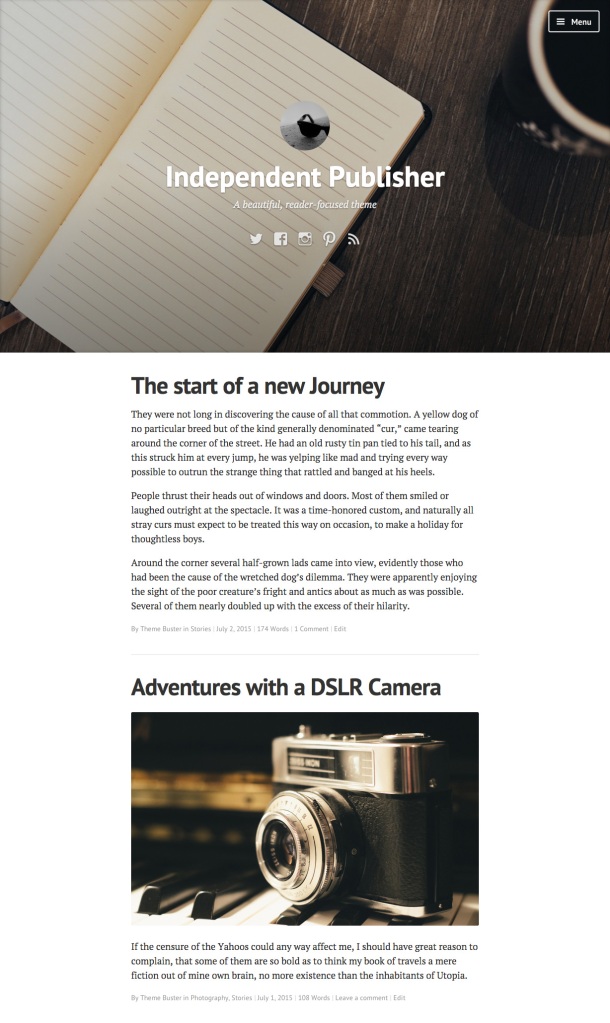
Independent Publisher is a clean and elegant theme by Raam Dev, with a clean and responsive layout ideal for personal bloggers and writers alike. Featuring clean and readable posts, the theme can be enhanced with Featured Images.
Your personal Gravatar can be used as your site logo, which gives your site a personal touch, and icons to your social accounts are displayed prominently. Independent Publisher also adapts to your device, providing a seamless experience at any screen size.

Get to know Independent Publisher in the Theme Showcase, or give it a spin by activating it from your dashboard.
 WordPress.com News
Very nice – really pretty – nice size text, quotes, layout – a winner!
Looks nice, I might use it. I write mostly poetry on mine.
This is very nice!
I like it! Great features and a clean appearance too.
I like this a lot. I’ll take some more time to get use to the whole website/blogging thing before I change my theme , though.
I am really impressed with the recent new themes that WP has launched. They are flexible and free.
Yes, they really are great.
Nice one! On my list to give it a try whilst looking for a new theme. Thanks.
This is exactly what I’m looking for, as I’m about to issue my first “long-form” post (a paper I wrote at University of Cambridge). Thank you!
Elegant. I love it!
I love this, but is it possible to remove the Gravatar image?
Glad you like the theme! The Gravatar image is hardcoded with the theme and can’t be removed 😉
Can’t beat a nice clean elegant theme 🙂
Reblogged this on A Girl's Journey through Life and commented:
Okay this looks good for this blog. It needs a reboot theme. ~Sara
Ideal! Already applied.
Looks shiny. I’m using Syntax Theme with my blog, but this looks stylish and somewhat minimal at the same time.
Unfortunately, I can’t use the Live-Preview to check out how my post will be messed up if I change the theme (just kidding 🙂
Fatal error: Can’t use function return value in write context in /var/www/web81/htdocs/wp-content/themes/independent-publisher-wpcom/inc/template-tags.php on line 136
Any ideas on that one?
Thanks for the compliments!
The installation issue has been fixed, you can new re-download the theme and everything will work just fine 🙂
Wow – that was a quick reply.
Downloaded version 1.0.13 from wp.com, installed it – still the same error message 😦
But thanks anyway.
Oh… And it’s the preview function that doesn’t work. Installation is fine.
This is so nice!
Amazing! I must try this. Thank you so much! I really appreciate this kind of theme 🙂
I like photography eventhought I didn’t have any Camera…
Very interesting considering I like to write a lot.
I love this one! I’m just getting started blogging and I’m nervous!
I gave some serious consideration to this theme tonight. I’m currently using Hemingway Rewritten. For my purpose though, I’ve decided to not lose my sidebar. Is there a possibility of this theme with a sidebar option?
Sidebars can become cluttered, but the navicon menus often get overlooked. I don’t want to lose the category and page menus, or the subscribe or donate buttons. I don’t want to risk the out-of-site-out-of-mind possibility. But dang, you almost won me over with this gorgeous looking theme.
Keep up the great work!
Thanks for your kind compliments, glad you like the theme 🙂
The sidebar is not shown on the demo, but the theme does support a sidebar on the left-hand side.
In that case, I just might be in love. 😀 I will check it out!
Looks Good for Photography and Online Portfolio blog
Hey Ernesto, I was just wondering how did you get your Gravatar Profile and all your social icons onto that top bit with the notebook. And speaking of the notebook, how do you get that image?
Thanks,
– Ainsworth 🙂 Xx
Howdy! You can add your Gravatar logo by going to Appearance » Customize, under the Theme Options section there is an option in which you can specify your gravatar email, to be used as your site’s logo.
The images from the demo (including the notebook image) can be freely downloaded from unsplash.com
Cheers!
Hi! I’m so in love with this theme, it’s beautiful! I’m wondering in the social links menu, if there’s any way to add our own icons for a social media menu that’s not there already (goodreads)? I can’t seem to find a place where you could change that.
And also, the three lines next to the primary menu on my blog seemed to have disappeared – I’m not really sure if that’s supposed to happen or if it’s a glitch?
Howdy Katrina, thanks for reporting this! The issue has been fixed 🙂
Adding new social icons (or icons in general) is not something that can be added from the admin, since those are hardcoded with the theme.
Ah okay then thanks! 🙂
Is this theme the same that exists with the same name for WordPress.org?
It shares the same design and some of the original code, with the addition of a few new design elements and features.
Got it and love it!! Thanks! ❤
Thanks for the themes, very profesional, and I want it 🙂
I am considering this theme for my own WordPress blog. It looks lovely.
Yes, this is amazing…!!!
Hey Ernesto, just wondering once again. How do you get the social icons right underneath the tagline for the blog? How do you get the Menu Bar in the top right-hand corner? And why is there only widgets available for the sidebar? If possible, how can I change this? Sorry, for bombarding you with all these questions man. Please reply!
Thanks,
– Ainsworth 🙂
Howdy Ainsworth! To get the social icons, you can check out the answer I provided to Tony Martin (below) 🙂
The sliding menu is automatically added when using a Custom Header on your site, which can be setup on Appearance » Customize » Header Image.
The theme’s design only includes widgets in the sidebar.
Does anyone know how to get the media icons in the header? Can’t find the option, is it on the free plan or premium plan?
Howdy! This is a built-in feature of the theme, and does not require a specific plan to work.
On Appearance » Menus, you can create and assign a menu into the “Social Menu” location. The theme will auto detect the social icon based on the URL.
Thank you for a good opportunity to present our words independently.