


Internationalization is very important to us, and we’re striving to make sites across WordPress.com accessible to all, such as your international followers and multilingual readers.
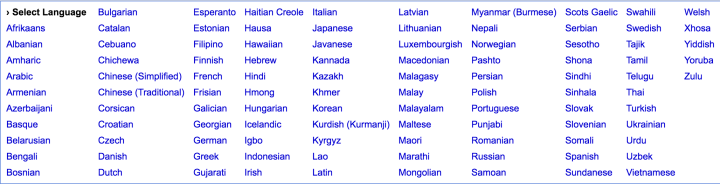
Today, we’re thrilled to introduce the Google Translate Widget, which allows you and your site visitors to instantly translate your content into 103 languages currently supported by Google Translate.
How it works
To enable automatic translation on your site, add the Google Translate Widget in your Customizer by going to My Site(s) → Customize → Widgets. Once enabled, your site visitors will be able to access a dropdown menu in your sidebar or footer and automatically translate the content into 100+ languages.
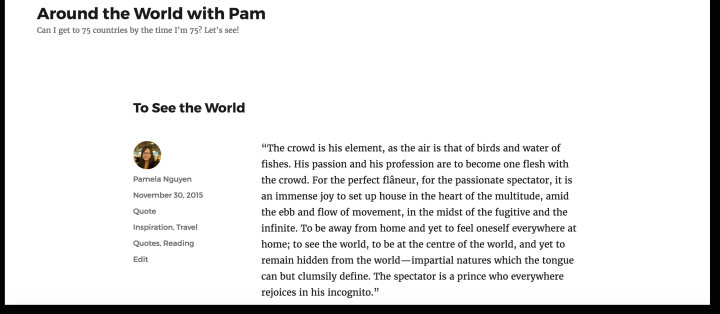
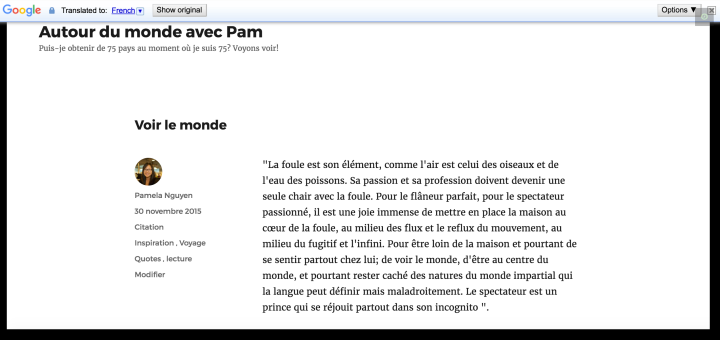
Additionally, you can also send readers to a specific language version of your site by adding a language translation code — such as “?lang=de” for German — to any page URL.
You’ll find the steps to activate the widget and use language translation codes in our Google Translate Widget support doc.
Available for Jetpack
The Google Translate Widget is also included in version 4.4 of Jetpack so you can enable automatic translation on your WordPress site, too. Install the latest version of Jetpack on Jetpack.com.
We’re excited to offer this tool to all of our users — and make it easier for you to reach and connect with a wider audience around the world.
 WordPress.com News
This is going to be of great use. A landmark feature for WordPress. It is especially useful for us- the Bloggers who write in regional language in India.It could be a great boon for my Gujarati Blogs…. I am sure all will welcome this… Harish Dave Gujarat India
Great idea! The world compresses and comprehension expands!
I just installed the widget at my Gujarati Blog. I checked its translation into English. I am sorry to say but it translates headings somewhat OK, but not the content.
Next, I tried to translate the post into HINDI. It works horribly poor! you can’t make out anything!
I think some additional work is to be done for this widget to work accurately. I am awaiting response from fellow-bloggers. Thanks.
While Google Translate is an amazing technology, still there is a lot of progress to be made when it comes to machine translation.
The good news is, they are making a lot of progress on this ( https://www.washingtonpost.com/news/innovations/wp/2016/10/03/google-translate-is-getting-really-really-accurate/ ). We are impressed by Google’s efforts to bring the world closer together and we hope they will improve it so it can always be of sufficient quality.
As an advanced technology, this is a great boon to us-for the WordPress bloggers. I noticed it works fairly well in Western languages. For regional languages in India, Google may intensify efforts to solve issues. We are prepared to help both Google and WordPress. Welcome, Google Translate Widget.
Introducing Google translate is definitely a step in the right direction regarding internationalization.
Any insight into when manual translations would be available? Something similar to WPML or Polylang plugins for self hosted sites.
Is that even on the roadmap?
Very nice news. The Google Translate widget seems an amazing tool.Thanks for introducing it.
Brilliant addition!
Great additional tool. Only concern, the quality of Google Translate is still questionable. The essence of posts could be lost for readers
Yes! I had the same concern.
I tried the Google translator, it works well and I like it. I have however been forced to temporarily remove it as there is no way of switching the viewing of my website back to English other than remove it. The English language is simply not on the translator.
Thanks for trying this!
The widget adds a bar at top of the site with the button with “Show Original” – like this: https://cloudup.com/ihxMCp4RcFU
Please reach out to our support if you don’t see tis bar.
I love this google translator
This is fantastic! A good majority of my readers are from countries where they speak English as a second language only, I’m sure this will help some of them out immeasurably! Very happy! 🙂
I tried the new Google translator and it works fine and I like it. However I have temporarily removed it as there is no way of reverting back to English. I am sure this is an oversight but obviously a very important one.
Wonderful! Génial! Bravi!
That’s really good. One more barrier removed from inviting international readers to the site. Keep up the good work.
Great! Just added this on my site.
GREAT Feature; Thanks so much!
I really appreciate the idea. But there are practical problems. I tried the translation widget and read just one of my blog posts in Tamil language. The translation was just terrible, I removed the widget.
“I recently published a children’s story on the Story Jumper website. If you have children or grandchildren or nephews or niece between the ages of 3 and 6, this would make for a good bedtime story about friendship. ”
This is the passage in English. Most of the translation was nonsensical. But one particular piece made me remove the translation widget.
In Tamil, the “..nephews and niece”, part of the sentence, translated into “daughter-in-law”. I don’t know how that is even possible. So the translation meant, that if the reader wanted a daughter-in-law between the ages 3 and 6 and so on and forth. It was just unimaginable.
So I removed the widget, because this is beyond terrible.
We agree sometimes it’s hit-or-miss and machine translations are not perfect.
While being grateful to Google for working in this technology, they have room for improvement.
I hope it will get good enough so that it will be usuefull for you!
What a great idea for this widget, just added it to my blog 🙂
Nice, but whenever I see references to Google translations, I keep remembering when I was searching the net for yubinuki (Japanese thimble-rings, literally, “finger brace”). I didn’t have a problem with the search, but when I translated the pages, Google kept talking about “binukino oil”! (and never once said “thimble” or even “finger brace”)
Yes, the machine translation technology is not as good as human translators, they are constantly improving. But translations from my mother tongue – Polish, are not perfect too 🙂
It sounds like a good idea in the mind, but once it’s actually applied, it’s too inaccurate for complex vocabulary and that’s a shame, I hope we’ll get perfect translations one day but well done to Google for their effort on internationalization. Meanwhile, I just do separate posts in both French and English using my own translation, there currently isn’t anything better than your good old brain if you have an extensive knowledge of both languages.
Hi,
Thank you! It’s great … Just a pity that the Widget is not more flashy … But otherwise it’s really fantastic. Question: can we put this translation widget directly into an article on the site, Thank you and again congratulations.
Alexandre Goldfarb Président Observatoire du MENSONGE http://observatoiredumensonge.com
>
Thank you! It’s great … Just a pity that the Widget is not more flashy … But otherwise it’s really fantastic. Question: can we put this translation widget directly into an article on the site,
Thank you and again congratulations.
Thanks!
Regarding your question: no, unfortunately it only can be put in widget areas…
I “liked” the post right away! And then I tried it in Spanish on my blog. Oh, my gosh! Lots of errors!!! Great idea, but no thanks.
Need a “Love” button for this!!!
I must say that while the idea is nice, the quality of Google Translate is simply not good enough for this. I use WordPress to communicate. To make a good impression, sometimes even to sell my services. In my communication, I want to convey the same quality that I strive for in my services. The appallingly bad translations of Google are not something I want to associate myself with. Of course they are working on it. But if a customer would complain about my work, would it help for me to say: “Yes I know it sucks, but I am working on it”? Of course not!
Tried it and I think its a Great feature.
However, I have a suggestion and a question:
~ Suggestion: I think this feature can use an improvement, possibly in the font color so that it stands out a bit more.
~ Question: Is it possible to set the translation to one language only (other than English) and if so how?
I hope you will some day introduce a feature that allows us to write other language versions on our own. I am ok with just offering English, German and maybe French, but I’d like to write it on my own. I don’t like Google translate at all and would much prefer to write in different languages. Google translate can not appier with my writing style, nor is the quality of the translation worth it.
Neat!!! Thanks!
Fantastic! Thank you for adding this feature.
Finally. I’d like to see more integrations from WP.com with other amazing internet tools like Muut forums and simple chats like CBOX.
I have Jetpack 4.4.1 – I assume it’s also got this enabled?
Yes!
This widget is a good beginning to democratize the web by breaking language barriers. It needs to improve though, as machine led translation is still not able to get the context right (getting lost in translation). But still its a welcome move
wow i was fighting with manual translating and qtranslate. good!
is it an accurate translation?
It is a machine translation and as such is a hit-or-miss.
google translate is not good enough for real bilinguals. Are there any themes that actually support bilingual websites? i.e. allows user to have 2 copies of the same website but can edit the text within (or something to that effect). I have no problems making my own website again in the second language, but for something like widgets or menus, i don’t think it supports automatically switching to the second language when i witch the language.. (am i making sense?)
Reblogged this on Social Media, Blogger, Friend and Business partner and commented:
Noted thanks for the heads up
Whoa guys…keep rocking! 😃🙌
Another perspective is this. I am in China and some of my students’ read the blog but.. we can’t get Google – will it still work? This and some of the tech problems mentioned above are the two big stumbling blocks so far. Good idea in theory, let’s hope the technology continues to evolve. Thanks artpi.
That is a very good point! Unfortunately, if Google is blocked in China, that feature wont work there :(.
Hi. Don’t know if I’m being a bit dim, but I couldn’t get the translation widget to show on the side bar of my (free) site. I’m using the twenty twelve theme and got all the other widgets I needed on to the side bar okay.
I went on to theme customization, chose widgets from the list, and added the translation widget to the list of widgets currently on my side bar (I could move it up the list to go, theoretically, under “archives.” But it wouldn’t enable??
Evangeline
Hi Evangeline! Thanks for trying it out!
I can see the widget on your site without any problem: https://cloudup.com/iY51yrEoLpb . The problem may be with your browser, please contact help@wordpress.com if you need further assistance 🙂
Hi artpi/ Yes. It did appear the following day. Thanks very much for replying though. Great to have it.
Weird actually. I’m at a public library (browser is G Chrome) and the widget doesn’t show up at all. I just put a title on, ‘TRANSLATE MY POSTS’ and that’s all I can see. But, as you say, the widget showed up perfectly okay on m ipad at home. Evangeline
I’m excited to see that there’s now the google translation widget in my blog. It’s so good, but I hope it can do translation accurately
Activated. Works well. Thanks!
First of all, thank you. This is a welcome step towards reaching wider audiences, and sharing world-views. While we are learning beyond the limits of our languages and cultures, we are also seeing the amazing beauty and subtlety within all our experiences. This morning I installed a Google Translate widget on my blog. https://duplezwrites.wordpress.com It’s a neat little addition that may soon allow for seamless understanding in a number of languages. It is not there yet. This morning the widget has translated monster as ‘giant’, and orange as ‘jeruk’. I was not writing about Jack’s nemesis, nor was I writing about citrus. In time, I will learn how to use this new tool and it will evolve. For that opportunity, and for the possibilities, Thank You Google.
Reblogged this on O LADO ESCURO DA LUA.
Is there a way of PREVENTING Google from translating even single pages? I only want my own authorised translations to appear, and anyway their translations are horrible!
If you don’t put the widget on these pages, they won’t be translated. You can limit where widget appears with widget visibility: https://wordpress.com/support/widgets/#widget-visibility
Pretty good widget! I know translation quality is what it is, but hopefully will get better. Anyway a great initiative.
One nice feature, that would complement it, would be if it could analyze the IP of the requestor or the main language in the requestors browser and propose the right language, right away, may be as a popup or a message in the widget area in that language.
Google does this to an extent. If a visitor with a browser set to a different language visits a site with a widget, it will ask her if she wants the website translated, in her language.
We try not to analyze IPs because of privacy reasons.
Great!
Wow! Google Translate is a dream come true 🙂
Reblogged this on Charlieseverythingblog and commented:
WordPress.com has announced Google Translate support. Cool, huh? Like their version of the post , not my version. This is such an AWESOME feature 🙂
Great job. Powerful tool for communication to readers.
Thanks! I really appreciate this widget!
Please keep in mind that having the GT button on your website doesn’t mean it’s magically available in all the languages offered and is nothing like having your website actually written in/translated into a foreign language. I seriously hope people don’t think this makes their website available in foreign languages at the same level of quality as their English site, because I can tell you right off the bat it doesn’t. But if you’re just looking for people to get a gist of what you’re putting out, perfect. Just don’t expect your carefully written articles to make much sense in other languages. (Sorry, I am a professional translator; just had to get that off my chest.)
Thank you for your post…I was having a devil of a time trying to get an IFRAME google map in a jquery mobile application to be ‘responsive’…and thought I’d have to re-write a ton of code…your post on setting the IFRAME to class=”responsive google-maps”, with the associated style code did the trick!
Thanks!
http://www.peridotsystems.in
Google Translate may not offer an exact interpretation of what your trying to say, but this is definitely a step in the right direction. Thank you WordPress for offering this! I’m sure Google Translate will get better with time 🙂
Thanks a million! This is just great!
I just added this to my blog, it is amazing! Great for international readers. Thanks for this feature!!
It’s just out of this world!