


Over the past few months we’ve been working to dramatically improve users’ experience on iPad — and we’re proud to share those with you now, in our WordPress app for iOS, available in the iTunes Store.

The apps were originally designed with only iPhones in mind, so we wanted to make better use of the space available on the iPad and especially iPad Pro, to maximize your productivity in the app. These changes shipped incrementally, with the very final ones being included in the 7.1 release that went out last week.
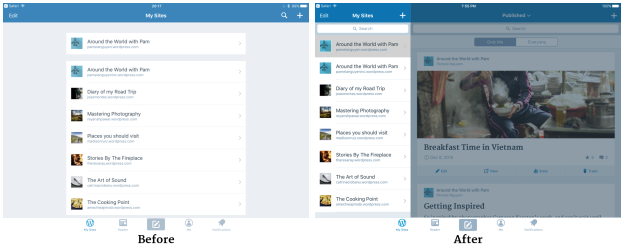
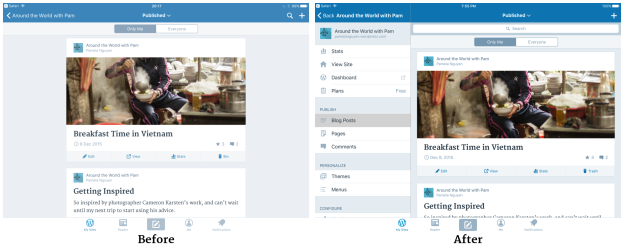
We’ve improved the My Sites management to make it easier to handle multiple sites on iPad. Now you can see the posts from that blog alongside the list of blogs, and site management is now all on one screen – no more back and forth!

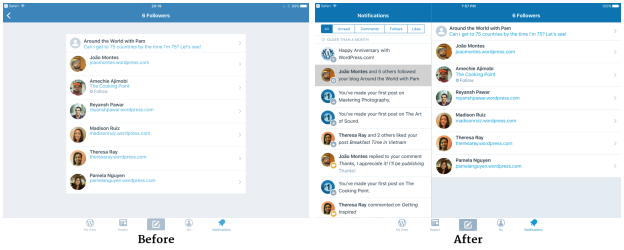
Managing profiles follows the same pattern.

Notifications has been overhauled, too.

We’re really excited about these improvements and hope iPad users of WordPress will be, too! We look forward to continuing to improve your WordPress experience, no matter what device you use.
 WordPress.com News
I liked it! Thanks! 🙂
Looks so sharp and efficient. Thank you for the upgrade!
If this works the way you say, Thank you! it’s an exciting improvement.
It’s great that your focusing on improvements, thanks so much for the awesome blogging experience! But with my iPad Mini, reading posts on the Reader is now more difficult because the new layout cuts the posts in half and shows them mini size. The new look probably works fine on a larger iPad. (Also, images are not downloading and links aren’t working). Anyway, I’m still a WordPress fan 😊 have a great weekend!
Hi! We hear you and we’re working on improving the iPad mini experience – so expect to see it in an upcoming release.
So, is this basically the reason why desktop users are at a design disadvantage now? The whole design changes in the past were made that you can basically can port or load it on mobile devices? That’s a sad progression of the WP service. I hope you give desktop users some love as well and bring them back the good old desktop design that had a much better usability.
I love it, but still miss a simple way to write on a self-hosted wordpress site along with my wordpress.com blog without log out and log in everytime. For example, I write at reaconaria.org and have a wordpress.com blog here.
Keep this as a suggestion for future updates but I understand if this isn’t possible 😉
I have good news for you! You can add self-hosted sites alongside WordPress.com sites in the app. On your site list in the app (tap the My Sites tab twice to get there) you can tap the + icon in the top right to add sites to the app. Select “Add self-hosted site” to add your self-hosted site, which you can do while staying logged in to your WordPress.com account. (Another option: If you activate and connect the Jetpack plugin on your self-hosted site, it will show up in the app automatically when you’re logged in to WordPress.com.)
If you run into any trouble, you can go to Help & Support (on the Me tab in the app) and tap “Contact us” for more help from our app support team. 🙂
Do we actually have a choice? No, of course not. The cyber world changes constantly, mostly under the name of improvement and who am I to say it is not so good. I am a golden oldie, aged 70, but I can doi it. I can keep up with all your altrnations and new fashioned ideas. I am sure it is good for us all. It keeps me on my toes learning the new ways. I never had a problem on the iPad in any case and my iPhone is really too small for blogging. Am wondering what the next develoopment will be. Yes, really exciting.
Reblogged this on Sérgio Estêvão and commented:
A great update on our WordPress app.
There was a time when people came home from work or school students home from school, she started working on their PC.
Since the evolution of i-Phone and i-Pad, the whole day working on the Internet. During breaks, at bus train, everywhere.
So this is really a huge advance.
Congratulations
The Herbots
Your updates have been stellar lately!
Yay! We’re so glad you’ve noticed 🙂
I second The Snow Melt’s comment on the reader. What’s with reducing the usable (readable) screen area? It’s a degraded experience on iPad mini and I also request that WordPress review the design of this component. Other than that I welcome the enhancements.
Hi! We hear you and we’re working on that so expect to see it in an upcoming release.
I’m taking it for granted this update is also effective on the iPhone Plus.
Looking forward to using this. Currently do most of my travel blogging on iPhone, so more functionality on-the-go is welcomed.
Awesome! We’re so happy to hear that!
Great
This is going to make blogging on the go a lot easier – thank you!
Amazing! We’re so happy to hear that!
Thank you!!!
nice
I really like the improvements you have made to stats pages, a lot more info on performance, etc. I used to calculate that myself but nice to just see it done for me. However, wish you would fix something else. I usually use my laptop for editing posts. Why? Because in that format I can resize my photos and place them where I want them in the size I want them. Have to bring my laptop to write posts. iPad won’t let me that and the iPhone is just too small for editing. If you could make it so I can resize to whatever size I want, not just big or small, I wouldn’t have to haul my laptop with me!
One of our current focuses is improving the media experience so please look out for that – we hope you’ll like it too!
Any improvements are welcome, I have recently moved away from desk top environment. Now using iPad Pro for all where I can. So the more functionality we can have is welcome. Regards Rob
My son will be glad to read this. The, sharing
Great!!!
An improved
great
Never stop doing for the best, thanks WP.
Great!!!!! Thank you!
Reblogged this on RANKING BY DESIGN and commented:
WordPress built especially for iPad is wonderful news for those of us building and blogging on the fly..
Hello Cate, I have some areas which as a user of word press app on an iPad pro can be improved. Are you ok with me making a video, then place here so you can see ? Much easier than word explaining,, regards Rob
Hey! Yes please go ahead 🙂 thank you!
best experience of using it on iPad.
Yay!
Nice.
Thank You very much.
Thanks, that is really neat.
Thank you
WordPress is awesome
Much more user/viewer friendly. Like anything it’ll grow and improve over time.
We’re so happy you like it!
Excellence thanks
I liked it!!! Im new here i just updated my blog please check it out!! http://Nabley.wordpress.com