


A great note-taking app can help with all kinds of daily routines like taking class notes, writing a shopping list, or jotting down ideas for your next great blog post.
At Automattic, we love using Simplenote, which is an easy way to create notes, lists, and more. Our favorite part? It’s backed by a powerful sync engine that syncs notes across all of your devices swiftly and smoothly — and for free! — so our notes are accessible everywhere.
The Simplenote experience is all about speed and efficiency. Open it, write some thoughts, and you’re done — saving and syncing happens automatically. As your collection of notes grows, find what you need fast by searching, and keep them organized with tags and pins. You can also share notes and publish them for other people.
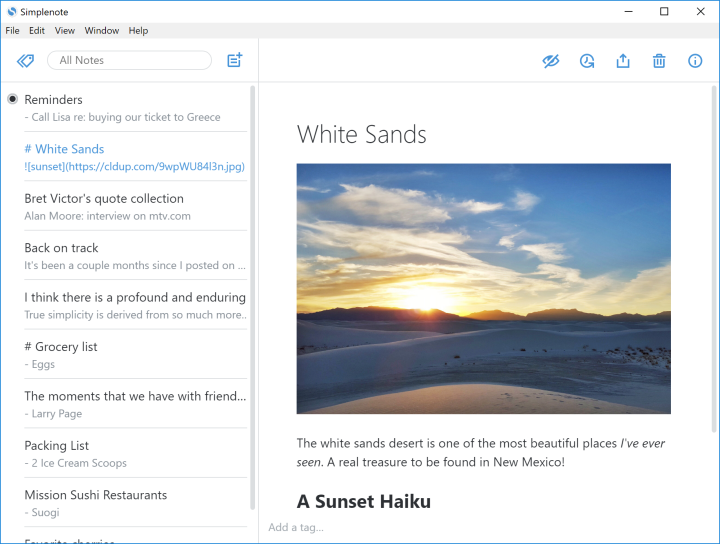
Simplenote is also built to play nicely with WordPress.com. With the latest update to the app, you can sign in to the app using your WordPress.com account, so you have one fewer password to keep track of. Write something in the Simplenote mobile app and share it directly to the WordPress app, where it becomes a new post. And if you’re a fan of Markdown, your posts will be automatically formatted when published.

Simplenote is available for all of your devices, including iOS, macOS, Android, Windows, Linux, or you can use it on the web. Download it, give it a try, and let us know what you think!
 WordPress.com News
How did you put a picture on that note? I can´t do this in my Simplenote.
The image was added using Markdown: https://simplenote.com/help/#markdown
Got it support for voice notes?
No, it doesn’t support voice recordings. But it can work with the native dictation input tools on platforms like iOS.
🤔🤔 ok
Simplenote, I am definitely going to download it on my Android.
Downloaded it.. thankyou.. 😇😇
I have been using this app for some while and I think it is elegant, simple, and works well.
Cool! I’ve been looking for just such an app – seems like it is a.d.d. friendly for those of us who (ahem) may have organizational challenges. 😉
Simplenote has been my favourite app for a long time. I save all my writing and other ideas in it. I like being able to log in with my WordPress.com login now, too. Thanks for taking good care of it.
Much needed. Thanks for sharing
Does it work offline? Meaning will I still be able to access and read my notes offline. I understand that the sync funtion etc would not work offline. We often find ourselves in dead-zones where there is no internet, cell data and even a satellite service is useless so cloud only ‘stuff’ isn’t an option for us.
Yes, it works offline! It will sync whenever it has an internet connection again.
Thanks for the quick reply, that’s nice to know.
I can not download from your message here for IOS !!!
Does this link help? https://itunes.apple.com/us/app/simplenote/id289429962?mt=8
Already invested in Evernote but this does seem good
Assuming we only download the app on our phone, and if we lose our phone and download the app on a new phone, will the notes still be all there on the app when we download the app again on the new phone?
Yup, the notes will sync right up after you sign in on the new phone 😎
AWESOME! lol thank you for letting me know! 🙂
Our team is partial to Evernote. However, Evernote has made very few updates for premium users this year. We may start look elsewhere.
Superb app very powerful and love it
This is really useful.
I am on the WordPress Business Plan.
Is Simplenote free for me?
It’s free for everyone 🙂
Thank you.
Great
How will I attach a picture?
You can’t attach pictures directly in the app, but you can use Markdown to display images in notes.
I have tried this app for long time; then I stopped using it. The features and utility of this app was and is very good. The main disadvantage is lack of privacy and security. The notes are not end-to-end encrypted. This is a major issue because notes are meant to be private to an user and be able to accessed by that user ONLY; not by others, not by WordPress and not by any third-parties or governments. The best alternative is Standard Notes; which can be found at https://standardnotes.org/
Thank you for the information 🙂 ❤
This seems interesting! I’m an Evernote user myself, and I’ll probably stick with it. I have a concern, though. If the application is completely free, what happens to the content within our notes? Is it properly encrypted, or is it sold to third parties for revenue? We’re in worrying times on the issue of privacy.
Is it bad that I usually get more done when I write on paper? I have note and to-do list apps that I never get done but nothing beats that feeling of crossing something off a list!!
I don’t think it’s bad at all. Have you heard of bullet journaling? https://bulletjournal.com/
I was just looking for a new note app to replace my no-longer-supported old favorite. This will do what I need perfectly. Thanks for the recommendation!
I pretty much live in Simplenote. It’s always on, no open a new document, then file it somewhere–it’s just there. The tags work, the interface is clean. Shouts to Simplenote