


The WordPress editor keeps expanding its library of blocks, adding new and exciting functionality to websites on a regular basis. After a crop of new business-related blocks last month, our most recent additions will appeal to three communities we hold close to our heart: podcasters, podcast lovers, and bloggers.
Use the Podcast Player block to spread the word about your favorite episodes
Podcasts have been an unstoppable cultural force for several years now — and the format seems to have only grown in popularity in recent months, as so many of us are at home and looking for entertainment and (occasionally?) enlightenment.
Are you a podcaster? Add the Podcast Player block to share your passion project with your visitors, embedding your podcast’s latest episodes on any post or page on your website. If you haven’t launched a podcast (for now, anyway), but are still an avid listener, you can now embed episodes from others’ shows within your own content so readers can listen to them without ever leaving your site.
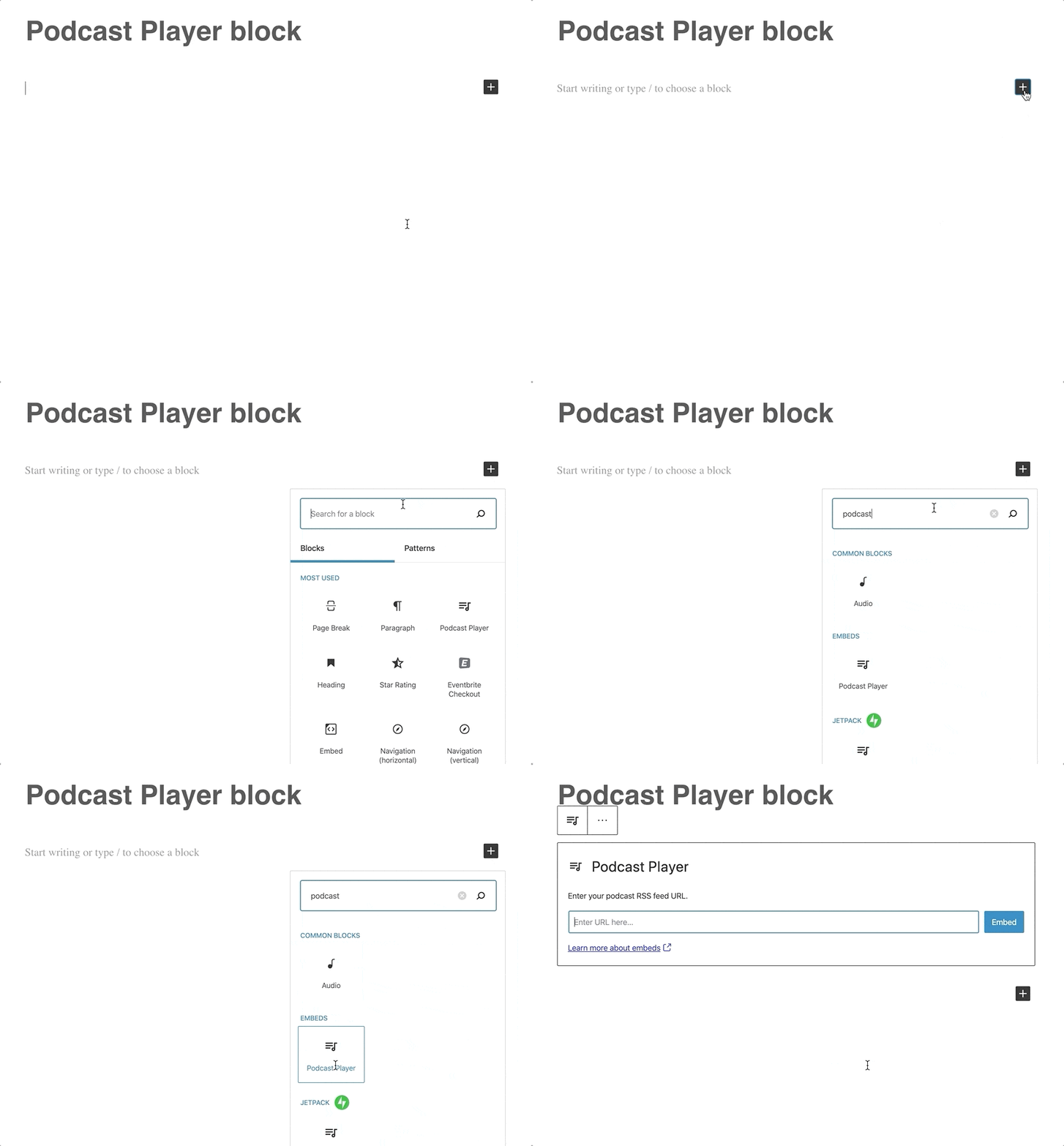
Once you choose the Podcast Player block from the available blocks in the editor, you won’t need any special codes or embed links. The only information you’ll have to provide is the podcast’s RSS feed URL (not sure where to find it? The information will be readily available on your preferred podcast platform.) Here’s what the podcast player will look like on your site — the example below features the latest episode on the Distributed podcast, hosted by Automattic CEO Matt Mullenweg:

Episode 30: The Magic of Meetups – Distributed, with Matt Mullenweg
You can customize the Podcast Player block in a number of ways, from specifying how many of the most recent episodes to display, to deciding whether or not you’d like to show each episode’s description. Whether you feature your own podcast or someone else’s, you get to design the listener’s experience on your site. Learn more about adding and customizing the Podcast Episode block.
Keep readers reading with the Post Carousel block
Sooner or later, both veteran bloggers and newer creators encounter a similar issue: publishing frequently helps energize your audience (and gives you an SEO boost, too), but also makes older posts tougher to find.
The Post Carousel block comes to the rescue, providing an easy gateway to the treasures in your blog’s archives.
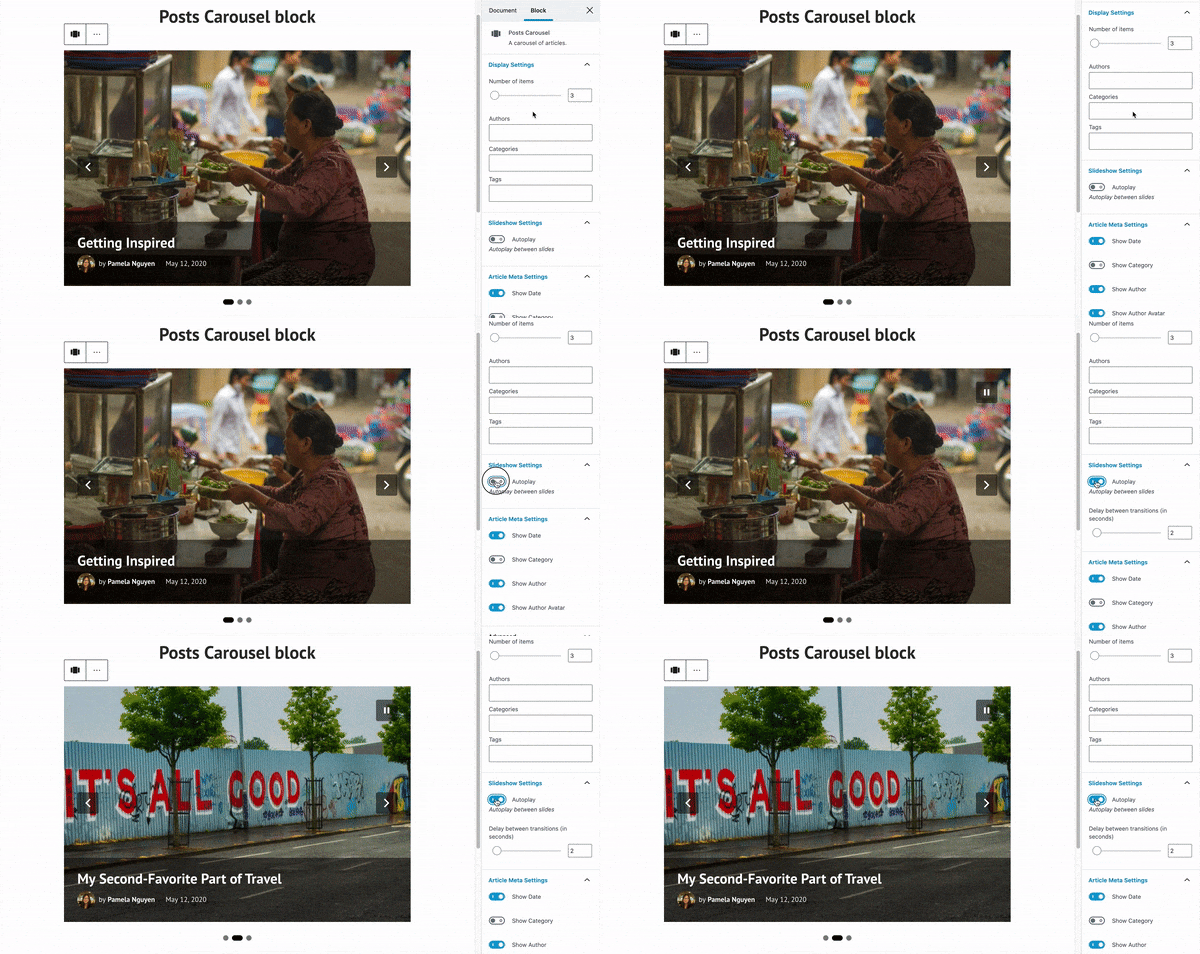
Add the Post Carousel block to any post or page on your site to encourage visitors to explore more posts (by default, the block will display your most recent ones). For a post to show up in the carousel, it needs to have a featured image; the idea is to engage and entice readers with strong visuals they’ll want to click on. To get a taste of the carousel in action, here’s one highlighting the five most recent posts on the WordPress.com Blog:


For a more curated experience, you can customize what the post carousel shows. A post about your cauliflower taco recipe might call for a carousel showing other recipes that share the “vegan” tag or category. If you run a multi-author online magazine, consider presenting other stories by the same contributor. You can also configure how many items each carousel displays and whether it automatically slides from one featured post to another (among other options). Learn more about adding and customizing the Post Carousel block.
We hope you give these two new blocks a try — leave a comment if you have any questions, or if you’d like to share a link to a post where you’ve already used them.
 WordPress.com News
That’s really very great 👍
Love these features 🙌🏻
I tried the new system once, and never again! Let me go on with my dear old system, please!
Hello! Sorry to hear you didn’t have a positive experience with the new system. This post explains more about the new block editor as well as how to go back to the Classic Editor, if that’s what you prefer: https://wordpress.com/blog/2020/05/18/say-hello-to-the-wordpress-block-editor/
Woohoo! Thank you.
I’m going to try it. I’m no good with technology but it sounds interesting. At least the podcast piece does. If people won’t read my stuff perhaps they can listen to it in my sultry voice.
Just so you know, when viewing this post on Reader within my WordPress iOS app, the post carousel just lists the five posts one on top of each other.
I tried this in the front page of my blog and it’s just as wonky in my block editor (maybe because of my horrible connection), but on the site itself it works nicely! I like it and I’m going to keep it.
Now I can have that carousel instead of two Blog Post blocks (one for my latest posts), which for some reason WordPress doesn’t like. It always told me I can’t have two of them (but never stopped me from going forward anyway), and I don’t like the Latest Posts block because it doesn’t have the same options and customization.
Thanks for letting us know! I noticed the same thing earlier today on the iOS app. We’ll look into why the block isn’t displaying correctly in the editor and on the iOS app for you.
Thank you for the information! Nice graphics on explaining the process. Got it.
Thanks – new things to do. Great!
Does the ‘by default, the block will display your most recent posts’ mean that there is (or will be) a way to get the Post Carousel block to display older posts if one wants?
I just thought that a workaround would be to tag the posts on wants to show, but that seems a bit artificial – maybe if WP was to introduce an option to specify a date range for the posts?
I think using tags is a really great way to get the exact posts you want to display in the carousel! I don’t know if adding a date range is planned or not, but I put in a feature request for you. 🙂
Thank you! Now if we could only get a similar feature to embed a podcast player in the footer section 🙂
Whoaa!
You guys are really amazing and the ideas are really mind blowing.
The Post carousel is really especially for those into series on their blogs.
I really appreciate this effort.
Thumbs up 👍👍
Thanks, that was very useful! I am huge podcast fan. I don’t have one of my own, but I can’t imagine public transportation without earphones and my podcast of the day :)!