


You deserve only the best for your website. World-class performance. Air-tight security. Top-tier support. So we decided it was time to give you a couple of quick and easy ways to move your site to WordPress.com.
We’ve made the migration process a seamless and refreshing experience with two new tools we’re excited to share with you.
Move from another WordPress host to WordPress.com
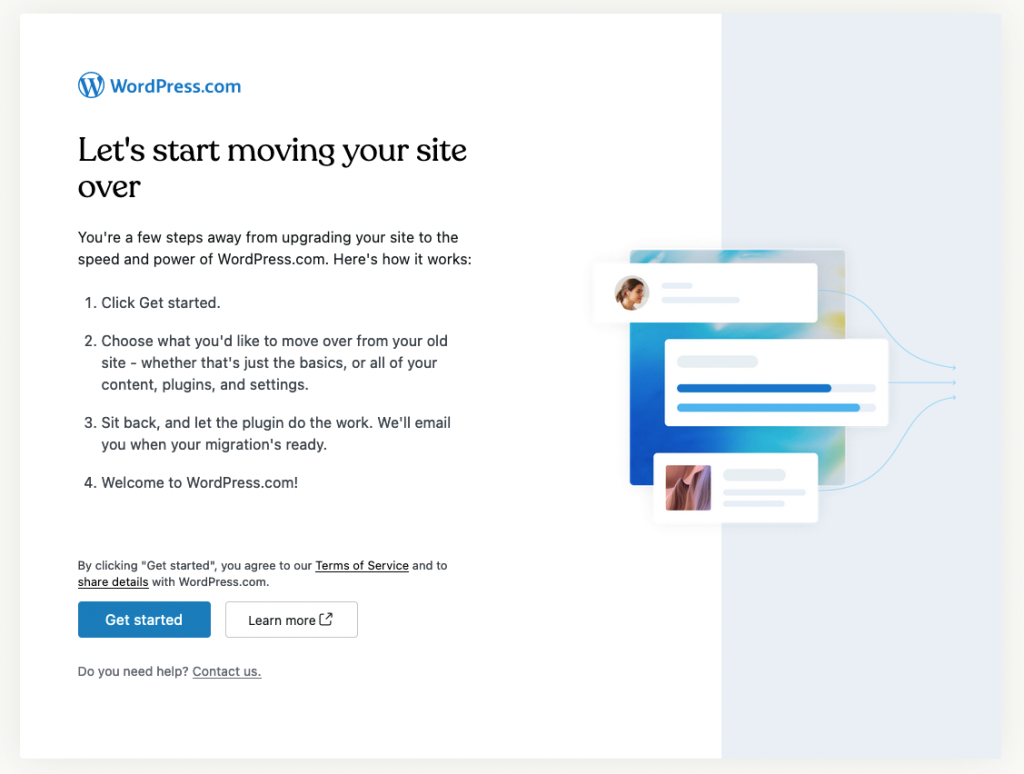
We understand the hassle of moving your website from one host to another. That’s why we’ve developed a new, free migration plugin that takes the stress out of the process. Simply install, activate, and run the plugin on your WordPress site, and let it handle the entire migration for you. You’ll be up and running on WordPress.com in no time.
Move from another platform to WordPress.com
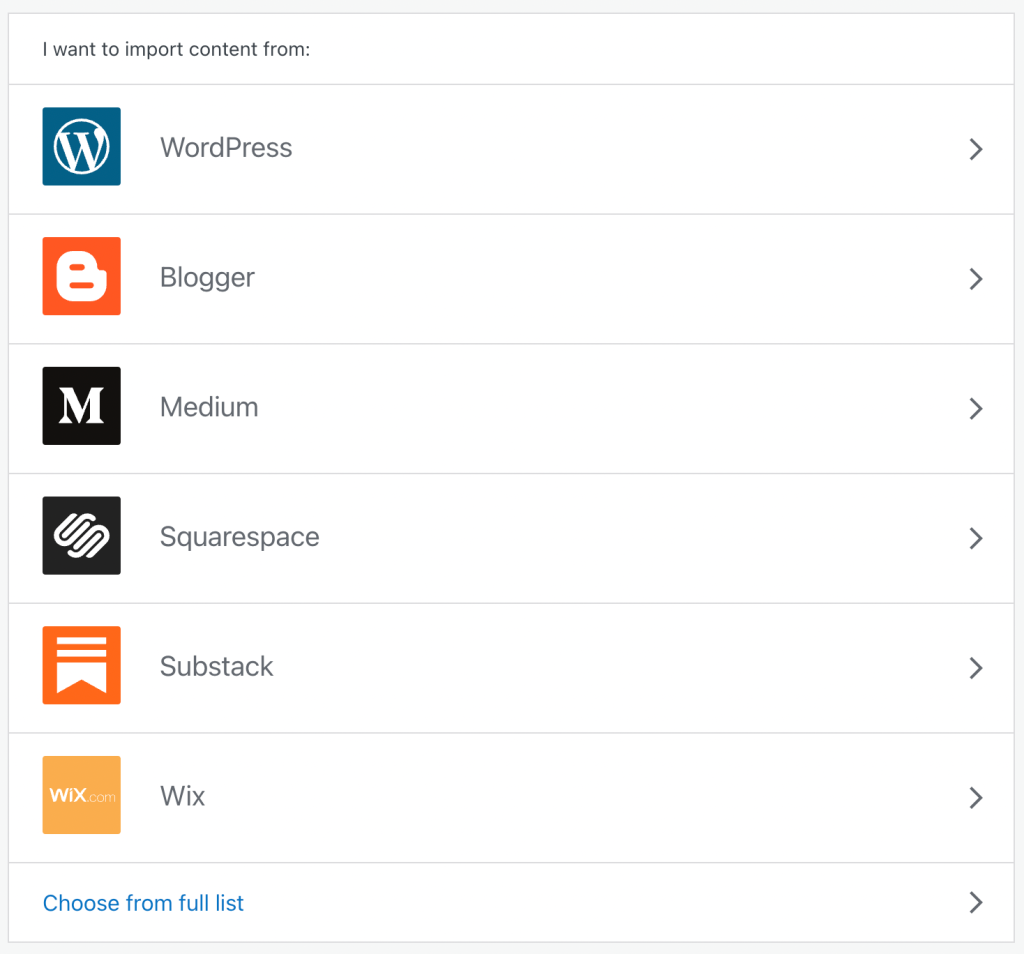
We believe in providing a first-class experience for anyone who wants to move their content to WordPress.com, regardless of platform. That’s why we’ve unified the migration process for users coming from Blogger, Medium, Squarespace, Substack, Wix, and others. No matter where you’re coming from, you’ll receive the same exceptional service and modern import interface.
Say goodbye to complexities and embrace the simplicity and convenience of migrating your content to WordPress.com.
Make the switch
With our new migration plugin and content importer, transitioning to WordPress.com has never been easier. Let us take care of the technicalities while you focus on what matters most—creating and managing an outstanding website.
At WordPress.com, we empower you with the tools and features needed to give your website a competitive edge. With our managed hosting service, you can enjoy world-class performance, robust security measures, and a dedicated support team that’s always ready to assist you. We are committed to providing you with everything you need to thrive in the online world.
Embrace the simplicity, convenience, and seamlessness of migrating your website to WordPress.com.
 WordPress.com News
Dear Sir/Madam,
We wish to move our existing website to wordpress. Kindly advise cost for hosting our website and moving our commercial website to WordPress.
Also, if a new website is developed, if WordPress can host this entirely new website for is. Plse advise cost for this as well.
Hi! The cost depends on the type of site you’re running currently and what you would like imported: content vs plugins vs an entire design from another platform, for example. Can you get in touch with support and share a link to the site you’re hoping to import? We’d be happy to advise. And if you’re interested in designing a new site, be sure to check out Built By WordPress.com… a team of experts will set up your site with a professional design, so you need only add new content as you like.
It’s already with Word Press
Sent from the all new AOL app for iOS
I find the whole process confusing and unwieldy and anything but simple. None particularly easy to use and counter intuitive
Are you struggling with importing a site? If you’d like to get in touch with support and share more context, we’ll gladly help!
I hope amateur and hobby bloggers will always have a place here.
We’re aiming for that, too!
Very good platform
How do you mean
Do you need help moving a site here? If you’re struggling or have questions, send context and we’ll point you in the right direction for help.
Blogger
If you’re trying to move your content from Blogger, we’ve got a guide here… is that what you have in mind? If not, can you reach out to support?
I don’t know exactly what is going on now? I have a blog that is under the https://wordpress.com/home/spaanse stories.com account. But when I click the plugin to transfer my site to WordPress.com, and I automatically log in there (with a different password, by the way), it seems that I also have a wordpress.org/coralmar? Are the two connected? Or how exactly does that work?
I think that my site under https://wordpress.com/home/spaanse stories.com does not need to be transferred and thus the account of wordpress.org/coralmar can be cancelled. Is that correct?
Hey there, it sounds like you’ve got two different accounts, and maybe you’re logged into one when you mean to be in the other. Can you reach out to support directly so we can take a closer look?
nice feature
Hi, I have a question. I already have a website with WordPress.com. I have two blogs with Blogger of two trips I took. Can you advise? Thanks Mary Lou/ Me in the Middle
Hi! Did you want to migrate the sites here? We have a tool for importing Blogger content. You could import that into separate sites on our services, or add it to your site with us. If you want to reach out to support and share what you have in mind, we can advise!
Thank you for responding! Here are the two blog sites on Blogger: http://songforireland2014.blogspot.com/ http://christmasinarabia2011.blogspot.com/ I think I’d like to add it to Me in the Middle: My WordPress website/blog.
Hey there! No problem – so this guide explains how to Import from Blogger, as they’re separate sites you may have to run the process twice. I hope this helps! 🙂
I agree , can’t say much about the blogger
I am interested
Amazing feature!
Nice
I’m looking for work to continue on my studies I will really appreciate if you will employ me in return of my services in your company please 🙏
Are you hoping to create a site here to learn more about WordPress? If so I’d highly recommend starting with one of our tutorials or webinars. Or, if you’re hoping to find work here with us, we have more details here.
Where can I talk to someone about removing ads?
Hi! Ads can be removed with any of our upgraded hosting plans, which you can get here. If you’ve got any questions about which plan to choose, or about anything else for that matter, you’re welcome to reach out to support. Cheers!
How do I invite people to my blog
Hey there! Please see this guide on how to Invite People to a WordPress.com site.
Your question is want to drive your friends traffic to your Blog and they can check your Blog?
I think as a beginner all you have to do is to post your blog links on different social media’s. In order to gain familiarity.
That’s a great way to get more views and traffic. We’ve got some ideas listed here, too.
how do i invite people to my blog
I would desperately like to transfer my “CommonSense InvestSense” to WordPress. WordPress already hosts my site. My current custodian illegally transferred ownership site to someone. To their credit, they finally recovered it, but it took over a year and hurt my business. Not clear if this post is something I can use to make WordPress my custodian. Any help would be appreciated so that I can have all three of my blogs under WordPress ‘ incredible program. Thanks!
You should always be the custodian of your domain name so you can control where it’s hosted, etc.
Would you like to host your site here now, too? If you can get in touch with support and share a link to the existing site, we can recommend options for importing the full site or the content. Or, this guide can help, too.
Blog already hosted thru WordPress (investsense.com) so DNS addresses alrrady show WordPress. Custodian of record is not WordPress. Want to transfer account so WordPress is custodian of record. Just do not want to do something wrong and possibly lose 10+ years of content.
Thanks.
Gotcha! You would just need to unlock the domain at the current registrar, get a transfer code, and migrate the domain to our services. We have more details here. It takes a few days typically, but as long as you don’t cancel the domain or allow it to expire first, it should transfer nicely. Transferring also adds one year of registration to your services. I hope this helps!
WordPress already hosts my blog. How/What do I need to do to make WordPress my registrar of record?
It is an easy process.
I’ve only been on WordPress for a little over a month, but I have really enjoyed my time on here so far! I find WordPress to be much better than social media.
Glad to hear you’re enjoying it!
Am happy to be with you
Very informative migration tips. Thank you so much.
– Regards
Great platform where we can learn new thing without any interruption,thanks a lot.
Hello, I want to move my site from Squarespace to WordPress because the back end of my Squarespace site has lots of errors and issues with google indexing and SEO. If I migrate the site will these errors be copied over or will WordPress just copy the pages and content but effectively recreate all the back end? Thanks.
Hi there, the errors you describe are likely specific to your platform, so I would not expect those to come over in a migration to a new platform like WordPress.com. Not everything from Squarespace will come across in the import (theme design and appearance, etc) but your pages and posts will come over, and be adapted to display on WordPress. More info here: https://wordpress.com/support/import/import-from-squarespace/
Thanks for getting back to me, I decided I needed a pro 🙂
Understood. If you’re looking for one, our Built By WordPress.com team may be able to help.
It’s so amazing
Great platform
I like the platform
Very informative migration tips. Thank you so much.
Thank You So Much!
Good
That’s good
Very nice
Very good
Good