


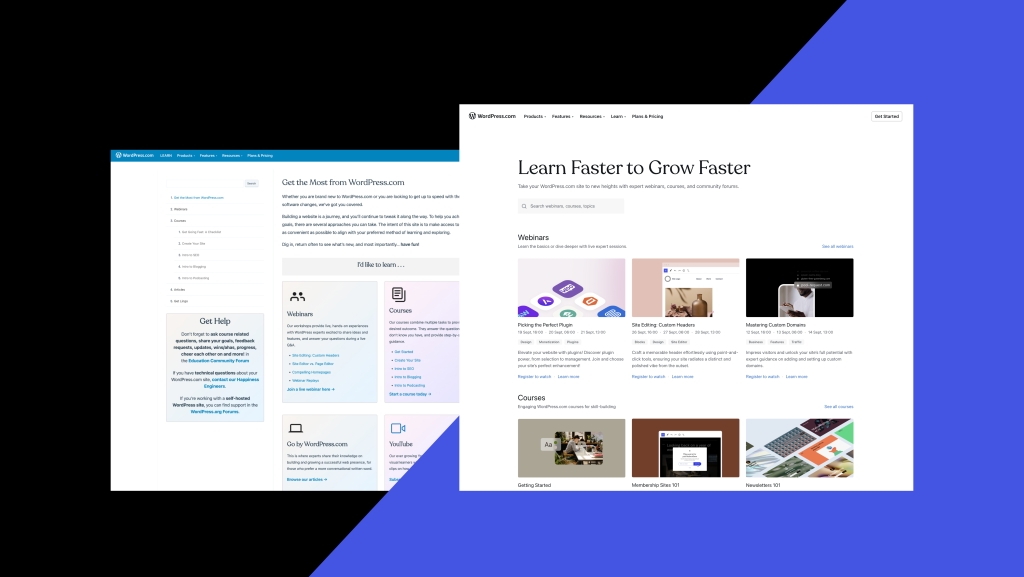
We’re thrilled to unveil the new and refreshed WordPress.com learning hub! This new resource is easily accessible at WordPress.com/learn. Our mission is to create a central place for all your educational needs. In this post we’ll give you a tour of the new digs and explain the behind-the-scenes design work that has made this resource more accessible, more navigable, and more enjoyable to use.
Let’s take a look!
Why the refresh?
We’ve always been inspired by the passion and curiosity of our users. To better serve your thirst for knowledge, we’ve kickstarted an ambitious journey to bring together the best of our educational content under one roof.
While there’s plenty to explore right now on WordPress.com/learn—including free courses, webinars, and step-by-step tutorials—know that this is just the beginning. We’re continually evolving and adding material to create a resource-rich hub for all your WordPress.com endeavors.
What’s new?
- Fresh and intuitive design: A sleek new interface that makes navigating through courses and webinars a breeze.

- Webinar times shown in your timezone: We’re thrilled to let you know that webinar sessions are now shown in your local timezone.
- Enhanced functionality: With improved search and responsive design, you’ll find what you need in no time.
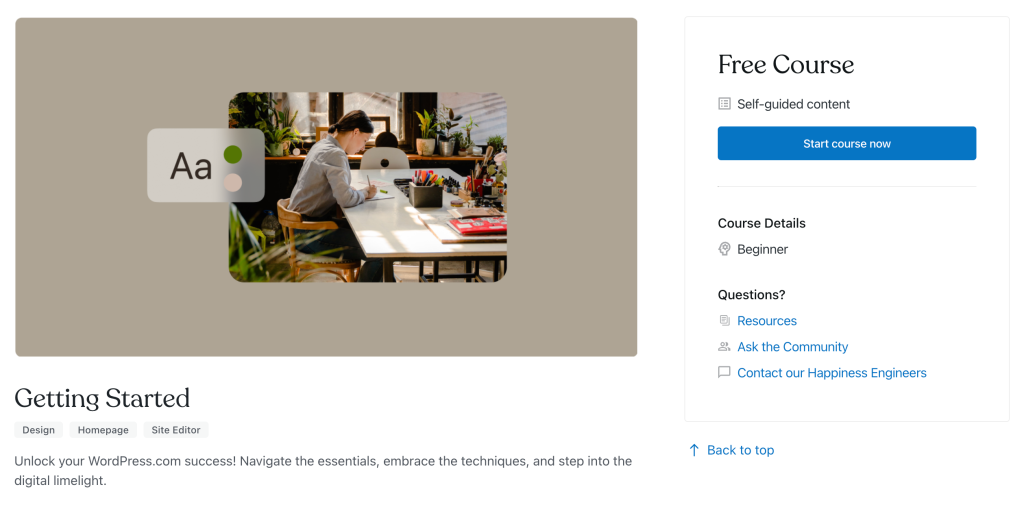
- Courses come with more details: You’ll find time estimates and expertise levels (Beginner, Intermediate, etc.) listed on each course page.
- Unified experience: We’ve made the design consistent with our WordPress.com/support and WordPress.com/forums pages, ensuring a seamless experience across our platforms.
Big thanks to our team!
Behind the scenes, an incredibly dedicated team worked tirelessly to bring this vision to life. From our designers and developers to our course and webinar coordinators, we’re grateful for every single effort.
Here’s what Vini M., the lead designer on this project, had to say about his vision for this new learning hub:
“Design was the heartbeat of this project. Our revamp aimed to weave together functionality and visual appeal, creating a learning experience that’s both intuitive and captivating.
While crafting this new learning experience, we envisioned a space where interactivity meets accessibility; a place where every learner feels right at home. With resources for diverse users and specific tools to guide beginners, we’ve met diverse needs.
Take a moment to explore, feel the depth, and share our vision. This project is the culmination of passion, dedication, and the combined brilliance of many. We’re immensely proud of our accomplishments, and I hope you feel the same exhilaration. Here’s to the beginning of a renewed journey of learning and growth with WordPress.com!”
Join the adventure!
The journey doesn’t stop here. Our eyes are set on the future as we continue to evolve based on your feedback and needs. Dive in, explore the new WordPress.com/learn hub, and let us know your thoughts. This upgrade will redefine your WordPress.com learning experience!
 WordPress.com News
Wonderful idea centralized guidance. Hoping to build an effective, inspiring, and attractive platform.
Will do!
Thanks for your email!
None of this is helpful for my blog………..I simply want to use the classic editor and post a photo every day. But I can’t find the classic editor..it is hidden somewhere. This is very frustrating .
You can find info on accessing the Classic Editor here. But have you considered the classic block? It allows you to use newer themes and features while still having the edit interface you’re used to. To access it, just type
/classicon a new line in the block editor.connect to my website
If you need help, can you reach out to support? Share the site link and any more context you have, and we’ll help how we can.
I miss the easy to use Remove Block that was displayed on previous Editor.
You should still have an option for deleting blocks, either from the list view or by clicking on the block and using the three-dot (meatball) menu. Delete should be the last option on the list.
Thanks for your email!
Hi nice to meet this site
I can’t access my website, http://www.lifeinsmallbites.com as I only receive following message:
Your server is running PHP versi
I’d recommend contacting your host to see if they can help with your PHP version. If you’d like to move the site to our services so that we can manage it going forward, here’s how to migrate to our services.
Please advise how to correct website, www. Lifeinsmallbites.com.
This is message when try to access:
<
div>
<
p class=”p1″ style=”margin: 0px; font-stretch: normal; line-height: normal; font-size-adjust: none; font-kerning: auto; font-variant-alternates: normal; font-variant-ligatures: normal; font-variant-numeric: normal; font-variant-east-asian: normal; font-variant-position: normal; font-feature-settings: normal; font-optical-sizing: auto; font-variation-settings: normal; -webkit-text-size-adjust: auto;”>There has been a critical error
Hi there, we’re not able to assist unless your site is hosted with us directly (your site is currently with Hostgator) so we are not able to take a closer look. Your host uses a different version of WordPress, the self-managed open source version, and you can find help for this kind of critical error issue here: https://wordpress.org/support/forum/how-to-and-troubleshooting/
You are also welcome to move your site to us, where we will be able to support you directly! https://en.support.wordpress.com/import-using-move-to-wordpress-com/
Your site isn’t hosted on our services, but your host should be able to help you. The error itself will mention some instructions, or this guide can help:
https://wordpress.org/documentation/article/common-wordpress-errors/
Great 👍
Your welcome sir
Am not getting anything
Do you mean you aren’t seeing the course? Send more info and we’ll point you in the right direction for help.
It is the first time to get this page and gladly.
Thank you for creating your learning hub!!!
There’s been several versions of this idea over the months, & a couple of dead-ends of older tutorials, but the chase is always worth it! Appreciate all the hard work!
Thanks for your email!
how can i open my existing website
Hi! Are you trying to access /wp-admin? If you’re having trouble, you can reach out for support here. Share your question and any further context, and a link to the site.
Thanks for your email!
Fabulous idea! Thank you.
I love the new Learn site! The refined navigation is especially intuitive. As a former and future participant in course offerings, the only thing I truly miss is the previous community forum experience at wpcourses. 🙂
Glad to hear you’re enjoying it! And thanks for the feedback, re: the community.
❤️ We miss it too. But please do use the new Education Community Forum, we’re happy to continue the conversations there. In fact, it would be great if you started up a topic thread there about the differences in the community forums and we can chat about it 😊
Please inform how to put my books on your website.
Can your reach out to support? Let us know whether you are advertising your books, selling e-books or physical books, etc. We’ll be happy to get you started.
Nice
Thanks
Nice
Great
I am absolutely thrilled to learn about the unveiling of the new and improved WordPress.com learning hub! The commitment to creating a centralized resource for educational needs at WordPress.com/learn is commendable. It’s clear that this refresh is driven by a genuine passion for knowledge and a desire to enhance the user experience. The new features, from the sleek design to showing webinar times in local timezones, reflect a deep understanding of user needs. The dedication of the team behind this project is truly commendable, and Vini M.’s insights into the design process are inspiring. I’m excited to explore this revamped learning hub and embark on a journey of growth and knowledge with WordPress.com. Thank you for your commitment to excellence!
Am new here, thanks
Glad to have you join us. Be sure to use the Education Community Forum within the site to stay in touch and provide feedback 😊
Thanks
I lost some postings how can I find my drafts
We are not able to investigate here in the blog post comments but please contact us here and we are happy to take a closer look. Thanks!
https://wordpress.com/help
Very very nice and helpful platform for me.
Wow this is so amazing and inspiring….to obtain this great opportunity to learn and join in this inner WordPress blog, thanks to the CEO and also God should keep adding to your home and life as you keep adding to our brain and future ❤😍
Thanks again for all your help.
I can’t change my email address in profile. I changed it in general settings, but in profile I’m not able to change it. I tried to erase it from users but it doesn’t give me that option and when I try do edit it from users I end up with the same result. I don’t get a confirmation email and it stays the same.
Good
I lost some postings how can I find my drafts
We are not able to investigate here in the blog post comments but please contact us here and we are happy to take a closer look. Thanks!
https://wordpress.com/help
So nice
Wow, this is amazing. Thank you for sharing.
Nice idea
I am a little bit confused with your posts
Let us know what questions you have; we’ll be glad to help.
Sahile. Can you explain further?
Thanks for your response.
In what area are you confused pls?
Learning is nothing more than; “NDRANC”: NEWLY DEVEL0PED REPETITVE AUTONIMIZED NEURAL CONNECTIONS! Like learning how to ride a BICYCLE, Once the connections are made, they are made for life, you never forget? Learning “NEW” task is the same concept!
Exactly what I need to get started again. Too long since I blogged.
very good
This should be front and center during login for newbies
Absolutely
Waooh
Good
So nice
so nice
Thanks for your email!