

Customizing your theme just got easier! The Custom CSS Upgrade now provides the ability to save revisions of your code and uses the same engine that WordPress uses for post revisions.
If you currently have the CSS upgrade, you can see this in action by logging in to your WordPress admin and going to Appearance->Edit CSS. Click the “Save Stylesheet” button. You should now see the Post Revisions box below the preview and save buttons. Note: the revisions box will appear on the CSS editing screen only after you have saved at least one revision of the CSS.

If you click on one of the links in the CSS Revisions box, you will be able to visually compare different versions of your CSS.
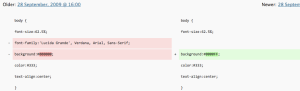
If you’ve ever considered the CSS upgrade, now’s a great time to take the leap. With this new CSS revisions feature, you’ll be able to make changes to the look of your theme without worrying about losing earlier versions, and can see how CSS changes will affect your blog’s appearance. To get the upgrade and start editing your theme’s CSS today, just log in to your WordPress.com Dashboard and click on Upgrades in the upper left menu.
*Not sure what we’re talking about? Here’s a short description of what you can and can’t do with CSS on WordPress.com.
Update:
Custom CSS will now save your preview revisions while in free trial mode. Now you can see the revisions in action before purchasing the upgrade.
 WordPress.com News
I’m going to learn CSS now, better late than never!
cool… very handy to revert! 🙂
greats news!
But Custom CSS Upgrade is not free?
It is not free. See https://wordpress.com/support/custom-css/
Awesome!
fantastic!!!! Finally changing things in CSS will be more easy than before!!!
I really wanna upgrade to this, I think my blog would have a major improvement.
I clicked save stylesheet and it’s not showing up. But this is a great idea, thank you much.
Did you make a change?
Much needed features. You guys rock!!!!
Nice feature!
thank you ; )
I wish I had the CSS Upgrade… *sob*
This is handy. Thx!
Hi there,
You know what would be cool: if the functionality was available without the upgrade but just could only be previewed not applied. That way we’d have some indication what we’d be forking out the cash for the upgrade for (from Africa, cash is a factor).
You guys provide a cool service.
Thanks,
Mark
Revisions now works in free trial mode!
would be helpful when i upgrade, cause to fine tune and experiment we need to keep the previous saves intact so we can revert in case of a bad change while experimenting.
From all the work I was doing a few months ago, I can see where this would save a lot of time and anxiety. Thanks, WordPress. You guys rock.
That’s a great facility – now I won’t need to keep a log of my changes. Thanks WP.
I love this feature and it has saved me hours of fixing my goof ups. Thank you