

We’re excited to announce new features that integrate your WordPress.com site with some of the services Google has to offer. New features include:
- Connecting your site to your Google+ Profile.
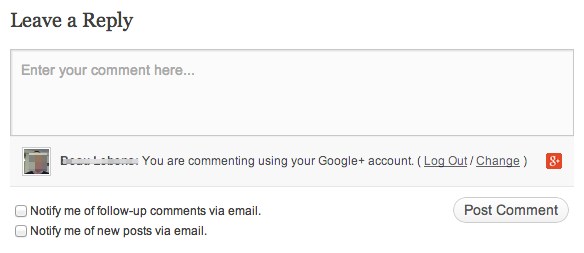
- Commenting using your Google+ account.
- Sharing posts on Google+ via Publicize and a handy sharing button.
- Embedding Google+ posts on WordPress.com.
Connect to your Google+ Profile

Linking to your Google+ Profile creates an official connection between your WordPress.com content and your Google+ account. The benefit? It adds a layer of verification, confirming you are the author of your posts, and helps Google understand who created certain pages, which helps to increase the accuracy of search results.
In some cases, Google may also use this information to make your posts stand out more in search results by including your Google+ Profile information next to your listing.
Connection highlights
- The display name that appears on your posts will use your Google+ Real Name, which is the name you have on your Google+ Profile.
- A Google+ section will be added to the Sharing/Like area at the bottom of your posts, which will include a link to your Google+ Profile, a button your visitors can click to follow you on Google+, and your Google profile picture.

For more details on connecting (and disconnecting) your Google+ Profile, visit the Connect Your Google+ Profile support page.
Post comments using your Google+ account
When you post a comment on a WordPress.com blog, you can either post as a guest (and enter your own details), use your WordPress.com account, or use one of your social accounts. We now support Google+ accounts here, and when you use it we’ll automatically grab your name and email address from Google, as well as your profile picture and URL to associate with your comment.
Share posts on Google+ with Publicize
Publicize makes it a snap to share your new posts on other networks (like Facebook, Twitter, Tumblr, LinkedIn, and most recently Path). We’re excited that you can now connect to and share your latest stuff on your Google+ Profiles with this tool. (Got a Google+ Page? Don’t fret! You’ll be able to Publicize to Pages as well in a few weeks.)
To get started, head to Settings → Sharing in your dashboard and, under Publicize, find and click Add new Google+ Connection. You’ll then be asked to approve the connection between your WordPress.com site and your Google+ account. Here you can select where you’d like your Publicized posts to be shared: to specific people, Circles, or broadcast to everyone (Public). To authorize, click Accept.

Once verified, you can check a box to make the connection available to all users of your site, which means that when another user publishes a post, it will also publicize to this Google+ connection.
Share to Google+ button
You can add a Google+ button at the bottom of your posts so readers can quickly share your stuff with others. You’ll see this option in Settings → Sharing as well, under Sharing Buttons (below your Publicize connections).
To activate, just drag and drop the Google+ button from Available Services to Enabled Services.

Embed Google+ posts on WordPress.com
You can also embed a Google+ post on your blog, similar to how you embed other media, such as tweets. When creating a new post or page, just insert a Google+ URL on its own line. Or, you can use the shortcode, like this:
[googleplus url=https://plus.google.com/u/1/b/107577179550139609711/107577179550139609711/posts/4EwjFDvYiVJ]
This will display an embedded Google+ post on your blog:

Additional features
You can take advantage of other services that Google offers to make your online publishing experience even better, from site/domain validation and XML sitemaps to custom email setup (via Google Apps) and embedding content (like Google Docs, Maps, and Calendars).
Jetpack users, sit tight!
Are you a self-hosted WordPress.org user with a Jetpack-powered site? You can start authenticating comments with Google+ now, and most other features will be available to you very soon — stay tuned while we tighten some nuts and bolts.
 WordPress.com News
I was waiting for so long! Thank you, people! 😀
Definitely a welcome feature! With Google+ Authorship such a hot ticket item (and so important for any looking to reach a wider audience), allowing us to connect our Google+ accounts is critical. Thanks for this!
Thank you ! Thank you! Thank you! I was waiting for it.
I’m so happy with this feature! This was my missing link!
I cannot find any information on how to connect my blog to my Google+ page. Please help.
Hi there — this support page has steps to connect (and disconnect) to your Google+ Page.
awesomeness!
The earlier comments are exactly how I feel. You guys rock!
i am also happy for this feature.
Thank you, thank you, thank you!!!!!!! ❤
this is definitely very useful 🙂
Very helpful. I’ve been bumping into walls trying to figure this out.
Reblogged this on The Virtual Virtuoso and commented:
I love this; I have been wanting WordPress to add a Share to Google+ feature for a long time, and I know of other bloggers who have been waiting for this too. Thank you WordPress!
One thing still appears to be missing: publicizing to Google+ Pages. When do you think we WordPress.com users and Jetpack users can avail?
Hi there — as mentioned in the post, publicizing to Google+ Pages should be available in a few weeks.
I have connected my blog to my google + account. After the connection is made it can take several months before the snippet shows up in the google results. be patient and don’t forget to use google webmaster toolbar and let google know your website is connected with google+.
When will this be coming to wordpress.org?
Most of the features mention here should hit Jetpack in a week or so, allowing them to be used on WordPress.org blogs. Keep an eye on http://jetpack.me/
Justin, thanks to you and the WP.com team for making this happen. I have one question: will my Google+ connections show up as part of my follower count as part of Publicize (similar to Facebook, Twitter and Tumblr?) So far, that hasn’t happened, and I wondered if it’s on the boards. Thank you.
Not yet Andra. We are looking at this and it may come around the same time as pages support.
It’s the primary reason for me to connect them, as I prefer to override the link with a picture on G+ because of its visual nature. (if that helps persuade anyone in your internal discussions.)
I often find myself trying to find other social media accounts for my google+ followers. For this, I use the Ark.com people search engine at http://www.ark.com. Easy way to find information about anyone anywhere.
Im new to the blogosphere. How do I get people to follow me?
Hi there — you can start by engaging with others with similar interests. You can find topics you’re interested in in the Reader, and find bloggers there to follow and interact with. If you want people to find *your* stuff, be sure to tag your posts as well. (Actually, this tutorial page, Get Connected, might be of interest to you, too.)
I have a private blog and I have a Google + private Community by the same name. I was thinking about moving to Blogger so that the two could be integrated. But, I much prefer WordPress. One thing available on Blogger that would be awesome would be to have it so that I could post automatically ONLY to my private community on Google + instead of circles or my profile page. This is because community posts are put into categories. I have a blog here and a self-hosted one, so it would be great if this feature could be added in both places. 🙂
This is truly great – support for Google+ Pages anytime soon?
As mentioned in the post, you’ll be able to Publicize to Pages soon (in a few weeks).
thank you 🙂
Wow…I was eagerly waiting for this integration to happen. Comment using Google+ account, share on Google+ via publicize, Google+ profile link at the bottom of post…all are excellent features. Now waiting to get new google+ badge to work and I’m done!
Thanks for this awesome updates WordPress.com! 🙂
great work and nice post.
Is any personal information shared between wordpress and google by doing this?
WordPress.com will get your Google+ user name, avatar, and other bio information for the authorship stuff. Commenting will provide the email address associated with your G+ account. Publicize gives us access to post on your wall.
Google will get your blog URL / ID.
When you connect these accounts the authorization dialogs will tell you want information will be shared.