

WordPress bloggers love to share their photos and images with each other, so perhaps it shouldn’t have come as a surprise that when we removed the boring, old image icon that you wrote to us lamenting its disappearance.
But if you haven’t noticed already, there’s nothing to fear, for in its place is the Add an Image button in the Media Toolbar, which has been around for a bit but is now more robust than ever — making it the only thing you’ll need to add and organize photos.
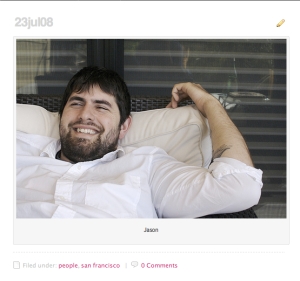
Among its newest features is an easy-to-add caption tool. Just write your caption in the caption field before inserting an image and, voila, the caption displays below the photo inside a tasteful frame.

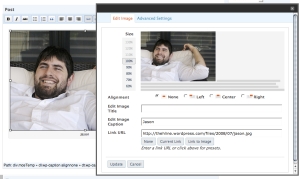
To add captions to an image you’ve already uploaded, select the image in the Visual Editor and click the landscape icon for Edit Image. You’ll be presented with the Image Editor, which lets you resize, realign, edit the title, add a caption, and change the image link URL.
Prefer the HTML editor? There’s a shortcode* for it, too.
*(Check out this page of the FAQ for a definition of “shortcode” and a list of more handy embeds.)
 WordPress.com News
The original image facility worked better, was easier to use and didn’t need to be ‘fixed.’
I would have rather seen you work on something that’s REALLY needs fixing – The tiny number of widgets you allow people with wordpress.com hosted blogs to use! The inability to use 99% of widgets is extremely frustrating and dramatically reduces the user experience of those visiting our blogs.
I’m guessing it’s done deliberately – to force us to move our blogs to your favoured ‘paid for’ hosts?
Pity.
Jim Connolly
jimconnolly – The new Add an Image tool has a lot more options, with greater flexibility. Please post to the Ideas Forum if you’d like to suggest additions to its functionality. In regard to widgets, our options on WordPress.com will always be somewhat limited for the sake of both security and simplicity. Again, the Ideas Forum is a great place to suggest new widgets.
Thank you.
Why an explanation so late?
Whoa, Heather is sexy. And uhhhh… what? caption? Right, great idea. But Heather…. sexy
This is really keen! Thanks.
Shortcode? Real bloggers don’ neeeeeed no stinkin’ shortcode!
Keep this up and you’ll make blogging so easy, even g’dubya bush can do it! That goes double for nobama and mcPain!
The scientifically impossible I do right away
The spiritually miraculous takes a bit longer
ok cool.
Nice!
Excellent! Thanks!
I’ll get plenty of use out of this. Thanks!
Nice 🙂
Hello! I’ve been using the Mistylook theme and if I add a caption, there is a double border that isn’t that nice. Are there any ways to take the original border off?
Very nice 🙂
Angele – Default borders around the images can be removed by setting the border to 0 (zero) on the advanced settings tab.
Nice modification just what I’ve always wished. I’ve been inserting captions the hard way but surely not next time.
cooooooool!
RED OUT
Cool! It’s awesome to be able to do this! I haven’t really done much with the Image Editor, but I think I’ll try it out!
-Woton
Good Idea.
Noticed it earlier and thank you very much! A very handy and cool item….
This is new ? 😀
I like this, perfect…congratulations !
wow so cool.
Well, but what we need really is to be able to use our own favicon 😉
well, this is an interesting & useful ‘small’ feature update! 🙂
thanks for the continuing good work guys..!
Thanks, is a new great feature for our blogs…
Nice one! I aways dream for one of this! 🙂
Cool!
Great new add; I use a lot of images, so this will be very handy. Thanks!
thanks but I really like the little quick version of adding an image,
its now gone, can u also bring that back
i forgot what it was called but it was quicker.
Actually, I hate the add a caption, because it automatically comes up as “null” and if I forget to change it, then my caption says null under the photo. Annoying!
Moo – If “null” appears in the caption field for images without a caption when opening the “Edit Image” dialog, some of the JavaScript files that make it work may need to be refreshed. If you’re using Gears, try to disable it and re-enable it after reloading the page. If not, right-click in the pop-up and select “This frame – Reload” for Firefox or “Refresh” for Internet Explorer. Please contact support if you’re still having trouble after trying those solutions.
Great idea! Keep on codin’ this way!
Yes! Needless to say, I love it. I’ve needed an actual caption thingamajig for a while now.
cool! nice job as usual guys!
You guys are the best! Cheers mates!
Yep! I’ve been using it since a while now!
Initially I had trouble finding the ‘border’, ‘horizontal/vertical space’ etc options and almost thought *gasp* they’ve done away with it! But they’re hidden from view…maybe a little too well hidden
BTW, I thot the gray lines in the image editor was my browser problem! Now I understand its universal…. 😀
awesomeeee! that’s why i say you’re the best! Thanks and keep up the good work.
This makes WordPress, as always, the best blogging software existent. Great feature!
Nice! So Beautifull!! Thanks!
COOOOOL I heart wordpress 😀
Hey. Good job WordPress, your really becoming better and better.
Good Feature!!!
Tanks!! 🙂
Nice feature. I’ve used it for some ridiculous captions at dadorbust.wordpress.com.
Interesting. I always did caption manually with smaller fonts, though. This is a big help. 🙂
Fabulous. As the Queen of posting photos I can’t wait to use this. Thanks. It’s brilliant!
Nice feature! However, I would like to suggest two potential improvements to WordPress related with the support for images:
1) it would be extremely useful to add support for a default image for a given category: each time a post related with a given category is sent, an image (icon) associated with the category could be displayed. Currently I do this manually.
2) a simpler feature: currently images are sorted according to their submission date. I would like to be able to reorganize the order of my picture in the Media Toolbar.
BTW, I would like to thank the WordPress.com team for their wonderful work. Million thanks…
cute !
What took so long to put this up? I love the feature and will use it soon.
Very Cool!
WordPress gets better and better day by day. Most Impressive.
Thank you
Indus Asia Online Journal
I like! It will relieve me of the hassle of html coding a table everytime I wanted a caption 🙂
What would be really cool is to have some default settings. One thing I always do is add 3 pixels of room on the horizontal level. I think it just makes it look better. But I can’t do this when I add the photo. I have to add the photo THEN go back and edit it, then go to advanced settings and make this minor change. But I do it to all my photos, so it would be really great if I could set this as a default preference for any new photo somewhere.
Another thing that would be cool is a download from URL thing. If I find a photo I want to use I have two choices I can save it on my drive then re upload it, or I can just link to the URL and hope they don’t move the photo. It would be really good if I could just put in a URL and click a box to have it saved on my wordpress so that even if they move it I am ok.
What do you think?
Jason Dragon
http://blog.capitalactive.com/
good new feature!
YAY! Captions!
Yeah, I saw that a few days ago. It is a realy good idea. That’s what was missing! 😉
Love it!
Also you can make them SEO friendly just by adding a keyword to the image. click on the following link to find out how to add your images to google search:
http://www.google.com/help/faq_images.html
This will bring you more free tartaged traffic to your blog 🙂
WordPress still rocks! This is a good innovation – because it is all about presentation. The only thing needed now is an easy way to wrap text 5 or 10 or 20 pixels away from the image. Then it will be almost like having our “tree” back.
cool. the image editor looks interesting, i’m gonna have to try it out!
Thanks WP!
Thanks for the New Feature, gregor
Cool! The ‘caption’ thing Rocks!!
Thanks a Lot!
Is there an effort to add an autosize feature that prevents the ‘border push’ to the right when images are too large?
I’ve seen this already a while ago but did never use it up to now. Anyhow it allows a clean presentation of the images – thanks.
The Image Uploader is great, but I am afraid I won´t be able to use it.
Regards
Thanks *SO* much for this! A *lot* less frustration involved! Hurray!
This is an AWESOME feature 🙂
Thank you WP Gods 😀
It’s a tiny feature, but I swear, I’ve been waiting for this forever! Thanks, WordPress!
A great idea for bloggers who post a lot of pictures.
The problem is, I don’t use captions myself, and I like to put a 10px horizontal space around the pictures I have on my posts. I upload the image minus a caption and all is OK. When I click on the picture to add the 10px hspace (which needs a second step – something you could add to the original uploader page to streamline things), “null” comes up automatically in the caption line and subsequently gets displayed under my picture.
This means that not only do I need to use two steps to put a picture in my post, I also need to delete an attribute that I didn’t put there. Half the time I forget to delete the “null” line and have to go back in a third time. It’s all a little wearisome.
Great, and comfortable. Thanks so much…
What about category?
Sounds great! My wife just took 2,000 photos of a trip to Israel-mostly desert shots:) I am willing to but maybe 20 on my blog to satisfy her. Thanks,
Tom
This is a fantastic addition.
http://suburbanconnoisseurs.wordpress.com
It’s about time. This is going to be a really nice feature.
Thanks much!
A much-welcomed addition. Getting the captions where I wanted them by fiddling with the HTML was annoying, and often I settled for sloppy work or none at all simply because I was in a hurry. This tweak rocks!
Very cool!
holy cow. this is nifty, im gonna try it out!
Interesting 😉
I notice this new feature. It’s really nice, though it’s a bit slower to pop up than the old & simple image window. 😐
omg! every day wordpress improves… i dont know how people can be using other suport for blogging….
un saludo muy fuerte.
y gracias!
yeah
Very cool. This is something I have been waiting for.
How convenient!
Great feature! But I really think a 50% size should be there.
At 50% pixels are equally divided, making a cleaner small image. And, 50% is the most common reduction size. The percentages that you have available in the slider are not in sync with standard reductions.
100% 75% 66% 50% 25% 10% are very common
I find this feature last week. So cool.
Captions are good – but they should be optional. Having to delete “null” from the caption field is a pain . . . and as for the “tasteful frame” – sorry, it looks more like an old Polaroid photo border. Other stuff working well, though, and free software still a good value!
It would be nice if it didn’t add a caption of “null” to uncaptioned images when there is no caption…
very useful. thank to the team.
very cool feature! thank you wordpress!
Whoa! this is a neat feature. Well done!
Although, I’m really hoping to see a feature that allows multiple images from the Media Library to be inserted into post at one go and applying defaults such as “Full Size” and “Link URL: None” (ones we likely dont ever change). This would be the single biggest improvement for users who manage large number of images and want to spend the shortest possible time in doing so over and over.
Thank you!
that’s nice!! thanks a lot
Thanks wordpress !!!!!!!
Wonderful… If there a choice not to have caption.
You see, sometimes, a pic may be better off without that caption design for that bit of size-up.
Ok Im Check it.
This is cool stuff , is it me or Bloggers are getting Hot!!
I like the look…but I am still having trouble getting pic.s to upload. Help!
awesome!
Great! This is really great for posts with multiple photographs that are difficult to put into context based on the great lengths of some paragraphs.
~Awesome~