


Today we’re launching a feature that will show instant notifications for new comments and likes — even when you are not actively using WordPress.com. Browser notifications give you a real-time sense of your readers’ reactions, allowing you to stay more engaged with your audience. Notifications will show up in Chrome or Firefox in the same location where each browser normally displays notifications. They will appear whether or not you have WordPress.com open, as long as your browser is running.


You’re in complete control. You can enable browser notifications from the notifications page of your personal settings. If your browser supports them, you’ll see an option at the top of the page to enable browser notifications.
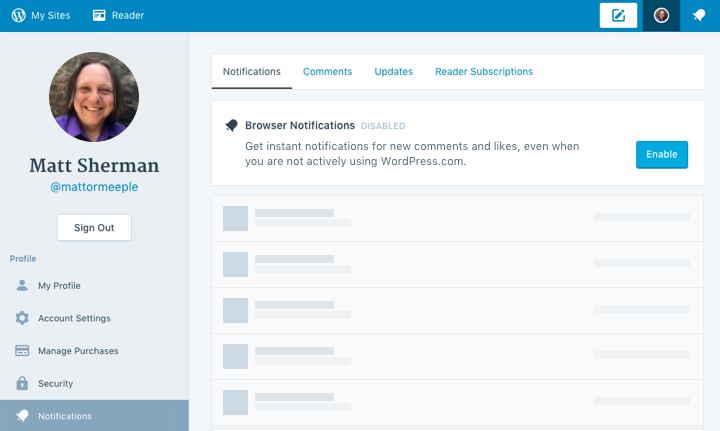
Browser notifications are supported in the latest versions of Chrome and Firefox — if your browser isn’t up to date, make sure you update to the latest version.
 WordPress.com News
Seems a workable attraction, I’m impressed.
Thanks,
What about in Safari?
Safari is not currently supported, as we chose to focus our initial efforts on browsers that support the Push API standard. We will evaluate support for other browsers.
Question: When the blogger responds to a reader’s comments, is tghe reader notified this has been done?
The reader is not notified via browser notifications when the author of the post responds to a reader’s comments. The reader can subscribe to receive email notifications when new comments (including replies) are made, by checking the “notify me of new comments by email” checkbox when they write their comment on the post.
Nice feature for sure, but it would have been nearly perfect if Internet Explorer and the new Edge browser were also included.
Internet Explorer / Edge is not currently supported, as we chose to focus our initial efforts on browsers that support the Push API standard. We will evaluate support for other browsers.
Thanks, that sounds fair enough. It seems like a lot of applications are not developed for Microsoft products for various other reasons. I was hoping this was not another one of those cases, and I even thought WordPress and Microsoft were linked at one point. I use their browsers simply because I like them.
And those who do not use chrome and find that firefox spoils the blog? What about the best browser, Opera? Not that I want notifications anyway!
Opera is not currently supported. We currently support browsers that fully implement the Push API standard.
Very good, nice feature. Thank you 🙂
Thanks but I use Safari and it is unlikely I’m going to switch 🙂
Enjoy your day.
Orlando
What about on mobile app? My notifications on the app always seem to be far behind real-time and frequently do not show until long after I have already responded. Sometimes there are several days’ lag between reader response and notifications.
Also: what about Safari?
And, in reading the statement below the “reply” field here, it says “please do not use these comments for asking questions…” So, what exactly is the point of beinf able to reply? Singing praises or offering criticism only?
A person often asks a question as a means of pointing out the information they need to know which is not addressed in the blog post…
Unfortunately, Safari does not support the Push API standard, so WordPress.com browser notifications are currently not supported on it. We will evaluate Safari support in the future.
Thank you for your feedback regarding the “please do not use these comments for asking questions”… the intent of that is to caution people to not use these comments for technical support questions, as they are not monitored as closely as our dedicated technical support mechanism is (https://wordpress.com/help/contact). We certainly welcome questions related to the posts!
I will follow up with you privately regarding your issue with notifications on the mobile app.
Thanks, Matt!
Y’all are so awesome!
Who here is sick of getting browser notification about websites asking them permission to deliver them notifications on the web? Every third website on the internet appears to have added this feature. And most of them use it to push ads.
But it’s great to have this feature on WordPress.com.
Interesting. I’m using Safari, so my guess is that this won’t work for that browser. However…..since the Mac has notifications for many products, I’m wondering if WordPress plans to release one?
Unfortunately, Safari does not support the Push API standard, so WordPress.com browser notifications are currently not supported on it. We will evaluate Safari support in the future.
I have been using this new method of instant notification and give it a thumbs up 😉
Any browser notifications for custom domains?
-C
Browser notifications are supported for custom domains.
The new update certainly makes maintaining comments and responding to replies possible in a more timely manner. Thank you!
This is awesome! About a week ago, I built web browser notifications into my blog for users, but didn’t think to engineer them for myself! Now I’ll have to start hacking away at a solution for self-hosting for this too, unless JetPack is planning on picking up the mantle. Great job on creating functionality I didn’t know that needed, but now likely can’t live without.
I presume this is being done by supporting the Push API for Chrome and Firefox. Is there pending support for APNs on Safari?
This feature currently works with Jetpack sites through WordPress.com.
Yes, this uses the Push API in Chrome and Firefox. We are currently evaluating support for browsers that do not support the Push API, such as Safari.
Brilliant! Thank you Team @ WordPress.com.
Regards
Kameng
PUSH notifications – you mean chronic distractions, don’t you? Not a feature I’ll be enabling – so I hope I’ll continue to have a choice. There is SO much on the WordPress platform that needs to be fixed or updated – why this?
More to the point, why does everybody consider it a GOOD thing to make it more difficult to concentrate on what we came to the computer to DO? Hate it!
We give the individual user the option whether or not to enable browser notifications for themselves. Some users will love them, others will find them distracting.
WHEW! Thanks so much for that.
As the ADD Poster Girl, some days I am holding on to focus by my fingernails, already struggling to follow a thought to even an illogical conclusion.
I won’t be one of the ones enabling – even for a test run – and it is a HUGE relief to know I have the choice.
xx,
mgh
Wow i love it, thanks.
That looks cool! Thanks for the heads up, Matt!
Awesome. Though I rarely get notifications LOL.
Great This is really great news. now it is very easy to mention all things. thanks
Great idea! Will it work with Safari?
Unfortunately, Safari does not support the Push API standard, so WordPress.com browser notifications are currently not supported on it. We will evaluate Safari support in the future.
Meh. Just another social time waster.
I run a regularly in the top-10 wordpress.com blog.
What would be REALLY awesome would be a feature I and hundreds of my readers who have requested it have been asking for for years – the ability to temporarily fix comments they wrote.
I waste more time than anything fixing readers comments due to misspellings, formatting/html tag errors and responding to emails about it than anything. I’ve been asking for this for years and so have readers.
And it isn’t like you can’t provide it, there are several plugins for self-hosted wordpress that do this…you guys just have to get serious and approve one for wordpress.com
Facebook has the ability to go back and edit you comment, Blogger has the ability to go back and edit comments, and several other platforms have the ability to go back and edit comments.
Mysteriously, wordpress.com still does not, yet instead pushes inconsequential features like this one. Why? I mean really, why is wordpress.com so far behind?
Do I really care if “Miklos liked your Super Mario…whatever”? Not one damn bit. Give me something that eases my blog management work load, instead of something that wastes more time.
I’ve had numerous people at Automattic tell me “we are seriously looking at this” for years…so please don’t tell me that. Make some noise up the food chain instead.
Thanks for your feedback. We understand your frustration, but we are currently not working on that feature.
Just need to comment on these push notifications so thst you know, not everyone welcomes this. My phone is constantly buzzing calling my sttention to it 24/7. Another thing it’s going to buzz about to draw my attention to deal with RIGHT NOW! You gotta be kidding. No thanks.
That’s why the user is in control whether or not they enable browser notifications for themselves. We also offer fine-grained control or what notifications we send. Of course, users can always just keep browser notifications disabled (that is the default setting) — that’s perfectly understandable! But, we also know there are users that will greatly appreciate being able to respond quicker to activity related to their site.
Thank you. Awesome!
Thanks, Matt. It’s an intersting service. I want to see it running.
Very good news, thank you !
Thank you for the information!
Great: i love it, thanks.
Matt, does the push notification also work on new blog post? That’d be really helpful for those who did not subscribe
Leo, we do not currently support push notifications for readers when new blog posts are posted. Thanks for the feedback. We’ll be sure to consider that in future plans.