

It’s easier than ever to add another dimension to your posts with embedded videos or tweets: announcing the Media Explorer, a new media curation tool that lets you add trending content from Twitter and YouTube without ever leaving your post editor!
To access the Media Explorer, simply click “Add Media” while editing a post, as you would to insert a photo. You’ll see a couple of new options below the familiar image tools: 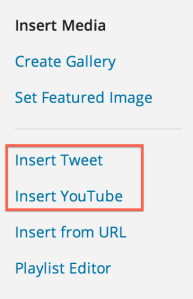 The Twitter Explorer lets you find tweets by keyword or hashtag, by tweets to or from a specific user, and by geographic location — search for tweets using any of those parameters right in the same window:
  Want eyewitness stories on some breaking news? You can pull tweets from people on the ground into your blog ASAP — the geographic search is the next best thing to having someone there:
  The YouTube Explorer changes the way you’ll find video to embed into your posts. Before, you opened a separate browser tab, went to YouTube, searched for the video, and then copied/pasted the URL back into your post. Now, you can find the perfect clip and embed it — no leaving the edit screen, and no URL needed:
  For more on how it works, check out this video demonstration:
The Media Explorer will be coming to Jetpack soon, so self-hosted WordPress sites can also take advantage of easy embeds. (If you’re interested, you can find the code on GitHub.) If you’d like to learn more about how it was developed, take a look at this post from John Blackbourn of Code for the People, our partner in making this happen.
Happy embedding!
 WordPress.com News
So happy about this change! Thank you!
Reblogged this on Weevily World and commented:
I can’t remember who I was talking to about embedding tweets but I thought this post worth reblogging for all the other bloggers who follow Weevily World 🙂
So cool! Looking forward to it!
Great – thank you!
Goodness, you guys are getting clever. I’ll never keep up 🙂
Great upgrade!
This is a beautiful feature. I’ve been experimenting with Twitter poetry and this is a fantastic way of sharing poems in a blogpost. I haven’t used it yet, I’m still still trying it out in draft – but it looks wonderful!
nice addition. Vimeo?
Maybe! We’re definitely looking at integrating with other services, too, and Vimeo’s a big name, so we’ll keep them in mind. Thanks for the feedback! 🙂
This is wonderful. It really opens up new possibilities.
Nice feature! Just tried for the first time on a post… embedding tweets… later, will try to embed youtube videos… one step at a time! http://wp.me/p1oMvI-4sW Thank you! I plan to use it more! 😮
Really looking foward to this!
For my usual updates on Twitter, I show my preferred Favorites Tweets on monthly WordPress Posts.
#HAPPYDANCE! #THANKYOU! #WPRocks!
super excited about this!
wow, really great new feature!
This is freaking awesome. It just made blogging for me like 3223454235235 times easier. Thanks guys!
Thank you very much I search youtube alot for post videos
can I use it in wordpress hosted site
Hi Prashant;
As the article says, this feature will be coming to the Jetpack plugin in the near future.
Reblogged this on Jade Ducksbury's Conservation Blog.
Thank’s .. I’ll try .. 😀
Beautiful. My students will all be grateful. And if they are not, I will be just because that is one less video tutorial I don’t have to make!
A good service just comes better!!!
Cool feature. I will definitely try it out soon. Thanks.
Happy about your changes
Reblogged this on luffymcfluffy and commented:
Coming soon
Reblogged this on blogosphere.
Reblogged this on Hazara.
Very nice!! A great addition.
Looks good and I might try it but, as I have most of the youtube vids I want to use in my blog, bookmarked, will the Youtube shortcode still work?
Yep! 🙂
Oh good. Thanks. 🙂
Used it today for a YouTube video. Thanks!
Very cool. Finally
would be very nice if there’s embedded pics then…
Yep; great idea. We’re working to show tweets’ pictures in the Twitter search results, so keep checking back! Thanks.
I discovered this feature the other day. I think that it’s great!