

As technology advances, mobile devices are playing a bigger role in our lives. Thousands of you have been using the iPhone and Blackberry applications to post and edit content for your blog, and over 60 million page views a month of WordPress.com blogs have been on mobile devices. New smartphones do a great job with most web sites, but older phones have many problems and may not display anything at all.
Today we’re launching a couple of mobile themes that will automatically be displayed when your blog is accessed with a compatible mobile phone.
The first theme is a modification of WPtouch and will be displayed to phones with modern web browsers like those on the iPhone and Android phones. The second theme was developed from an older version of the WordPress Mobile Edition and will be displayed to all other mobile devices.

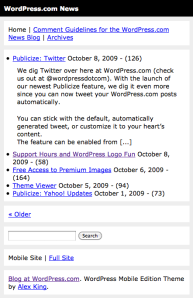
Mobile visitors greeted by WPtouch will get easy access to posts, pages, and archives. They’ll get fancy AJAX commenting and post loading. If you are using a custom header image, it will be scaled to size and displayed at the top of your blog. When viewing your blog on other phones, the focus will be on loading the blog quickly while displaying the important information about your content.
If you would like to disable mobile themes on your blog, go to Appearance->Extras in the Dashboard and uncheck Display a mobile theme when this blog is viewed with a mobile browser. For more details, be sure to check out the Mobile Themes support page.
 WordPress.com News
Awesome!
Sweet Dude!
Really cool!
Thx for that upgrade!
Just when I thought you couldn’t make blogging any easier. 🙂 Good job!
This is a real amazing aplication very usefull and fun can’t wait to try it out.
Great! I never use phones to access the internet but I know people who do! Yet another wonderful addition to the list of features! I wonder why will someone want to disable the option!
is it possible with wordpress.org blogs?
For self hosted blogs, check out any of the themes linked in the post (WPTouch or WordPress Mobile Edition)
One more time another good idea.
Awesome, this is a feature I wouldn’t even have asked for, but now that it’s out there, thank you!
Just check it out on my iPhone. Too cool!
I like that you’ve included a link to the full site as well. Nothing drives me more bonkers when surfing on my Blackberry than only getting a mobile site when I need to access something on the full site (and can properly load it!). Good going, as per usual, WP!
Wicked! I’ve been trying to get my girlfriend to chuck me for a while. Now I’ll be on my phone checking my blog all the time she’ll have no choice to but give me the elbow.
You may have just saved the best years of my life.
Fingers crossed. She really isn’t a very nice person you know.
Wow Coolness!!
This is so awesome!! My blog looks great on my iPhone!!
Dude, you guys rock! Love the ability to opt out too. The best of both worlds.
WoWnderful!
Great! But what about the P2-theme? I hope it’ll get this extension as well?
P2 has it’s own mobile version for iPhone type devices. It will be getting some fixes soon.
Interesting…
Was just overexcited when I posted my 1st comment till something popped up seconds later in mind, say, would you guys allow users with CSS upgrade to ticker with the mobile layout? Just asking…
Not right now, but we may in the future.
GREAT DUDE NICE
will get this going TODAY! yay, thanks, WordPress!
Awesome, was looking for this for last few days. Love it
…you guys rock!!! THANX!!!
@Nick Sounds great as the current mobile version of P2 doesn’t really work.
great feature. love it
I hope in future, we’ll have multiple mobile themes to choose one of them for blogs
replying from my phone now and testing it,simply it’s amazing..
I like it. Becaus get reduce RAM in my phones. Thx coy
Is it possible to preview what my blog looks like on a mobile device? I don’t have a smart phone. Sniff…
😦
If you install the Safari browser, you can change the User Agent to see what it would look like on an iPhone. See http://creativetechs.com/tipsblog/preview-iphone-websites-in-safari/ for instructions.
There’s also iPhoney on the Mac, which simulates an iPhone, or the official iPhone Simulator from Apple.
things change the drivers in people are the same…
OMG!!!!
And I didn’t even have to give up a first born for this.
Thank you WP!!!
(The first born is still up for the taking. She works real hard.) LOL.
My blog is totally sweet to visit from my iPhone! I had to tweet this:
Thanks!!!
The iPhone/Android version is much much better… This could be a good example of “standard” future mobile phones.
Now I can show off my blog to my family and friends 🙂 (with the clean interface provided by these themes). This is really awesome!
Shame my mobile is an English Heritage-protected relic…
Great idea this new feature.
Not a few days ago a Brazilian WordPress user was in the WordPress.com Support Forum asking if there was a similar configuration, adjusting the blog for displaying in a mobile device.
Now there is!
Congratulations and thank you very much
Looovely
awesome…cant be ne better
this is awesome!
wow… technology is a scary thing… slow down world slow down!!! 😛
keep the good WordPress the future depends on your path
Absolutely loving this. Cheers gang!
Great news TY – but I have to say, with an Xperia running the new beta of Opera Mobile, the old theme is very dated and lacks functionality. Is it possible for me to use the WPTouch theme instead?
Hell this is exactly I have been waiting for to have in wordpress.com feature list. 🙂
I dig this.
Wow, that’s pretty amazing stuff. Love it.
This is awesome!
oooo nice
is there a way to show android/iphone visitors the full site and dumber phones the mobile edition?
Visitors can switch to the full site with the link at the bottom of the theme.
Cool..
really fantastic… unfortunately for me my BB has some internet limitation ’cause ofmy company internet policy 😦
COOL!
An absolutely fantastic addition to the WordPress.com service. I discovered this by mistake today, visiting my site from my iPhone. I couldn’t believe how good – and how functional – it was.
Well done and thanks!
This is the best new feature! Thank you!
This is all great, but when I view my nokiAAddict.com site using a Nokia E71 I’m forced to using the WPTouch theme and I’m unable to view comments or switch to the full site, think the Nokia E71 should be using the WordPress Mobile Edition.
Oh and when I view the same nokiAAddict.com site using my Nokia 5800XM I get javascript not enabled 😦
THIS SUCKS
cool…
nice feature! thank you Yoav!
Thank you! Now I just need a new phone.
Good… Interesting…
Fantastic work guys…my design site is a WordPress.org blog and I’ve been using a mobile browser for a while on that one. Now a version has been released for my WordPress.com blog I couldn’t be happier!
Well done!
This is the UI that I want to have in my iPhone.Thank you so muchi.
Great. I was wondering when you made that happen. Thanks. Now I just have to figure out how to configure it perfectly.
i love this and this is what i’ve been waiting for! i love you wordpress! 🙂
How about for java enable phone (like sony ericsson). We hope its coming soon since in Indonesia most of people just have low end phone (j2me enable)
It’s already enabled – check it out!
Wow! At first it freaked me out… Then I realized, finally a mobile version. Great job, guys!! And I like the switch feature.
cool!
Good stuff. Thank you for your efforts.
cool~ tried it on my blackberry and it works perfect. thanks!
Really cool looks great on my iphone : )
can’t wait to get my b berry
It looks great on my Palm Pre but the only problem I have is that my side bars are no longer shown. I have a twitter feed and links that enhance my blog. Now by default these will not be shown 😦
This is way too awesome.. I have been dreaming you woud do this one day soon… but ou still caught me by srprie
Excellent work guys !!
Cool!! I like this. Is there mobile version for my dashboard?
While there’s no full featured mobile dashboard yet, you can use http://m.wordpress.com for most tasks.
Love you guys for this! Really!
WordPress, y’all never cease to surprise us! I just found out today during lunchtime. Neat!
Very well done – thanks so much!
good feature to add…what are some other such add ons of great value that are insignificant enough cost to wp.com to keep on the wordpress.com hosts?
Thank you very well done!!!
Great work thank well done
Awesome. That’s a feature I really wanted. As I am composing this on comment on my iPhone I am already enjoying the new theme.
interesting information! thank you very much! i never thought about such a stuff.
Great! Thanks!
When are you guys doing cool stuff for Windows Mobile? I am big into Windows Mobile, and I am sure there are a lot out there like me. Some of us might not be considering to change to Blackberry or Iphone yet, but the Windows Mobile apps and features from WP.com are not that cool.
🙂
I like, I like!
Awesome! Saya sangat suka ini
Really cool, great works
Just checked it out – its gorgeous!
Makes reading on the go so much easier! Thanks so much!
Thank you very much for your efforts on making the fabulous WordPress even better! The new mobile theme looks great on my iPhone. The red counter badge obviously doesn’t count pingbacks. But there seem to be some drawbacks, the pages can’t be handled by user in original theme like before.
I have a two-column theme (Ocadia). When the new feature “Display a mobile theme when this blog is viewed with a mobile browser” is switched OFF by blog admin (as it was before): On the iPhone the complete blog page fits perfectly (both columns) in the browser window, I can double-tap on a column and it will display the column in “optimum size” (zoom in). Double-tap again: All columns visible (zoom out). Very convenient for navigating. This and comments etc. works very well with Safari on iPhones and iPods touch since the first generation and since I have my blog.
When the new feature is checked ON by blog admin and the iPhone user switches back to good old “Full site view” via the link at the bottom of the page with the new layout (by the way: it looks like a typical iPhone virtual slider switch but it’s a button to tap on—needed a while to figure that out) the page shows another behaviour as in the “original version” (as described above):
The page shows up in the original design (theme) but has fixed size (my two columns are too large to fit into the browser window, both portrait and landscape orientation), double-tapping on columns does… well… nothing. It also can’t be resized manually (pinch). Viewing and navigating is not so easy and intuitive like before. And there is a line at the top with option to switch back to the new mobile design (what wouldn’t disturb too much).
I think it would be great if the page would behave truly like before at “Full site view”. Any chances for that?
I was really impressed with the look and feel of this plugin when I saw it recently on a .org account, so great to have it for .com accounts too.
I really like the look and feel on a mobile device.
One problem however: when you switch back to standard view, you have lost the ability to zoom/resize the original website, at least on a 3G iPhone. Strange, not disasterous, but still a bit unfortunate.
Have duplicated this on more than one website (including this one)
My website is stusshed.wordpress.com and it is a 3G iPhone with the latest OS.
Hmm, i like the functionality, though the graphics rendering and text wrapping on my iPhone is a bit iffy.
I’ll be viewing the full site for a while yet I think.
Many thanks for additional great functionalilty… and for the full site/moble site option.
Really cool looks great on my iphone, thanks