

If you’ve ever wondered where on Earth all the visitors to your site are coming from, this feature is for you!
Mosey on over to your My Stats tab on the WordPress.com homepage:
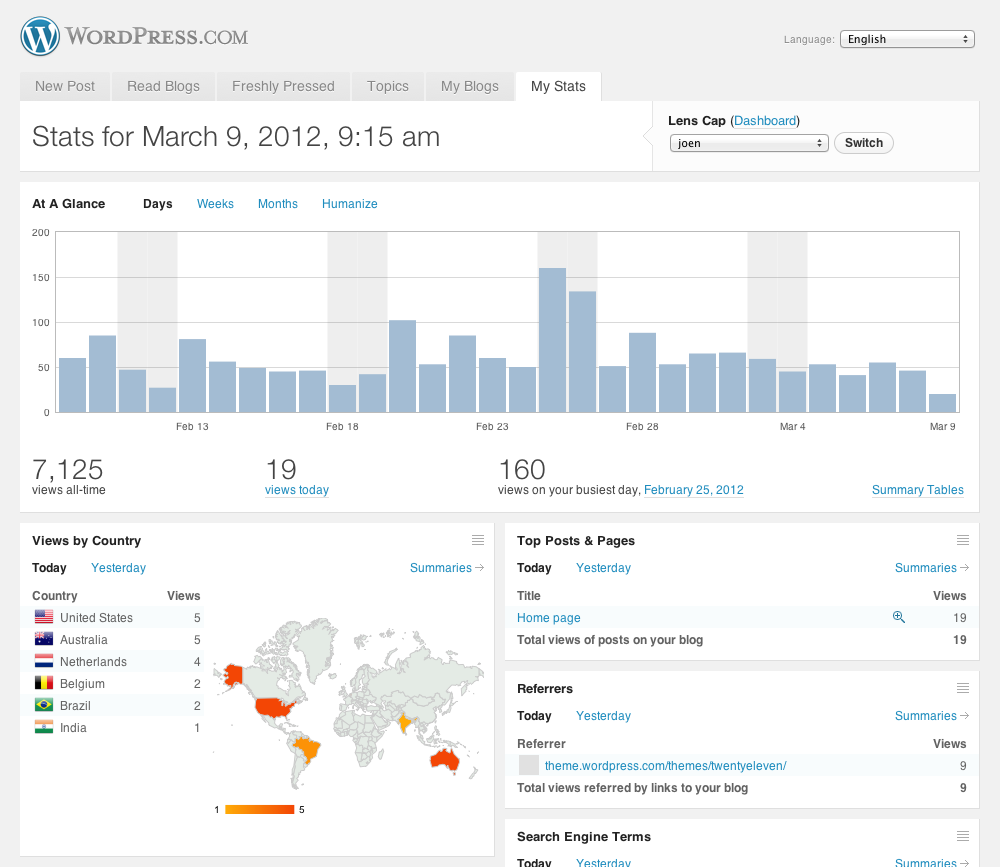
…and check out the brand new “Views by Country” panel.
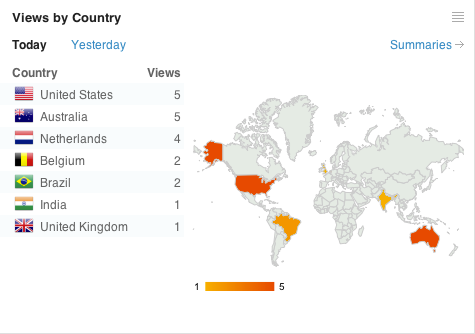
Now, you can see at a glance exactly which countries comprise your audience:
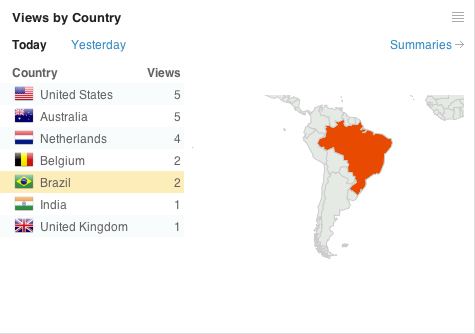
When you click on or hover over a country name, the map zooms in so you can really get a feel for all the parts of the planet your content has reached:
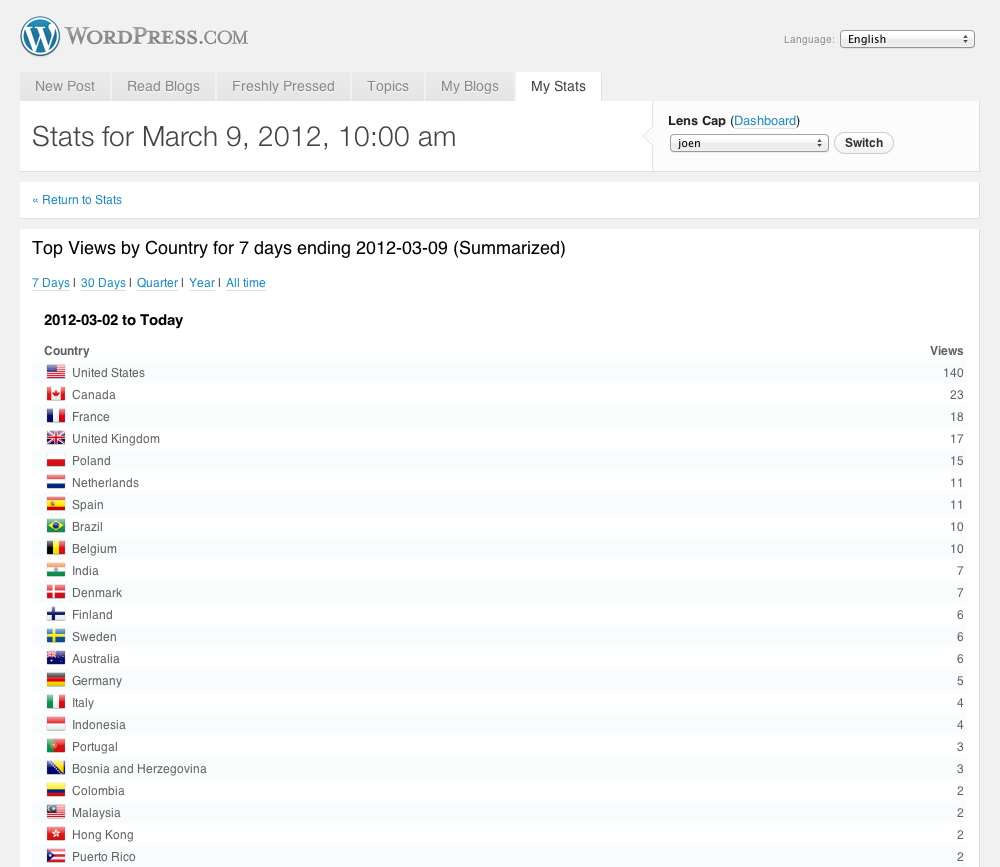
The Summaries page shows you country stats for the previous week, month, quarter and all time, but keep in mind this feature is new and views by country are not available prior to March 2012:
We are tremendously excited to be working on new features like this for your WordPress.com My Stats tab. Stay tuned for the next evolution!
 WordPress.com News
I just noticed this feature. Very cool and useful indeed. Thanks for the constant improvements!
Oh yeah! This this this is exactly what I was looking for 🙂 I won’t need any third party widgets anymore! Genuinely thanks a lot!
That’s pretty cool – I just signed up for flag counter so I could see the same thing. It’d be nice if WP would track “new visitors” in addition to “all hits”.
Reblogged this on martin remy and commented:
My favorite feature in WordPress.com stats.
Coolest feature so far!
I love this feature. Thank you WordPress!
Excellent! Thank You!
Great! I was surprised when I saw this last night 😀
Well done and thank you! 🙂
Pretty cool feature. Was about time for something like this!
It’s way cool. Thanks a lot!
Wow! Did you sneak into my brain to learn that this is exactly what I’ve been dreaming about for some time?
WOW!!! AWESOME!!! Thanks!!!
I do love this mapping of readers, many thanks, Sophia.
Brilliant….what took you so long?????????? (Smile here.)
Thaaaanks!
That’s really awesome.
Omg thank you for taking my suggestion into consideration! This is great!
This is INCREDIBLE. My boyfriend always jokes, “You’re BIG in England,” because so many of my subscribers seem to be from the UK…now I’ll have stats to back (or battle) his assertion!
🙂
Amazing feature. I used whos amongus till now. Could we also have a whos amoungus like guest counter widget from wp.com ?
Thanks! Love how WP keeps improving on an already great product.
Great feature, will look forward to keeping an eye on this!
can I put that as widget on sidebar?
We haven’t built the accompanying sidebar widget yet, but we thought it’d be a cool feature while we were working on this. Stay tuned!
Thanks a lot. I was hoping for a feature like this!
I noticed and explored the feature on my blog sometime back this evening. Love it!!
Amazing, I love it! Always get excited with WordPress news! 😀
great tool, I don’t have many visitors (yet) but even the tiny little specs of color on the map got me super excited! Ha!Happy Friday everyone, and thank you WordPress 😀
Thank you so much – amazing – I love it !!
I noticed the feature this morning and I looooooove it! Now I just need to see how many new visitors my blog posts are getting. Great Work, WordPress!
Nice job. Love this new feature. Keep it going ! ! !
This is a wonderful feature and I’m grateful for it. Yet I still wish WordPress.com would allow us to use Google analytics. Seems to work fine for Tumblr.
Fantastic new feature – makes all the difference. Great improvement. Thank you!
A feature I was missing out… Thanks WP. Would we be able to filter the other stats based on country?
Congratulations!!! It seems a fantastic and very good idea. Bravissimo!!!
In my own case, I see that the USA numbers are a lot larger than any other country, however if you add up the EU countries, then an area not larger than the USA is responsible for a much more significant chunk of the traffic than the individual countries. Could there be an option or an additional line entry for EU? And while thinking about chunking, what about unchunking… could we see the USA numbers broken down by state? Thank You!
This new feature is AWESOME! I’ve always wondered where my visitors were coming from. I know for a fact that I have American readers because of my friends & family but I took a wild guess that I also have Pakistani visitors because of what they search for on my blog.
Did you know that you can see what your visitors are searching for? I don’t think most realize that you can see in your administrator panel. When I look at the search terms it’s usually something related to Pakistan.
There are some FREE widgets out there that offer public stats but I like to keep things more private that is why I didn’t ever utilize any of them in the past. Thanks again for offering this new stats courtesy feature it totally made my day!
This is brilliant for writers – you can tailor your stories/vocabulary accordingly. Very useful.
I saw the map last night! Love it. Its great to see where visitors are coming from. Thanks 🙂
This is an awesome stat feature! Now I get to see where in the world my visitors have come from. Great insight!
This is great! It would be awesome if it showed which states people in the US are viewing from too!
Love this new feature!! Thanks 🙂
I noticed this feature this morning and I have to say that I think it is FANTASTIC! I love knowing where all my visitors are coming from and it just makes my blog feel more connected. THANKS A BUNCH WORDPRESS! 🙂 🙂 🙂
Thanks. Would love for you to show unique visitors in the stats. I have no idea if it’s one person looking at a hundred pages or a hundred people looking at one page.
This is really cool. Thank you!
great feature but would like to see eventually more stats like cities of visitors. Great feature!
OMG, I was right most vistors from the United States followed by Pakistan.
I was surprised to see that I also have vistors from Switzerland, Chile, United Arab Emirates, Thailand and Australia futher down the list!
This give me more motivation to blog! (=^_^=)
Thank you for this. You made my life much easier with this added feature. The people I am reaching are definitely worldwide and now I see those results immediately.
Finally! Thank you. 🙂
Wow! This is nice! Thank you for this 😉
I love this feature. The ‘My Stats’ Page just keeps getting better and better. One other section I would like to see on that page is a List of People who Like a post. To me, they are just about as important as Commenters, and it would be nice to see a summary of how often they click the Like button on my site.
Very cool.
And actually pretty useful on my second blog, which is more geographically targetted.
I love this feature!!! Thank you for adding it.
Thanks for the update, I’d like to see the US broken down by state as well. Canada broken out by province would be nice too.
What a fantastic feature! Thanks! I can hardly wait tot see the “My States” breakdown.
Nice addition! No map on my page though. ;-(
There should be a map if you’re looking at your “My Stats” tab on the WordPress.com homepage with a Desktop browser (The map will not display in mobile browsers for the time being). Please follow up with your browser information if you can’t see it on your computer.
Fantastico
bravi e grazie 1000
What a wonderful surprise to wake up to! Thank you so much. I had no idea I was so popular in Poland.
Such a pleasant surprise. I LOVE IT! LOVE IT! 🙂
Muy buena herramineta. Muchas gracias. Great tool, thanks.
Brilliant! I’ve only just noticed this and wondered if I’d been missing it somehow for the last six months. I love it.
Love it! Break the U.S. down by state and all my other stat widgets go bye-bye.
That is a nice feature. Can we expect it to be available to Jetpack users?
Hi, Gabriel.
I just enabled the “Views by Country” feature for Jetpack blogs. Only on the WordPress.com My Stats Tab. Enjoy!
Wonderful! Thank you very much.
Now you’re really kicking ‘#$*!’ Although I am always aware of the account stats traffic, so far, few readers are motivated to leave comments. Since my Blog is based on my Canadian ‘Superior Court’ legal struggles with an online web-developer, knowing what country readers come from gives the over all feeling of the ‘Who?’ and ‘Where?’ a lot more identity and pertinence. Good on ye WordPress!
One of the best!
Great job, Jeff!
For a long time since I migrated from Blogger to here waiting for this feature.
I liked all the innovations of WordPress so far, but this is my favorite! 😀
Congratulations once again at work! Every day I feel more proud of having a blog on WordPress, and daily monitoring the incessant work of your team to make it even better! 🙂
Seriously, this is a GREAT new feature! Thanks!
I love itttttt! Great way to see where your fans are located!!
Hi Jeff, Great work and very impressive. I enjoy the work view but my focus is in the state, county and city views also.
Jeff,
I just noticed this when I checked my Stats, and then opened your email. VERY COOL! You guys rock!
Thanks,
Ken
Jeff, I am loving the “country” stat section. Thank you for developing it. An enjoyable feature. Perhaps I can parley it into more effective communication down the road.
Love it love it love it!!!!!!
Pretty cool to find out just how world wide the blog has become…..wow! Thanks to WordPress!
This is a great invention. I know Chelsea Football Club is a club know globally throughout, but still surprised to see the diversity of my audience! http://thechelseachronicle.wordpress.com
Congratulations! A fantastic addition to the stats page. I’ve noticed that the stats for all time views are identical to those of this year and quarter, however- did you limit it from Jan 1 this year?
A widget for the sidebar would be excellent.
I manage number of WordPress.com and WordPress.org sites, with the .org sites linked to my stats via Jetpack but the .org sites don’t show the maps. Are you contemplating this? It would be a great inclusion for analytics reports for clients, at the moment I can only make some inferences based on the search-engine breakdowns (another excellent new feature)
Hi, Niki.
The “Views by Country” feature for Jetpack blogs is now active on the WordPress.com My Stats Tab.
Also, please note that the data behind this feature is only available starting couple of weeks ago. Once more time elapses the quarter & year pages will differentiate from the other views.
Great enhancement to the existing tools. Thanks so much. All is good when we all get smarter!
Saw this earlier. Very nice! (It does make me curious: who are those people from far away?)
What a pleasant surprise! I just love the idea. Please carry on. Thanks for this gift.
I just LOVE this new feature – yet another reason to love WordPress. I’m so chuffed to see I’ve got readers as far afield as Cameroon and Brazil.
When I saw it this morning, I thought I’d somehow activated a feature that I stupidly hadn’t noticed before. But no – it’s another great innovation from the WP team. Thank you!
That’s a very nice feature, I like it alot. Is there any way it can be turned into a widget so I can show it on my Homepage?
Reblogged this on Random Rumblings and commented:
It’s only been a couple of weeks since I moved the self-hosted WordPress blog to WordPress.com, but I’m already liking all the nifty tools that make it easier to blog. It’s not just the nifty tools, but the tools seem to interact better on WordPress.com. Well, now WordPress has added another tool to the mix. Apparently someone’s been snooping around my site from the Netherlands!
I too was super stoked to see this feature this morning. Leapbeer went global and I didn’t even know it.
This is the coolest feature! I love it because knowing where most of my readers are from narrows down the time zones and when I should blog my posts!
You guys rock at WordPress!
Fantastic~
It is just plain ol’ pleasant to know that readers and followers are from all over this globe. The graphics add a lot. Thank you all for your hard work. Hope you all have a pleasant day!
Austria!!, even over USA!!, and one I never even knew existed (thank you Seychelle)!! The like button is not big enough for even one of these little countries!!
This is brilliant – thank you! It’s very pleasing to see where my blog is read.
Wow, what a great new feature – thank you so much! It is so great!
Love this feature. Wish it was available for my website on wordpress.org.
Thanks! Wish granted (if you’re using Jetpack, of course) 🙂
Thanks for this feature. I know it is different from Google Analytics (which offers more granular data) but it’s fantastic. Now I have to decide if I still want to have my flag feed widget on my home page.
Should make a ton more WordPress.com bloggers happier.
I tried several times, to use those gadgets that tell you where your traffic is coming from, without success. This is great. Thanks!
Dear Jeff,
I am thrilled with this new feature. I knew I was getting a lot of comments from non-English speaking readers and wondered where they were from. Now if you could work on putting a tag of what article they are referring to in their comments, I would be soooo happy.
I enjoy WordPress so much and refer you to all that ask for my recommendation. WordPress makes me look good. Thanks.
Love,
Mary
I love this new feature! It is so exciting to see where in the world our posts have been read. Isn’t the internet amazing?
I noticed this feature yesterday and I love it. It’s very useful, especially for a tech blog like mine that relies on sharing news country specific sometimes.
“look at me ma! – I’m on top of the world” (Jimmy Cagney – White Heat)
What a great feature! This makes me a very happy Ocampa. 😀 Thank you, WordPress!
At last! 😉 Thank you!
This is a great feature! I love it and discovered I have followers from countries I wasn’t aware of. Now, if we only knew how many people were represented by the views, that would be helpful, but really all the information under stats is so helpful.
Hooray! I’ve been waiting for this.
Looks like most of my comments are coming from my mother’s bedroom. Say it to my face mom!
Oh wow, this is fantastic! I love seeing all of the different flags within the stats – talk about motivating! 🙂
THIS. IS. SO. COOL. Seriously love it.
Thanks!
Love this! So interesting, and amazing to see where all these readers come from. Thank you so much!
You guys never cease to amaze me! Thanks, it’s great
The improvements never stop coming. Thank you!