

1. Header 2. what are tags 3.title on tab won't change
-
1. when people go to my page. The header is in the way. If they do not scroll down a tad, the bar at the top covers the tabs. And they don’t even know they are there.
2. What are tags and how do I know I have them or how many I have.
3. The title on the tab for my interiors won’t change.
Thank you so Very Much for being available to help me. I’m trying to learn on my own. I’m dyslexic and it’s hard for my brain to focus at times. So I will send a HUGE HUG in advance. Pamela
Glowinggateway.comThe blog I need help with is: (visible only to logged in users)
-
Hello there Pamela!
I’ve broken down the answers to your questions below:
1. when people go to my page. The header is in the way. If they do not scroll down a tad, the bar at the top covers the tabs. And they don’t even know they are there.
Is this something you’ve fixed? I don’t see that issue occurring on your site. I visited it, and this is what I’m seeing:
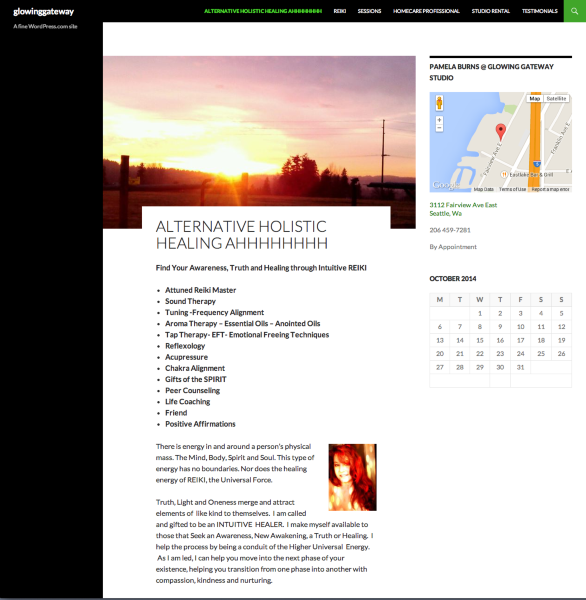
If you still need assistance with this issue, please let me know.
2. What are tags and how do I know I have them or how many I have.
Tags are a way to identify attributes of posts, and group them together. Here is a support document that will teach you how to use them properly:
Regarding the number of tags, you don’t want to add too many. Five to 15 tags (or categories, or a combination of the two) is a good number to add to each of your posts.
3. The title on the tab for my interiors won’t change.
I don’t see that tab in your menu. Can you explain to me where it is?
Looking forward to hearing from you. Thanks very much.


- The topic ‘1. Header 2. what are tags 3.title on tab won't change’ is closed to new replies.
 WordPress.com Forums