

A gap has appeared on right of my home page
-
A gap has appeared at the right of the twenty fourteen theme home page. This was after using the customise menu. Despite clearing cache and cookies and reloading this site this will not go away.
The blog I need help with is: (visible only to logged in users)
-
Hi there,
The main content are of the Twenty Fourteen is on left of the screen, rather than centered like with many themes.
If you upload a custom background or choose a color for your background, it will show there.
-
It was all fine until this morning. I didn’t alter anything but looked at the customise menu on the right. When I closed this it left a gap that will now not fill.
-
The default Twenty Fourteen theme should have a gray area on the right as seen in my test blog:
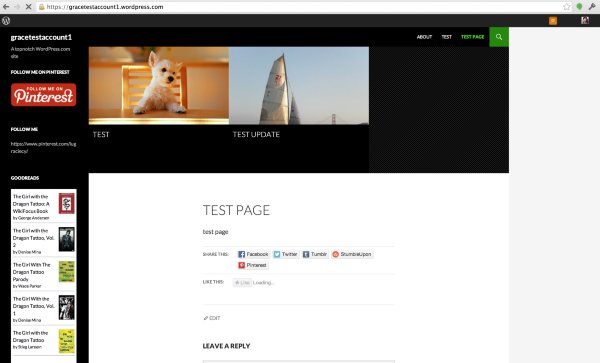
Please note that the Twenty Fourteen theme does not adjust to the size of the browser, so it may have been that the right side was cut off when you were viewing it before.
If you don’t like the gap you can always choose a custom background or color to get rid of the gap :). Or if it’s really bothering you, you can try another theme here:
theme.wordpress.com


- The topic ‘A gap has appeared on right of my home page’ is closed to new replies.


 WordPress.com Forums