

accessing my themes php files???
-
I do not know how to access my theme’s php files. I am trying to remove the side bar menu from 2 pages. I don’t see the ‘Editor’ option in Admin>Appearance. Can someone show me how to access the themes php files so that I can make edits??
The blog I need help with is: (visible only to logged in users)
-
Hey Mary Ann,
While users do not have access to a theme’s php files, you can adjust your settings on each page, to remove the side bar.
Go to Pages → All Pages, and click on your Contact page. In the right hand menu, you’ll see the option to use a full-page template without sidebars.
Here’s a graphic, displaying this:
http://maryann-cooper.com/?attachment_id=194Let me know if you have any other questions. Cheers!
-
Thank you!! So easy!! I do have one more question. I am trying to override font size and spacing in my template. I tried adding code within the CSS but it’s not working. The “visual” looks right when I am in the specific page but it won’t publish. Specifically within the “Stories” page. I want the titles to pop and made dark blue but they are rendering grey (as the template dictates)…Any suggestions??
-
Hey Mary Ann!
So glad that template adjustment worked out for you!
Regarding your CSS, and titles on the Story page, try this:
Click Appearance → Customize in your site’s Dashboard. Then, click CSS in your right-hand menu. In the CSS Revisions box, please paste the following underneath all existing text:
a, li.bypostauthor cite span, h1 a {
color: red;
}Then Save your changes.
I arbitrarily chose red as the color, just so you’d see if the changes worked. You can replace it with any hex color, like the one you had entered in your original CSS adjustment (#00ff00).
You can delete the other CSS you’d added in the revisions box, if it’s not working for you. It’s best to keep only useful code in that box.
I hope this helps! If you have any other concerns, drop me a note. Thanks much!
-
Hi. Thanks for info but it didn’t work. I needed to keep some code in the CSS field to center/add background image. Any other suggestions?
-
Hi there!
Your code appears to be working now. I do see your story titles in red:
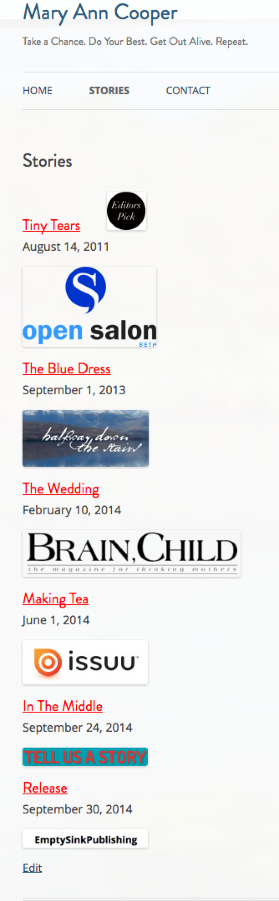
Maybe I wasn’t clear on your goal? Let me know and I can be of further assistance. Thanks!


- The topic ‘accessing my themes php files???’ is closed to new replies.
 WordPress.com Forums