

Accidently changed theme but tried to change back but theme isn't showing up
-
I was customizing my theme and in the process accidentally changed themes. I tried changing back but theme isn’t showing up. Why? How do I get the theme to show? Theme Name is Twenty Sixteen.
The blog I need help with is: (visible only to logged in users)
-
I see Twenty Sixteen active on your site so looks like you’re set:
https://crystalsphotobloggingsite.wordpress.com/
Please clear your browser cache if you’re not seeing it.
-
Theme not showing and don’t know why. I go to dashboard then themes but there I found out you can’t go to theme options. Please Help. Don’t know why things went ‘haywire ‘. I have this icon in the upper Right Hand Corner there is an icon to edit header. Tried clicking but is shows there is no header. I’m not sure why my theme isn’t showing. Any ideas. Sorry if I repeated myself. I’m a little flustered and frustrated right now.
-
Hi there – I see that you have two sites on this account, so I’m wondering if that’s where some of the confusion might come from.
Here’s the theme history on both of them:
https://crystalsphotobloggingsite.wordpress.com/
– Currently running Twenty Sixteen
– Previous themes: Bouquet, Twenty Sixteen, Hemingway Rewritten
https://daisymae2017.wordpress.com/
– Currently running Bouquet
– Previous themes: Twenty Sixteen, Bouquet, Twenty SixteenLet me know if this helps sort things out.
-
Before clearing my cache whatever that is, I should tell you and forgot to when I wrote this I had to hit hide header to get rid of the header. Would this have anything to do with it? Can I do anything else but clear cache?
-
How do unhide an image? Maybe that’s the reason and somehow went into my media too. What’s going on?
-
Could you please confirm which of your two sites you’re having trouble with:
1) https://crystalsphotobloggingsite.wordpress.com/
2) https://daisymae2017.wordpress.com/
If one of those sites has a theme you want to switch, please tell me which site it is, and what theme you’re trying to change it to, so I can better help you.
-
I’m having problems with CRYSTAL’S PHOTO-BLOGGING SITE is the site I’m having problems with and I’m trying to get the theme Twenty Sixteen to show. Why do I have a header icon? Didn’t put a header in only a theme. The theme is active but doesn’t show. How do I get rid of the header icon and get the theme to show. Like I said before, I accidentally put a header in and hit hide header to get the header to leave but now the icon is there and I can’t get rid of it.
-
“CRYSTAL’S PHOTO-BLOGGING SITE” at https://crystalsphotobloggingsite.wordpress.com/ is already running Twenty Sixteen, as you can see in this screenshot: https://cloudup.com/cJS1QxGC15P
Why do I have a header icon?
You can remove the photo of yourself by going into your Customizer‘s Site Identity panel, as you see here:
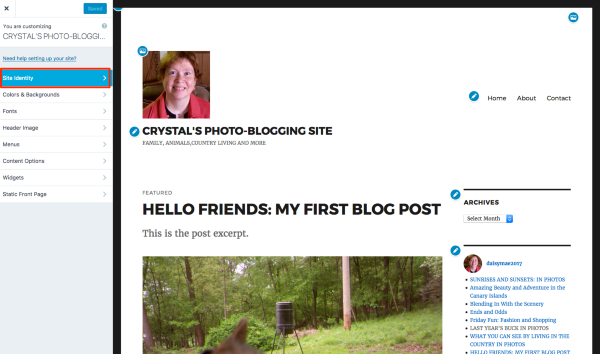
In the Site Identity panel, click the “Remove logo” button and then click the blue “Save and Publish” button at the top right, as you see in this screenshot:
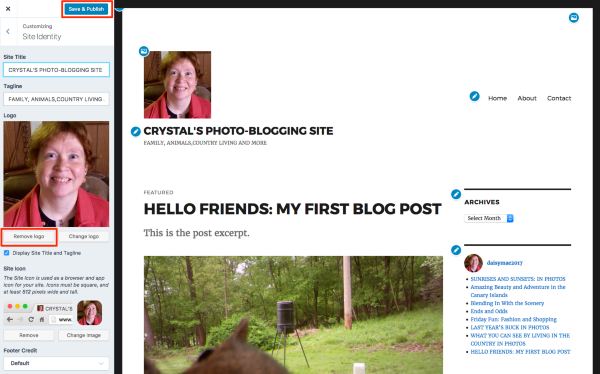
Let me know how it goes after following those steps.
-
I understand but I think there has been some confusion. I’m trying to get rid of the header image icon and can’t. I accidentally hit hide header and now all I have is the icon. I need to know how to get rid of that. Also, Why isn’t the theme showing in the background and header like WELCOME TO CRYSTAL’S SITE(ORIGINALLY COUNTRY LIVING)? WHAT’S GOING ON AND WHAT CAN BE DONE TO FIX IT? HELP.
-
I’m trying to get rid of the header image icon and can’t.
Hi there,
Do you mean the blue icons that appear when previewing the site in the customizer?
If you do, those icons will only appear in the preview. They will not appear on the front end of your site.
If that is not the icon you’re talking about, can you post a screenshot that shows the icon you want to remove?
-
How do I get my theme as my background like WELCOME TO CRYSTAL’S SITE(ORIGINALLY COUNTRY LIVING) BUT A DIFFERENT THEME(Twenty Sixteen). How do I get it like that?
-
-


- The topic ‘Accidently changed theme but tried to change back but theme isn't showing up’ is closed to new replies.
 WordPress.com Forums