

Add links from blog posts to photos in a gallery
-
Looking at each of these separately. :)
Would it be possible to make the photos just a tiny bit bigger without to much work?
- Let’s remove this bit:
/* Keep titles below images */ .page-id-9304 div.listing-item>a.image{ padding-right: 15px; } - Add this instead:
/* Keep titles below images */
.page-id-9304 div.listing-item>a.image {
	width: 100%;
}
Since some images are taller than others, we’ll need to adjust these too…
- Remove this bit:
/*Uniform listing item size for alignment*/ .page-id-9304 div.listing-item { height: 180px; max-height: 180px; } - Add this instead:
/*Uniform listing item size for alignment*/
.page-id-9304 div.listing-item {
	height: 270px;
	max-height: 270px;
}
1. I would like people to be able to make comments even if they do not enter a particular post. Like when they scroll up and down in my flow.
This can’t be done. If a reader comments while on the DIY page, it’ll be a comment on the DIY page. If they want to comment on one of the projects, they’ll need to be on that project’s page.
2. If not possible and maybe even if, I would like to add a widget where they may send me a message!
We have a contact form tool, and you enter those into Text Widgets too. It’s easiest to just create one while in the Post editor, then copy+paste the code into a text widget.
https://en.support.wordpress.com/contact-form/#add-a-new-contact-form
3. After the header in my blog post it says Posted by BautaWitch. It looks fine on a computer but on my iPhone it looks awful and I would like to center it.
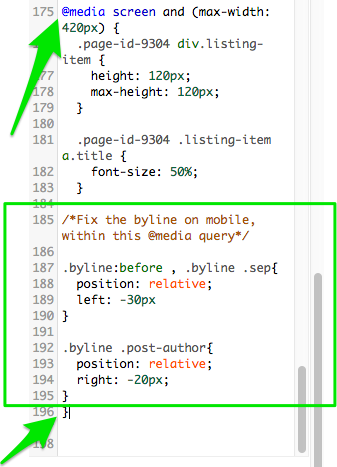
Add this code within our mobile media query:
/*Fix the byline on mobile, within the same @media query*/

.byline:before , .byline .sep{
	position: relative;
	left: -30px
}

.byline .post-author{
	position: relative;
	right: -20px;
}
So that is looks like this:
- Let’s remove this bit:
-
1. The photos are bigger and better now but the title disappeared or rather ended up in the photo below…
3. Now it looks great on my iPhone but ugly on the computer instead…
Soon, we are done! I promise! ;)
-
Thank You Alex! You have been the best help ever and so patient with all my questions!
All the best
Åsa :) -
Before I lose you Alex – one more for the road…
Is there a way to make a blog post which will always stay on top?
-
Hi!
Is there a way to make a blog post which will always stay on top?
Yep! The easiest way to do that would be to mark the post as “Sticky” as explained here:
http://en.support.wordpress.com/posts/post-visibility/#sticky-posts
Sticky posts will ignore the normal flow of your posts page and sit at the top by default!


- The topic ‘Add links from blog posts to photos in a gallery’ is closed to new replies.
 WordPress.com Forums