Adding a Photo to a Page
-
I would like to add a photo to my homepage. However, the customizer will not allow me to add a photo anywhere other than the header. Furthermore, the photo has to be cropped incredibly small (1/20th of the picture), and the resulting display is unrecognizable and very grainy. Lastly, when typing in CSS, the default photo overrides what I would like to display.
How can I add a photo to the opening page of my website?
The blog I need help with is: (visible only to logged in users)
-
-
Thank you for both of your replies.
I do not want the photo as a post or as a background.
Rather, I want the photo to float on its own to the left, and I would like some informational text about my site to float to the right of the picture.
What is the best way to accomplish this?
-
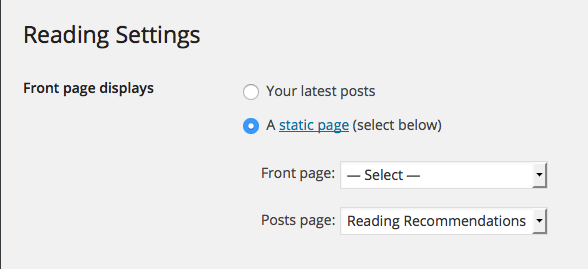
Hi there, currently you have your site set to use a static front page, but have not selected one at Settings > Reading, which means that it is defaulting to a “blog” page to show posts. See: https://cldup.com/4ip0_FUoBC.png
On a responsive width theme such as Radcliffe, where the page elements shift to accommodate smaller windows and screen sizes, this typically doesn’t work very well, but we may be able to use some Media queries to make it acceptable. Until we see the content you are going to have on your home page though, it is difficult to work anything out.
One way would be adding your image (left aligned) and text into the content area of a static home page and then we could see what we can do to move it to the left of your content. by creating a CSS class that you could apply to a div around the image and text.
As an alternative, you could use a text widget placed in the footer widget area with the image and text and we could move that up into a fixed position and use the Widget Visibility feature to limit its visibility to only the home page. Until we see the content in your home page though…
-
I think the best way to accomplish what you want would be to create a new page and add the image and text to it as you would like to see it displayed on the home page. Then go to Appearance > Customize > Front and select the page you just created as the “Front page” option. Can you try that to see where it gets you and then we can go from there? I think your request was just a little confusing to people in the beginning and no one had quite worked out exactly what you’re trying to do for some reason. Sorry about that!


- The topic ‘Adding a Photo to a Page’ is closed to new replies.
 WordPress.com Forums