

Adding an author box in Oxygen theme
-
Hello all,
I would like to add an author box at the end of each post.
If there is no way to do it automatically, how could i add it manually?
I would need to include the following : one picture, 2 or 3 lines of text, perhaps a link to twitter account and that’s it.Thank you for your help !
The blog I need help with is: (visible only to logged in users)
-
Oxygen provides a special widget area called After Post, which displays below each single post.
You could add a text widget for each author in the After Post widget area, and use the widget visibility feature, to display the box below each post by that particular author.
You’d add one text widget for each author, containing the information you want to display for each person. You could also add classes and IDs to the elements in your text widget if you like, and then style them with CSS in your Custom CSS editor.
You’d set the visibility on each widget to display only when the author of the post = that person.
Your widget setup would look roughly like this for each author:
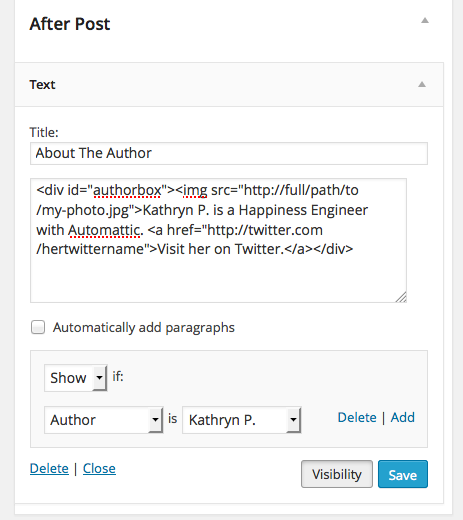
Let me know how it goes.
-
Hello Kathryn,
Thank you for your response !
It works well indeed, good advice !Now how can I make this box a little fancier? (adding classes and IDs, can you give me examples?)
Thank you for you help
-
Sure, I’d be glad to help. What would you like the box to look like? Do you have an example you can show me, or could you describe what you’d like?
-
I would like something quite simple like in this example :

A simple frame, a line to separate the name of the author from the text…i’d like it to integrate well with the rest of the blog.
-
Hi there, you could try something like this for the text widget:
<div class="authorbox">
<img src="https://kathrynwp.files.wordpress.com/2014/06/image-file.jpg" class="authorpic">

<p><strong>Kathryn P.</strong> is a Happiness Engineer with Automattic. </p>

<p><a href="http://twitter.com/hertwittername">Visit her on Twitter.</a></p>
</div>
And this for the CSS:
.authorbox {
	border-top: 1px solid #cccccc;
 	padding-top: 20px;
}
.authorpic {
	float: left;
	padding-right: 20px;
	width: 100px;
	height: 100px;
}
It looks like this: https://cloudup.com/cSdP4v_6Isq
I think it looks cleaner to have only one horizontal border instead of also having a border around the entire box.
-
-


- The topic ‘Adding an author box in Oxygen theme’ is closed to new replies.
 WordPress.com Forums