

Adding borders to images
-
I used to know how to do this. I don’t know if it’s the changes that have been made to the editor, or the fact that I haven’t written anything in so long and I forgot, but regardless I can’t figure out how to add borders to images.
I thought you did this by going to Advanced Options, and adding “border: 1px” to the “Image CSS Class” field, but that isn’t working. Any ideas what I’m doing wrong?
Thanks a bunch!
The blog I need help with is: (visible only to logged in users)
-
-
-
This actually did not work for me. I’m using the Twenty Fourteen theme by the way, don’t know if that has anything to do with it.
Can anyone help me figure this out? Here’s what the html looks like on the image I’m trying to add a border to:
[caption id="attachment_3695" align="alignright" width="350"]<img class="wp-image-3695 size-medium" src="http://everythingwrongwithtodaysyouth.files.wordpress.com/2014/04/photo-4-3.jpg?w=350" alt="Photo of three Amp Energy flavors, Original, Orange, and Cherry." width="350" height="262" "border="1" /> Original photo // Licensed under <a href="http://creativecommons.org/licenses/by-sa/4.0/" target="_blank">CC BY-SA 4.0</a>[/caption]Maybe I’m doing something totally wrong, but I swear doing it this exact way has worked for me in the past.
-
It was previously so much easier, but they changed it and now we have to use code in the text editor – progress ????
-
Hi there,
Just an update, I have great news.
Our developers have added border and margin options to the Advanced Options as seen in the screenshot below:
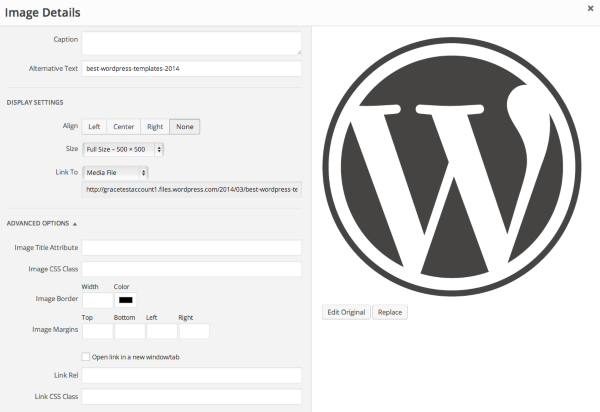
Cheers and Happy Blogging!
-
-
-


- The topic ‘Adding borders to images’ is closed to new replies.
 WordPress.com Forums