

adding borders to images
-
After the recent upgrade I could no longer add a border through the edit image dialogue box. I saw a discussion recommending css code to do this – tried it and it didn’t work. How do I add simple black borders to images?
The blog I need help with is: (visible only to logged in users)
-
Hi Vera,
You can do this by editing the HTML from the Text Editor. Please edit the post with the image that no longer has the border. Switch to the Text tab and find the img tag. It will look something like this:
<img class="wp-image-1648 alignright" alt="monet" src="http://pandwisrael.files.wordpress.com/2014/03/monet.jpg" width="216" height="258" />When you see that, add the border style to it. The border style is this:
style="border:2px solid black"So in the end, it should look like this:
<img style="border:2px solid black" class="wp-image-1648 alignright" alt="monet" src="http://pandwisrael.files.wordpress.com/2014/03/monet.jpg" width="216" height="258" />You can change around the number from the 2px less or more to make the border thinner or thicker.
Then it should look like this:
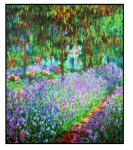
Feel free to reach out if you have any questions!


- The topic ‘adding borders to images’ is closed to new replies.
 WordPress.com Forums