Adding CSS code to hide date – but not 'sticking' / Working (upgrade active)
-
All,
I have the upgrade active. Settings: start fresh = not on; on mibile = on; preprocessor = non.
I hired someone that did some CSS on my WP.com site. He did this:table th, table td, table tr.even td, table tr:hover td {
background: transparent;
border: none;
}/*
*
*
* Nikita’s custom css styles
* delete or comment if necessary
*
*
*/
body.custom-background,
#top #topmenu li a,
#header #logo h1 a,
#header #logo #desc,
.posttop,
.posttop h2.posttitle,
.postcontent,
#footer,
#footer ul li,
#sidebar ul li.boxed,
h2#contentdesc span {
background: #fff;
color: #6c6c6c;
}h1, h2, h3, h4, h5, h6, p, li, dt, dd, blockquote, label, th, td, a,
#header #logo h1 a {
text-shadow: none;
}#catnav,
#catnav ul li,
#catnav ul li a {
background: #2374B2;
}#catnav ul li a {
color: #fff;
}#catnav ul ul {
padding-top: 5px;
}#top #topmenu li:hover, #top #topmenu li.current_page_item {
background: #fff;
}/*
* makes all links same color
*/
a,
#top #topmenu li ul li a,
#top #topmenu li a,
#content a,
#top #topmenu li a
#footer a,
#credits a
h1 a,
h2 a,
h3 a,
.wf-active #header #logo h1 a {
color: #2374B2;
border-bottom: none;
}#top #topmenu li ul li a:hover,
#top #topmenu li ul li a:active,
#top #topmenu li a:hover,
#top #topmenu li a:active,
a:hover,
a:active,
#content a:hover,
#content a:active,
#footer a:hover,
#credits a:hover,
h1 a:hover,
h2 a:hover,
h3 a:hover,
h1 a:active,
h2 a:active,
h3 a:active,
.wf-active #header #logo h1 a:hover,
.wf-active #header #logo h1 a:active {
color: #1b4c71;
background: #fff;
}.wf-active #top #topmenu li a {
font-size: .795em;
line-height: 140%;
}input[type=’text’], .contact-form input[type=’email’] {
background: #c9c9c9;……………………………………….
Now i would like to add some more CSS myself. For example hiding the meta tags date on the posts in the screen (not the date in the URL).But somehow it is not working.
Can some one tell me why the underneath is not working when i simply add it to my CSS.
I copied from this forum:
/* Hide post date */
.type-post header time,
.type-attachment header time {
display: none;
}/* Hide post date */
.sidebar #recent_post .widget {
display: none;
}——————————————–
and to hide catagory:.categories {
display: none;
}.tags {
display: none;
}The blog I need help with is: (visible only to logged in users)
-
Adding CSS code to hide date – but not ‘sticking’
This doesn’t sound good! Let’s talk about this first. Do you mean that it’s not sticking as in it won’t save or that the CSS you’re adding saves in the CSS editor but doesn’t work like you expected?
I copied from this forum:
CSS is theme-specific, so if you copied something from the forums that was designed to work with a certain theme, it probably won’t work for you unless you are using the exact same theme.
I checked http://surfdeal.eu/ and I see you are using the Motion theme. If you want to copy CSS from somewhere else, make sure it’s CSS that is written for the Motion theme specifically.
For example hiding the meta tags date on the posts in the screen (not the date in the URL).
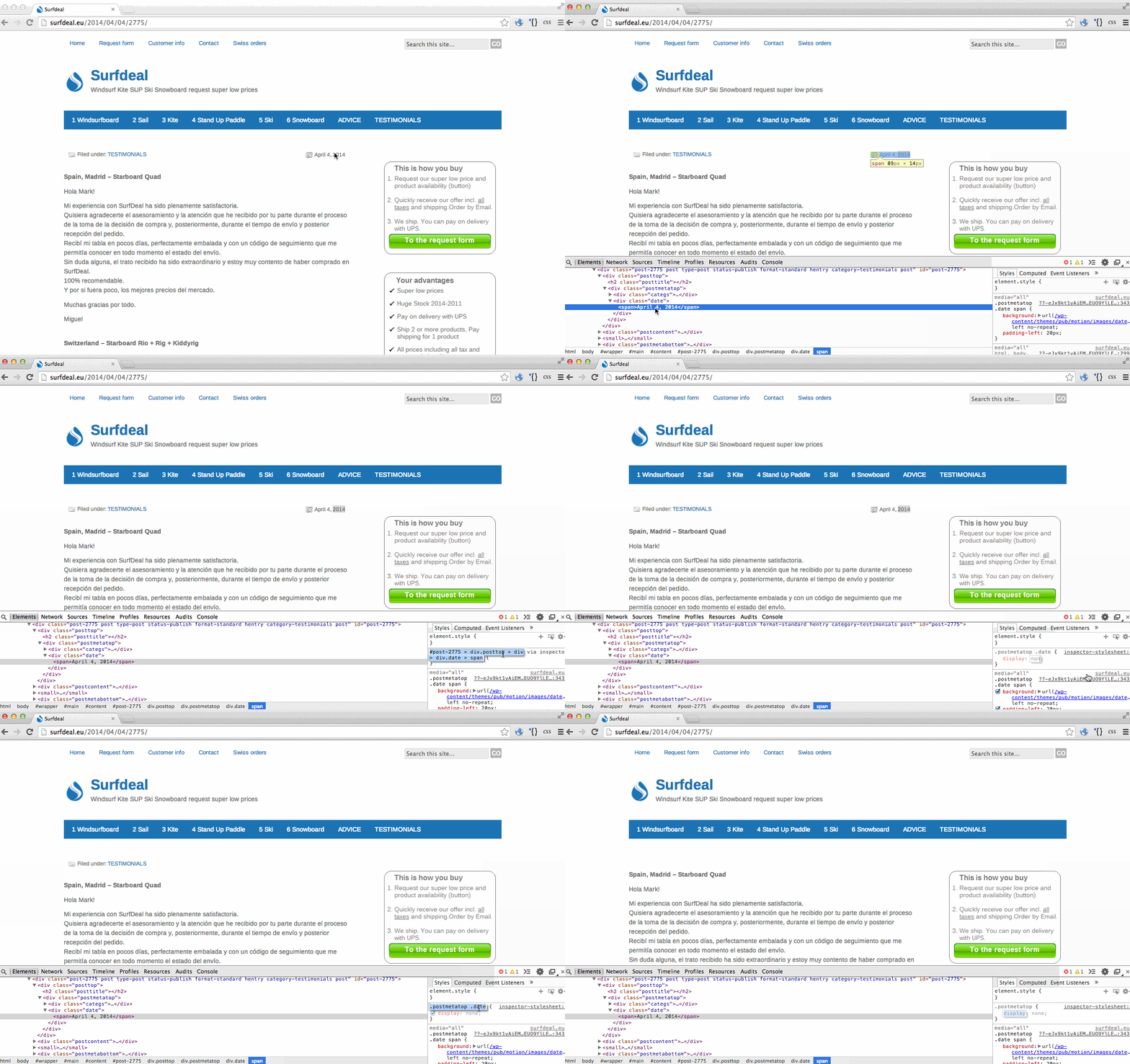
It always helps me a ton to see an example post—also I test a lot. So I researched on your site and found your latest post here:
http://surfdeal.eu/2014/04/04/2775/You could hide the entire post meta data section for all posts in the Motion theme like this:
.postmetatop {
	display: none;
}
Or you could hide just the date in the post meta area in the Motion theme like this:
.postmetatop .date {
	display: none;
}
Here is an example showing how I figured that out:
https://i.cloudup.com/cGuUkn-M4M.gifYou might also like this tutorial about finding CSS:
http://en.support.wordpress.com/custom-design/how-to-find-your-themes-css/ -
awsome support!
sorry for my late reply , i was AFK for 2 days.worked perfect and i learned. also found out how to hide ” comments rss feed ”
my WP.com is looking more and more like very clean website/ CMS system.
still so glad i stayed with a wp.com site !
-
question. i also found out how to hide the tags. and with that the complete bottom meta data. from a design point it would be a good move …
but will hiding the tags, hurt my seo ( google ranking) ?or not?
i know its not a css related question. but maybe someone will know
thanks
mark -
still so glad i stayed with a wp.com site !
Me too. :)
but will hiding the tags, hurt my seo ( google ranking) ?
I am not an SEO expert, but I don’t think it will hurt ranking. From what I understand, Google prefers indexing real, unique content so they are most concerned with what is in your headings and main content areas.
-
same for showing or hiding my google pluf profile underneath each post
a.gplus-profile
is hiding it gonny hurt my seo?
-
hi i just saw your reply. think i am staying with tags for the moment. it’s a super competitive market and need all the seo juice i can get so not taking any risks
as for the google plus profile. im undecided :)
-
I’m definitely not an expert at Google SEO! All I can tell you is that my opinion is that focusing on writing excellent content that other people want to read and link to is the best thing to do.
Best of luck!
-
Hi there, one more thank you especially for showing how you did it. I used it a lot and my blog now looks as clean as apples site :)
Mark


- The topic ‘Adding CSS code to hide date – but not 'sticking' / Working (upgrade active)’ is closed to new replies.
 WordPress.com Forums