

Adding in Subpages
-
Hello! I am editing my website and am adding pages to the website but they are not showing up on my published website. I published all of the pages and tried nesting them under a subpage and retrying several other options but they still not not appear on the menu bar. The only way I can find the pages is by clicking on the buttons I have included on other pages. Is there something I am doing wrong? Please let me know, thank you.
WP.com: Yes
Correct account: YesThe blog I need help with is: (visible only to logged in users)
-
Hi there,
I have checked the site link and it looks great.
I found the page links like below
HOME
MY WORK
INFLUENCER MARKETING
CASE STUDIES
GRAPHICS
ABOUT
AWARDS
RESUME
MEDIA KIT
CONTACT
Once you created your page and published it your page will go live :)
However, you will find the published pages from here
#Go to your_site->Pages->All_pages. Screenshot
#The pages which are not launched/published will be found from the draft option. :)Once you publish your pages, you can add them to the menu.
To add pages link on the menu please follow the below process.
#Go to your_site->Appearance->Customize
#From the next screen select Menus->Select_your_menu
The menu will be like the image below. Make sure that the menu location box is checked :)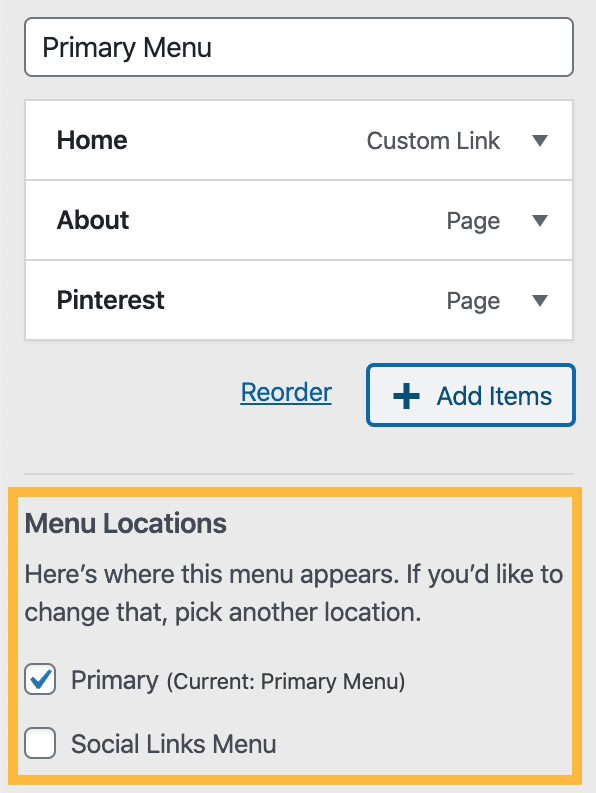
Now to add a page on the menu click on “Add Items”
From the appeared sidebar click “Pages” to add the pages link
Select the pages you want to add as link. Screenshot
Don’t forget to click the “Save Changes” button.
Using this process you can add all the pages to your menu.
To know more details please visit here https://wordpress.com/support/menus/create-a-menu/#create-a-menu-in-the-customizer
Here are more details to make menus using different ways https://wordpress.com/support/menus/create-a-menu/
Hope this helps. Let us know if you face any issues :)
Thanks -
Sorry, menu list didn’t appear the way I typed.
HOME
MY WORK
->INFLUENCER MARKETING
->CASE STUDIES
->GRAPHICS
ABOUT
->AWARDS
->RESUME
->MEDIA KIT
CONTACT


- The topic ‘Adding in Subpages’ is closed to new replies.
 WordPress.com Forums