

Adding logo to top left of title text?
-
How should I add my logo to site title in 2012 theme? I want it to appear top left, to left of text?
campingmaisonneuve.wordpress.com
custom 2012 themethanks,
russ.The blog I need help with is: (visible only to logged in users)
-
Hi there – thanks for the reply
its not the blavatar, that’s appearing as a favicon a-ok
I’m looking to add the logo next to the text at top of page
<logo>Camping Maisonneuve
St Jory de Chalais, Dordognethanks very much
-
Hi there,
After looking into your CSS I see that you tried to add an image that was no longer in your Media > Library page. I updated it using one of the logo images you had uploaded!
Cheers!
-
Hi Grace – many thanks, yes I have been playing around with it! have figured out the CSS to get the logo in the title area, but I cannot get it to line up correctly. it sits in line with site.title and I’m trying to get it to line up between site.title and site.description. ie shift down a little! does that make sense? any ideas?
thanks again!
-
Hi there,
I think I understand what you mean. You want the logo in line with the Site Title and Description?
You can do that by adding this to your CSS:
.site-title  a {
	position: relative;
	bottom: 25px;
}

.site-description {
	text-indent: 90px;
	position: relative;
	bottom: 30px;
}
Cheers!
-
that’s great thanks – will try that asap.
I was a little premature changing my domain mapping :)
campingmaisonneuve.wordpress.com is now redirecting to the old site (am waiting for the dns changes to be done). can you tell me how I get back to the wordpress site to make edits please?
thanks!
-
Hi there,
Currently, I see that your primary domain is set to: campingmaisonneuve.wordpress.com. Would you like it to be: camping-maisonneuve.com? Please note that the nameservers are not set to WordPress’ nameservers.
Please go to your domain registrar’s site and log into the control panel. You will need to update the name servers as below:
- NS1.WORDPRESS.COM
- NS2.WORDPRESS.COM
- NS3.WORDPRESS.COM
For more information, please visit the help documentation provided by the registrar and our support page:
http://en.support.wordpress.com/domain-mapping/map-existing-domain/
Once this is updated, please set your primary domain to camping-maisonneuve.com.
Let me know if you have any questions!
-
hi – the domain is currently registered by the previous owner of the business, I don’t yet have access to the registrar’s site :)
to enable me to continue working in wordpress, I’m looking to remove any reference to the domain http://www.camping-maisonneuve.com. I cannot see campingmaisonneuve.wordpress.com as it is redirecting to the old domain (and hence the old website)
what should I change the dns records back to please?
thanks :)
-
Hi there,
Without access to the DNS to change the nameservers you cannot point your domain to your WordPress.com site.
Currently, I see that http://campingmaisonneuve.wordpress.com/ is set as the primary so it is not redirecting to: camping-maisonneuve.com. If it is, try clearing out your cache and cookies using the guide below:
If you are sure you can’t change the nameservers, would you like me to refund you can cancel the domain mapping upgrade?
Please reply to confirm!
-
hi – yep have cleared cache etc, but I had changed settings on the wordpress end, which I now cant access as the site is pointing to the old site!
I am in contact with the previous owner, who is changing the dns records with the domain registrar so hopefully I should be ok shortly!
please do not cancel the domain mapping option.
thanks for your help
-
Hi there,
Currently this is what I am seeing:
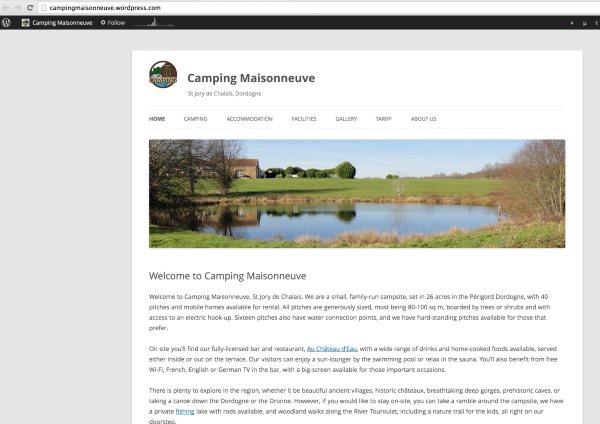
This is not what you are seeing? Can you try using a different browser – Google Chrome or Mozilla Firefox. Please note those browsers are what we recommend with using WordPress.com.
Your primary domain is set to http://campingmaisonneuve.wordpress.com/, which is what you should be seeing – not your old site. This is most likely a browser issue since I am seeing your WordPress.com site. Please try all the options here:
We might need to just wait a day for the cache to clear itself. I will not cancel your domain mapping upgrade as requested.
Feel free to reach out if you have any questions!
-
Hi,
the CSS tweak worked perfectly, and also I now have access again :) must have just taken some time to propagate.
happy days, many thanks for your help
-


- The topic ‘Adding logo to top left of title text?’ is closed to new replies.
 WordPress.com Forums