

Admin Bar
-
my admin bar no longer shows up on my blog page when i am logged in since the update recently. furthermore, i can no longer manually size images on my posts to be exactly what i want them to be like i used to. what is going on
The blog I need help with is: (visible only to logged in users)
-
Hi there!
That doesn’t sound quite right. Can you take a screenshot of your blog when you’re logged in so i can see what’s happening with the admin bar? You can just upload them to your Media Library, like any other image, and I’ll be able to access it from there.
Hi there!
There have been recent changes to the image editor. We no longer have an Advanced Settings pane for image settings. We have also disabled the image border feature. You can read more about the on going conversation about these recent changes here:
You can edit your image size by dragging the boxes that appear around the outer edge of your image when you click on it:
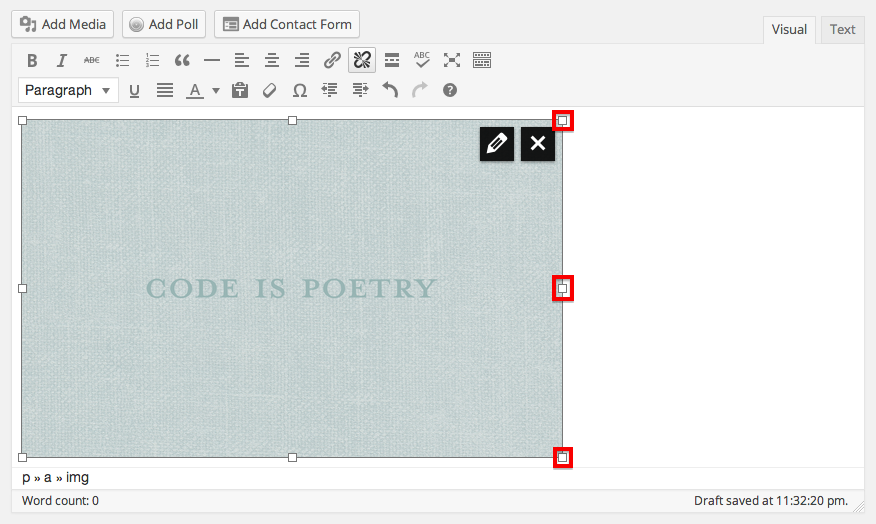
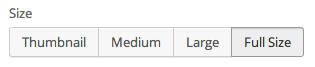
Or by selecting one of the various options that are available when you click on the pencil in the upper right hand corner of the image:
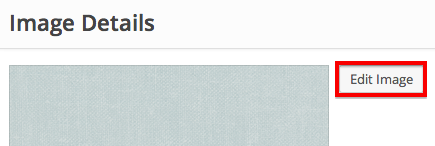
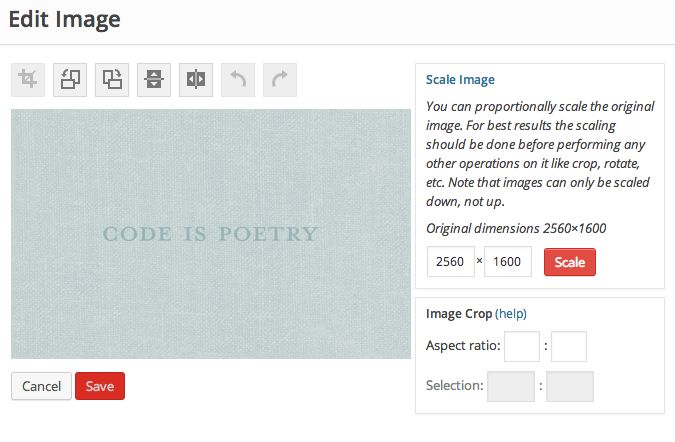
You can also edit your image with precise pixel count. Once you’re in the image editing menu through the pencil in the upper right hand corner of the image, click on Edit Image:
Then you can crop or scale the image:
Let me know if I can help with anything else!
-
what is this you are talking about my mapping upgrade? i already paid some fee about a month or so ago on my account via paypal and i just received a notice of automatic renewal for my saywhatsavannahmaekids.com that automatically happens tomorrow.
My mapping better not expire after I have paid.
-
Sorry about that! I posted in the wrong thread! Your Domain Mapping upgrade is all set through March 19, 2015. And you can see all of your current upgrades through your dashboard at Store > My Upgrades.
Sorry for the confusion!
-
-
-
Hmm. I can’t seem to replicate the issue on my own computer. Do you have the same problem when you visit the site in another browser like Google Chrome?
Can you try clearing your cache and cookies? Here are some directions:
Can you also make sure your browser is up to date? You can do that by visiting this website:
https://www.whatismybrowser.com/
Let me know if any of this gets your admin bar to appear!
-
I have tried it on different browsers and only the one blog (rebeccasreads) shows the admin bar. I cleared cookies and cache before i posted and then again today. My browser is updated. This started happening after whatever update went on last week-ish
-
Can you try these steps and let me know what happens?
1. Log off of WordPress.com.
2. Do ctrl+shift+del which will clear out your cache.
3. Log back into WordPress.com and check your site.I just want to make sure there’s nothing lingering because you’re still logged in when you clear your cache.
-
Can you also visit this site and tell me if you see the admin bar across the top?
-
ok, i cleared again..nothing has changed
It shows up on the sitedemo one but still not on my saywhatsavannhmae or saywhatsavannahmaekids
-
Thanks so much for doing that! That’s really helpful information to have. I’m not quite sure what’s going on here, so I’m going to go look into this further.
I’ll let you know as soon as I figure something out!
-
I thought it was strange that one of my blogs shows it and the others dont. I hope it is not a curse on me LOL Thanks for your help. The current work around takes longer but at least I can still update in the meantime.
-
Another thing to check, can you make sure you have third party cookies enabled? Here’s a link that will explain, and it has a quick test right at the top that will let you know if your cookies are enabled or not:
-
yes they are enabled. keep in mind that one of my other blogs shows the admin bar while two others do not. I cannot imagine what could be so different that 2 out of 3 do not show the bar. of course I tried all of these things before I even submitted for help. I even get the admin bar on other blogs that I contribute too, just not these two of my own. It is strange.
-
Thanks so much for checking! I know some of this troubleshooting gets redundant. I want to make sure I’ve ruled out all the easy options and can give our developers all of the information to solve this problem.
Thanks so much for your patience! :)
-
Can you visit these sites and let me know if you can see the admin bar or not?
http://testsjr1.wordpress.com/
http://shawnajroberts.com/
http://blog.ted.comLet me know if you can see the admin bar on any of those sites!
-
-
Okay! Thanks for that.
It really sounds like you don’t have third party cookies enabled. So far, you’ve been able to see the admin toolbar on sites that have .wordpress.com in their address, but not sites that have another domain mapped to them like, my site and the TED blog. In order for the admin bar to show up on WordPress.com sites that have non-wordpress.com domains, we need to use a third party cookie.
Third party cookies are different than normal cookies, so there’s a separate setting for them in your browser. Here are some directions for enabling third party cookies in Firefox:
Can you walk through those directions and make sure that specifically third party cookies are enabled in your browser?
Here are some directions for other browsers as well:
Let me know if that corrects the issue.
-
All the 3rd party cookies were on so I attempted to “not accept” them and then saved and then marked as accept and NOW it works.
Thanks so much. That was so annoying! Sorry to be a pain in the butt.


- The topic ‘Admin Bar’ is closed to new replies.
 WordPress.com Forums